Which file did this row come from?
Step-by-step manual
01The business question
Finance reconciles each month against its own file. Every sales row must say which file it came from, and the team wants the number of rows read written to the reload log.
02Before you start
- Unzip the episode package. You need the three
data/Sales_2025_0N.csvfiles andstart.qep, the project as episode 1 left it. - In Q-Expert, import
start.qep(Import .qep in the top bar). It brings episode 1's Source Path, formats and variables, so you continue exactly where you stopped. - The Qlik folder connection QXDistributors and its
Transform/_QVSfolder are the same as in episode 1. - Want to look inside the files first? Q-Explorator, the Q-Fábrica team's desktop tool, opens CSV, Excel, Parquet and QVD files so you can see their content and quality before you model.
03Step by step
-
1
Remove the wildcard load
The wildcard RAW
tmp_SalesRawreads the three files as one table and forgets which file each row came from. Delete it with the × on the node. The episode builds the same table again, now with a loop.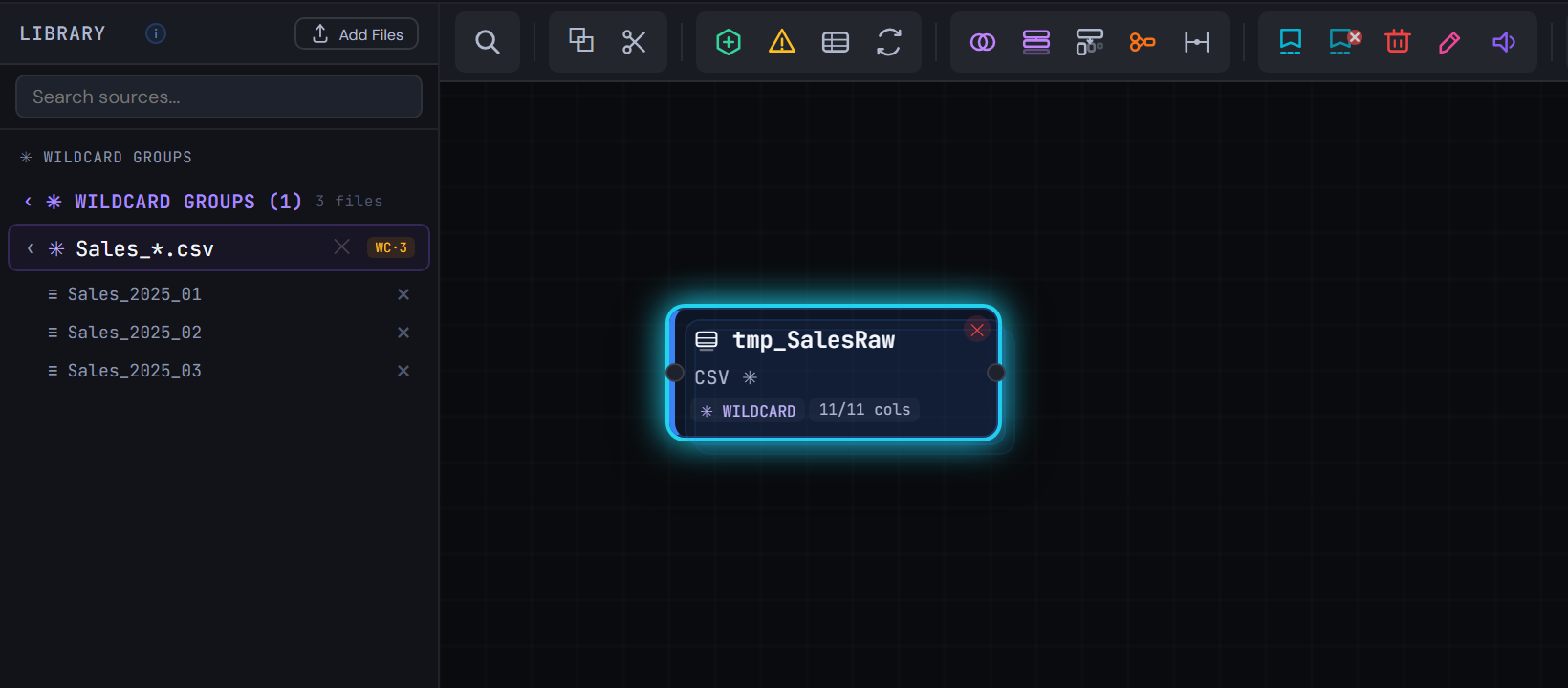
Figure 2.1 — Remove the wildcard load -
2
Add an empty table to collect into
Add an INLINE node from the toolbar and name it
tmp_SalesRaw. In its grid, give it one column,Dummy, and no rows, and tick the schema-only option: the script writesWHERE 1=0. Each turn of the loop appends one month to this table.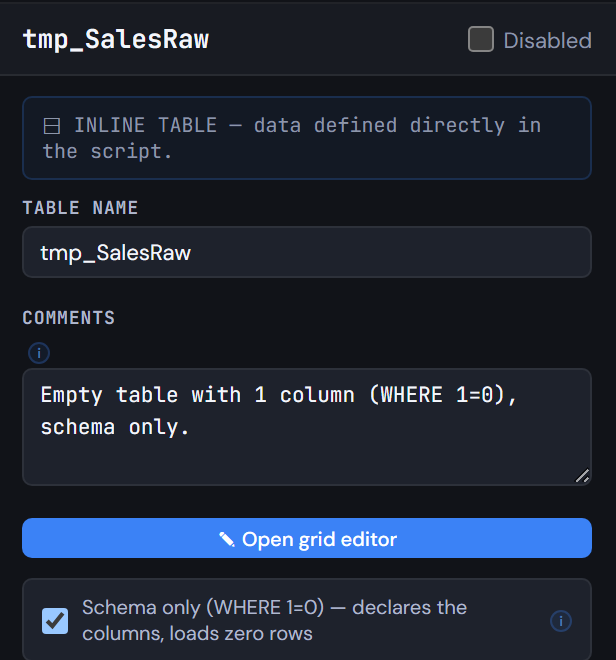
Figure 2.2 — Add an empty table to collect into -
3
Add the loop over the file list
Add a LOOP node after the inline table. Loop type
FOR EACH … IN FileList(), loop variablevFile, FileList path$(vPathRaw)Sales_*.csv: the same folder variable as episode 1.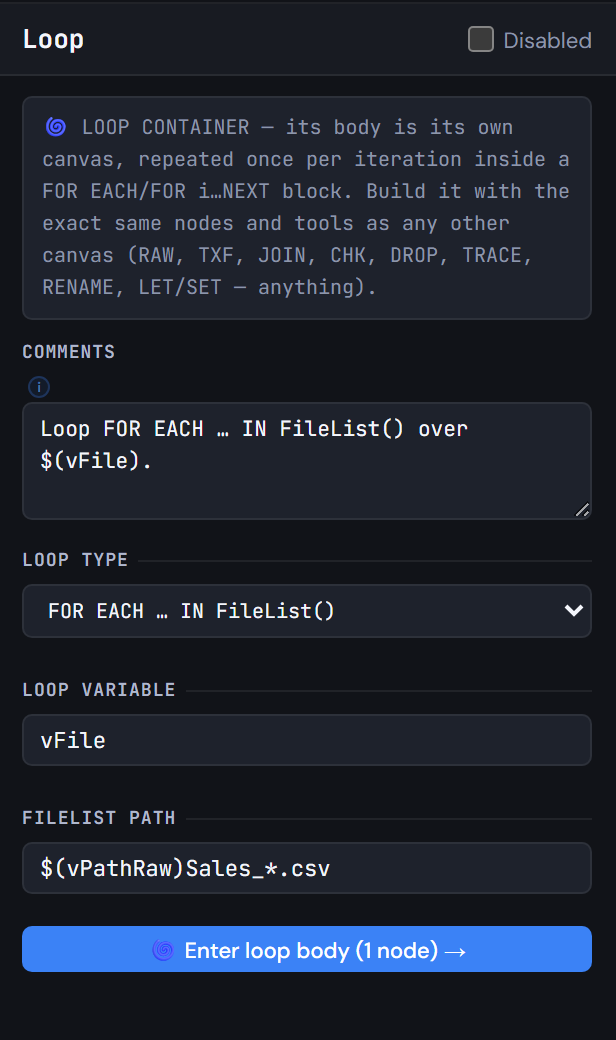
Figure 2.3 — Add the loop over the file list -
4
Inside the loop, read one file and append it
Click Enter loop body, then:
- Drag
Sales_2025_01.csvfrom the Library onto the body's canvas to get its 11 columns. - On the Config tab, tick Source by variable and write
$(vFile). - Set CONCATENATE INTO to
tmp_SalesRaw.
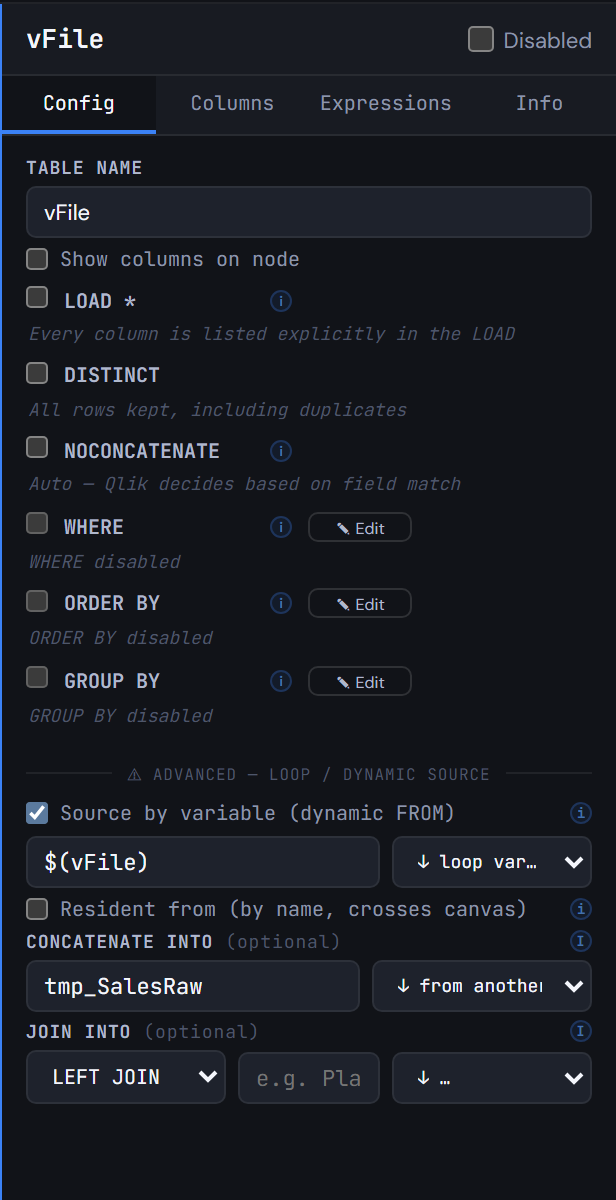
Figure 2.4 — Inside the loop, read one file and append it - Drag
-
5
Keep the file name on every row
On the Expressions tab, open the Expression Builder and add
FileName()asSourceFile. Every row now carries the name of the file it was read from.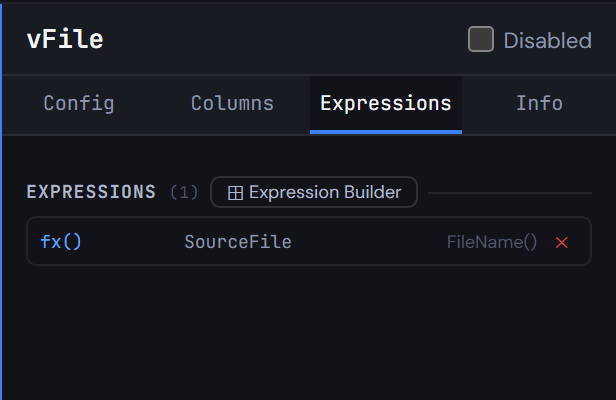
Figure 2.5 — Keep the file name on every row -
6
Clean up and count
Click Exit loop. After the loop add:
- A DROP node for the field
Dummyoftmp_SalesRaw. - A LET/SET node with
LET vSalesRawRows = NoOfRows('tmp_SalesRaw'). - A TRACE node with
Sales rows read from the monthly files: $(vSalesRawRows).
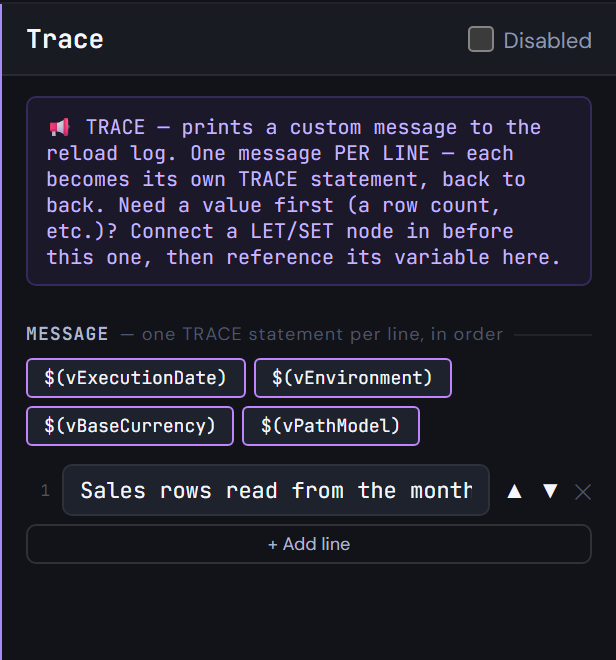
Figure 2.6 — Clean up and count - A DROP node for the field
-
7
Generate the script
Click Generate Syntax and open
Flow_1:FOR EACH vFile IN FileList(…), theCONCATENATEload withFileName() AS SourceFile,NEXT vFile, then theDROP FIELDand theTRACE.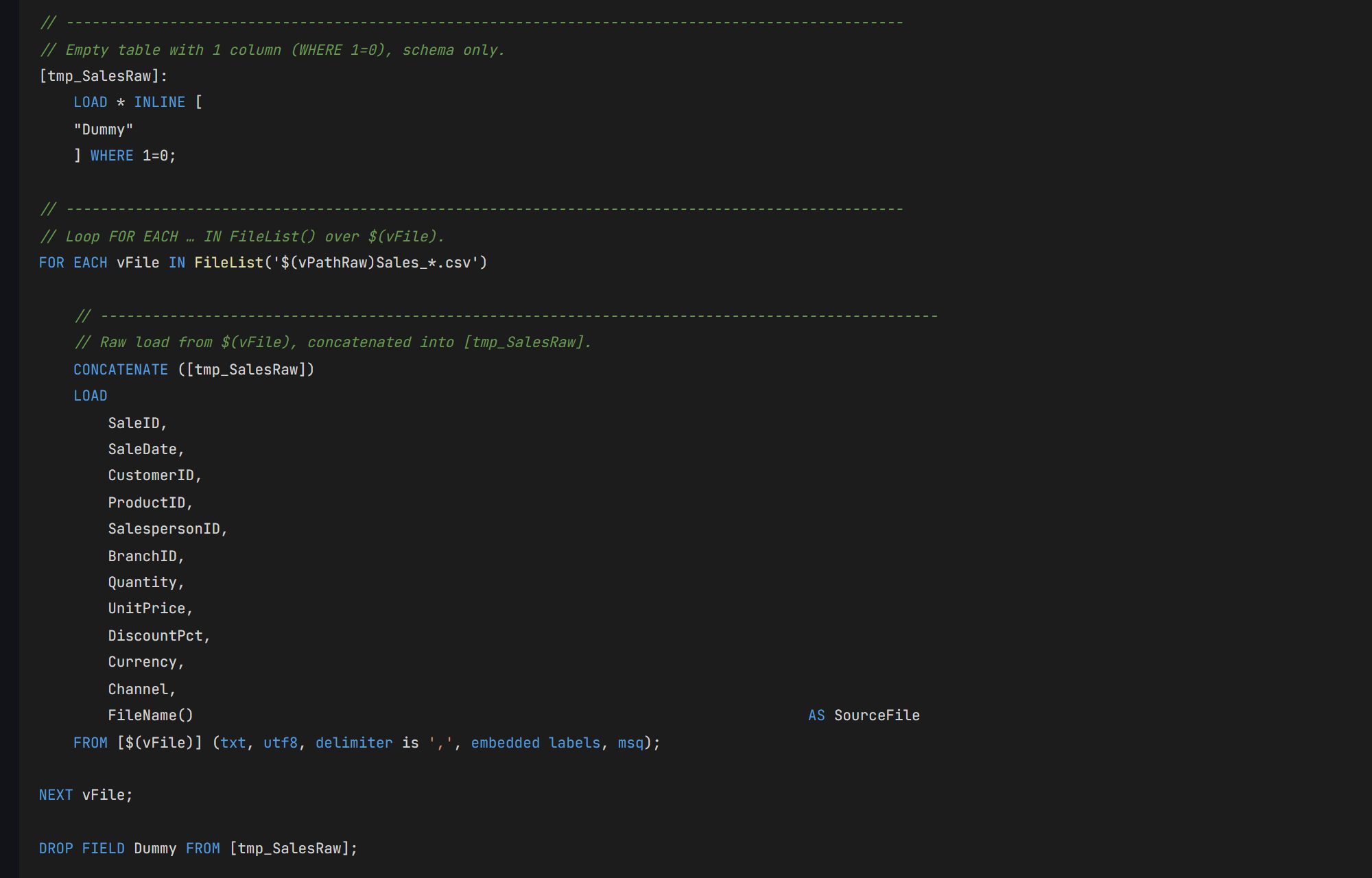
Figure 2.7 — Generate the script
04Check your result
- The main canvas has the inline
tmp_SalesRaw, the Loop (1 node in its body), a Drop, a Let/Set and a Trace. - Run the script in Qlik:
tmp_SalesRawhas 330 rows and 12 fields, andSourceFilehas 3 values, one per month. The reload log saysSales rows read from the monthly files: 330. - Q-Expert splits the script in two:
_Main, the only part you paste into Qlik, andFlow_1.qvs, a file that_Mainreads withMUST_INCLUDE. Both should match the ones below, except the date in the header and a// Q-Expert · Ref …line with your own reference.
_Main
Paste into QlikThis is the only script you paste into Qlik Sense: open the app's Data load editor, replace its content with this and reload. Each $(MUST_INCLUDE=…) line reads one of the files below in its place, so the rest of the model never goes into the editor.
Show script · 43 lines
/*----------------------------------------------------------------------------------------
	Description [MAIN]:

	-------------------------------------------------------------------------------------
	Author:	The Q-Fábrica team -
	Date:	[2026-11-02]
	-------------------------------------------------------------------------------------
	Changes
	-------------------------------------------------------------------------------------
	Author		Date		Detail
	-------------------------------------------------------------------------------------

	-------------------------------------------------------------------------------------
	Copyright © Q-Expert Distributors.
	Q-Expert Qlik Developer Framework. www.qfabrica.com
----------------------------------------------------------------------------------------*/

SET ThousandSep=',';
SET DecimalSep='.';
SET MoneyThousandSep=',';
SET MoneyDecimalSep='.';
SET MoneyFormat='$ #,##0.00;-$ #,##0.00';
SET TimeFormat='hh:mm:ss';
SET DateFormat='YYYY-MM-DD';
SET TimestampFormat='YYYY-MM-DD hh:mm:ss';
SET MonthNames='Jan;Feb;Mar;Apr;May;Jun;Jul;Aug;Sep;Oct;Nov;Dec';
SET LongMonthNames='January;February;March;April;May;June;July;August;September;October;November;December';
SET DayNames='Mon;Tue;Wed;Thu;Fri;Sat;Sun';
SET LongDayNames='Monday;Tuesday;Wednesday;Thursday;Friday;Saturday;Sunday';
SET FirstWeekDay=0;
SET BrokenWeeks=1;
SET ReferenceDay=4;
SET FirstMonthOfYear=1;

LET vExecutionDate = Timestamp(Now(), 'YYYY-MM-DD hh:mm:ss');

SET vTxfPath  = 'lib://QXDistributors/Transform/';
SET vPathRaw = 'lib://QXDistributors/';
SET vEnvironment = 'PROD';   // PROD, QA or DEV
SET vBaseCurrency = 'COP';   // Currency every amount is converted to
SET vPathModel = 'lib://QXDistributors/Model/';   // The model QVDs the apps load

$(MUST_INCLUDE=$(vTxfPath)_QVS/Flow_1.qvs);
Flow_1.qvs
File · read by MUST_INCLUDENot pasted: saved as a file. On the Flow_1 tab of Generate Syntax, Export downloads Flow_1.qvs (Deploy writes every tab into a folder at once). Put it in lib://QXDistributors/Transform/_QVS/Flow_1.qvs, the Transform/_QVS folder inside your QXDistributors folder. If the file is not there, the reload stops with an error: that is what MUST_INCLUDE is for.
Show script · 53 lines
/*----------------------------------------------------------------------------------------
	Description [Flow_1]:

	-------------------------------------------------------------------------------------
	Author:	The Q-Fábrica team -
	Date:	[2026-11-02]
	-------------------------------------------------------------------------------------
	Changes
	-------------------------------------------------------------------------------------
	Author		Date		Detail
	-------------------------------------------------------------------------------------

	-------------------------------------------------------------------------------------
	Copyright © Q-Expert Distributors.
	Q-Expert Qlik Developer Framework. www.qfabrica.com
----------------------------------------------------------------------------------------*/

// -------------------------------------------------------------------------------------------------
// Empty table with 1 column (WHERE 1=0), schema only.
[tmp_SalesRaw]:
    LOAD * INLINE [
    "Dummy"
    ] WHERE 1=0;

// -------------------------------------------------------------------------------------------------
// Loop FOR EACH … IN FileList() over $(vFile).
FOR EACH vFile IN FileList('$(vPathRaw)Sales_*.csv')

    // -------------------------------------------------------------------------------------------------
    // Raw load from $(vFile), concatenated into [tmp_SalesRaw].
    CONCATENATE ([tmp_SalesRaw])
    LOAD
        SaleID,
        SaleDate,
        CustomerID,
        ProductID,
        SalespersonID,
        BranchID,
        Quantity,
        UnitPrice,
        DiscountPct,
        Currency,
        Channel,
        FileName()                                                                       AS SourceFile
    FROM [$(vFile)] (txt, utf8, delimiter is ',', embedded labels, msq);

NEXT vFile;

DROP FIELD Dummy FROM [tmp_SalesRaw];

LET vSalesRawRows = NoOfRows('tmp_SalesRaw');

TRACE Sales rows read from the monthly files: $(vSalesRawRows);
05Why this way
- An explicit seed.
CONCATENATE (tmp_SalesRaw)needs the table to exist before the first turn. The empty inline table is that table; itsDummyfield only exists so the table can exist, and is dropped right after the loop. vFile, noti. Loop variables say what they hold. Six months from now,$(vFile)still explains itself.- Count in the log. A
TRACEwith the row count turns the reload log into a quick check: if a month's file goes missing, the number drops before anyone opens an app. - The path stays in one variable. The file list reads
$(vPathRaw), the same variable as episode 1, so moving the files is still a one-line change.
06What comes next
Episode 3: the master data arrives dirty.
Before you model
Q-Explorator is the Q-Fábrica team's desktop tool to explore QVD, CSV, Excel and Parquet files and to convert CSV, TXT and Excel files into QVD. Open the files of each episode in it to see their content and quality first.
About Q-Explorator