Maestros sucios
Manual paso a paso
Las capturas muestran Q-Expert en inglés; la interfaz en español llegará pronto.
01La pregunta de negocio
Antes de unir una sola venta, los datos maestros tienen que estar limpios. El archivo de clientes trae espacios de más, códigos en vez de nombres, ciudades vacías y cuatro clientes registrados dos veces con un ID nuevo. Productos, vendedores y sucursales llegan igual.
02Antes de empezar
- Descomprime el paquete del episodio:
Customers.csv,Products.csv,Salespeople.csv,Branches.csv,Categories.csv,Brands.txt,Holidays.csv,Parameters.txt, los archivos de ventas ystart.qep(el final del episodio 2). Agrega los archivos maestros a la Library. - Importa
start.qepcon Import QEP en la barra superior. - Abre primero los maestros en Q-Explorator, la herramienta de escritorio del equipo de Q-Fábrica para archivos CSV, Excel, Parquet y QVD: los espacios de más, los códigos y los documentos repetidos aparecen antes de escribir una línea.
03Paso a paso
-
1
Lee el umbral de crédito
Tres nodos seguidos:
- Arrastra
Parameters.txt(delimitado por tabulador) al canvas y llama al RAWtmp_Parameter. - Un nodo LET/SET:
LET vCreditThreshold = Lookup('Value', 'Parameter', 'CreditThreshold', 'tmp_Parameter'). - Un DROP de
tmp_Parameter: el valor ya vive en la variable.
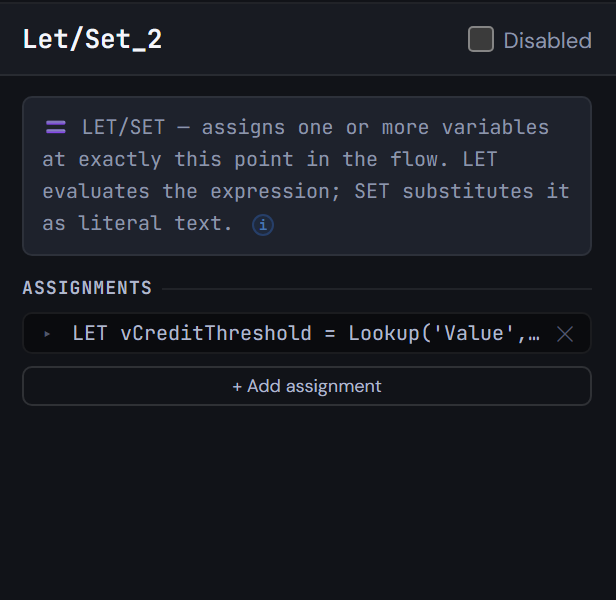
Figura 3.1 — Lee el umbral de crédito - Arrastra
-
2
Convierte códigos en nombres con tablas de mapeo
Agrega cinco nodos MAPPING. Tres toman sus filas de un nodo INLINE:
map_DocType: NIT → Company, CC → Personmap_CustomerStatus: A, I, B → Active, Inactive, Blockedmap_ChannelName: P, T, W → Phone, In store, Web
Dos leen un archivo directamente:
map_BrandNamedesdeBrands.txt(delimitado por barra vertical)map_HolidaydesdeHolidays.csv, conDISTINCTy la fecha como número
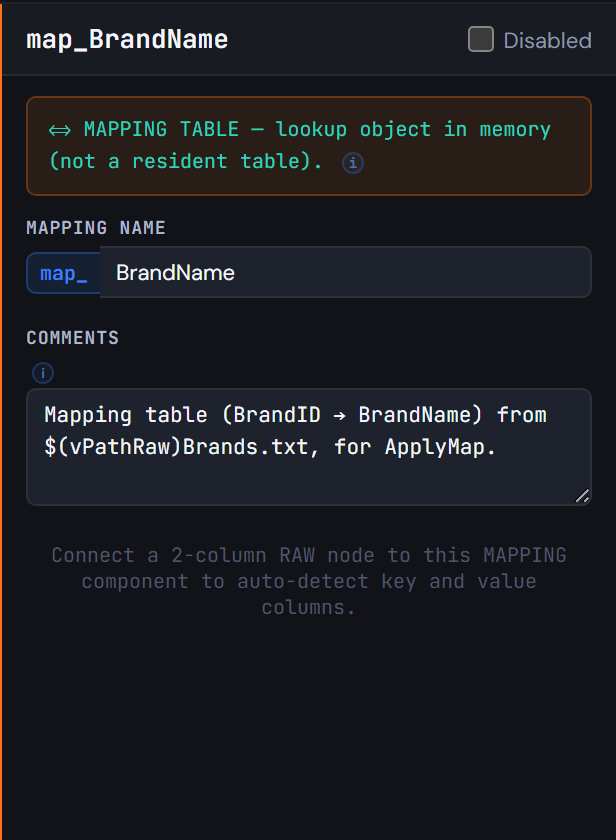
Figura 3.2 — Convierte códigos en nombres con tablas de mapeo -
3
Califica los maestros crudos
En este orden:
- Un nodo QUALIFY con todos los campos, y
UNQUALIFYpara las llavesCustomerID, ProductID, SalespersonID, BranchID, CategoryID, BrandID, DocNumber. - Los maestros crudos desde sus archivos:
tmp_CustomerRaw,tmp_ProductRaw,tmp_SalespersonRaw,tmp_BranchRaw,tmp_CategoryRaw. UNQUALIFY *.tmp_BrandRaw.
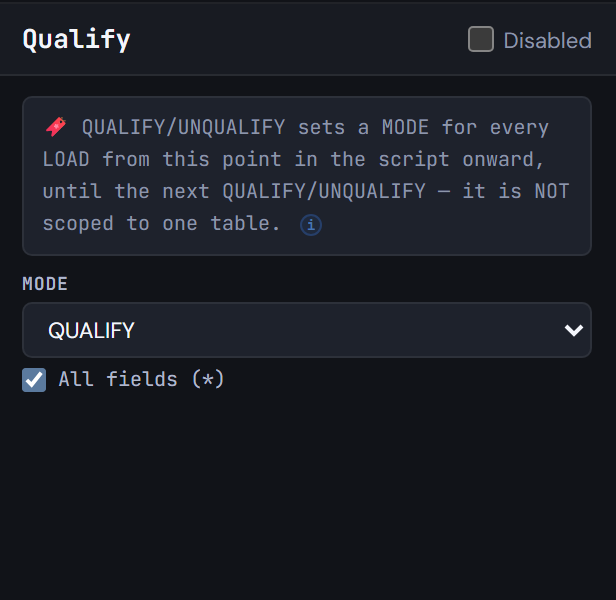
Figura 3.3 — Califica los maestros crudos - Un nodo QUALIFY con todos los campos, y
-
4
Limpia los clientes
Agrega un TXF después de
tmp_CustomerRaw, llamadotmp_CustomerClean. En Columns, apaga lo que no necesitas y renombra con un alias (City→CustomerCity). En Expressions, arma estas columnas con el Expression Builder:Capitalize(Trim(CustomerName))comoCustomerNameApplyMap('map_DocType', DocType, 'Other')comoDocTypeName'No city'para las ciudades vacías, comoCustomerCityDate(Date#(SignupDate, 'DD/MM/YYYY'))comoSignupDateApplyMap('map_CustomerStatus', Status, 'Unknown')comoCustomerStatusCreditProfile:'High'o'Standard'contra$(vCreditThreshold)
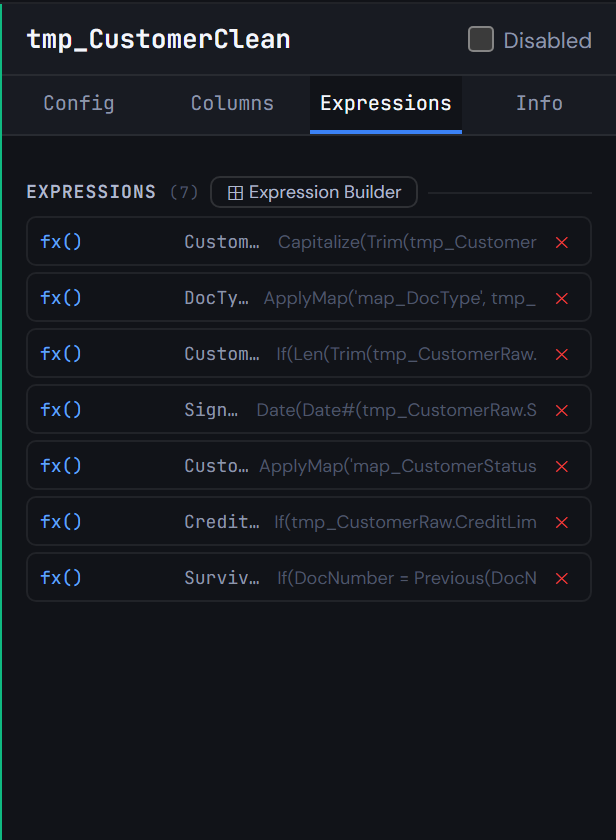
Figura 3.4 — Limpia los clientes -
5
Deja un solo ID por cliente
Cuatro pasos:
- En
tmp_CustomerClean, pon ORDER BY enDocNumber, CustomerIDy agregaIf(DocNumber = Previous(DocNumber), Peek('SurvivorID'), CustomerID) AS SurvivorID. - Un MAPPING
map_CustomerSurvivorlee de ahí CustomerID → SurvivorID. - Un TXF
Customer(NoConcatenate) conserva soloWHERE CustomerID = SurvivorID. - Una fila INLINE agrega el miembro
Unknown customer(CustomerID = -1) para las ventas cuyo cliente no existe.
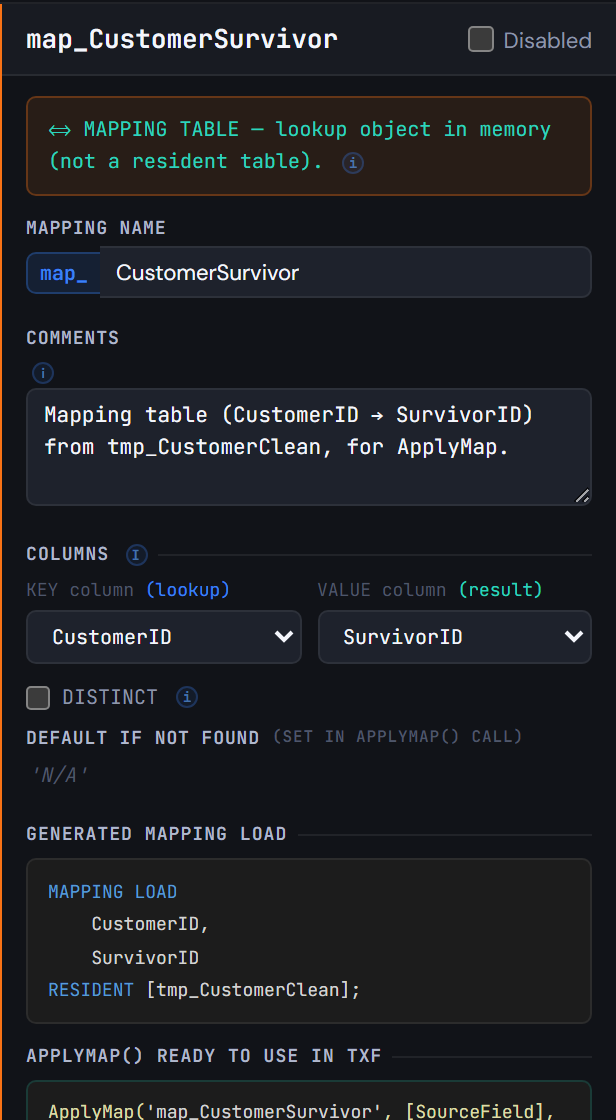
Figura 3.5 — Deja un solo ID por cliente - En
-
6
Detente y mira: un checkpoint
Agrega un CHECKPOINT después de
Customercon STORE a$(vTxfPath)Customer.qvdy Exit Script marcado. La recarga guarda los clientes limpios y se detiene, así puedes abrir el QVD (en Q-Explorator, por ejemplo) antes de seguir.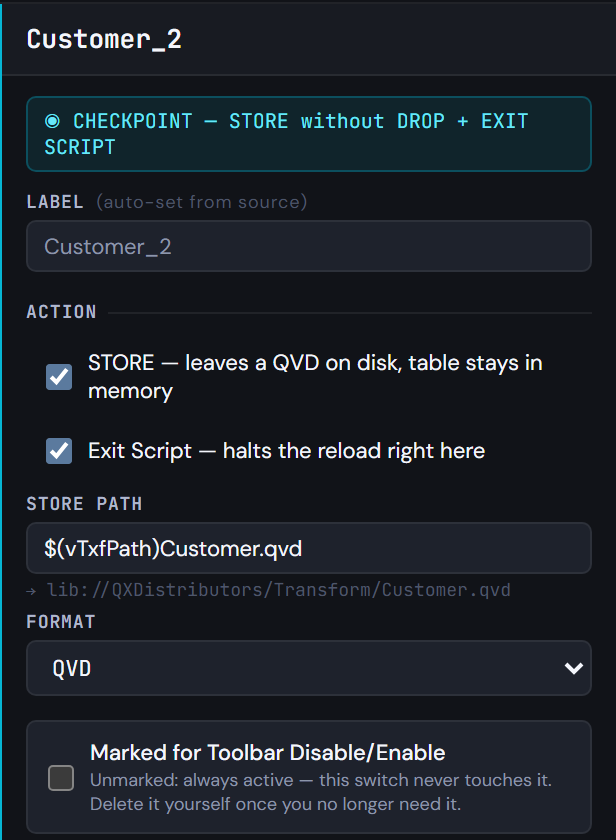
Figura 3.6 — Detente y mira: un checkpoint -
7
Productos, vendedores y sucursales
Los otros tres maestros:
Productconserva los productos activos (WHERE Status = 'ACTIVE'), conApplyMap('map_BrandName', …).- Un LEFT JOIN trae
CategoryNameyFamilyde las categorías (conDISTINCT), y otro trae elCountryOfOriginde la marca. Salespersonusa un LEFT KEEP contratmp_SalesRaw.Branchrenombra sus campos.
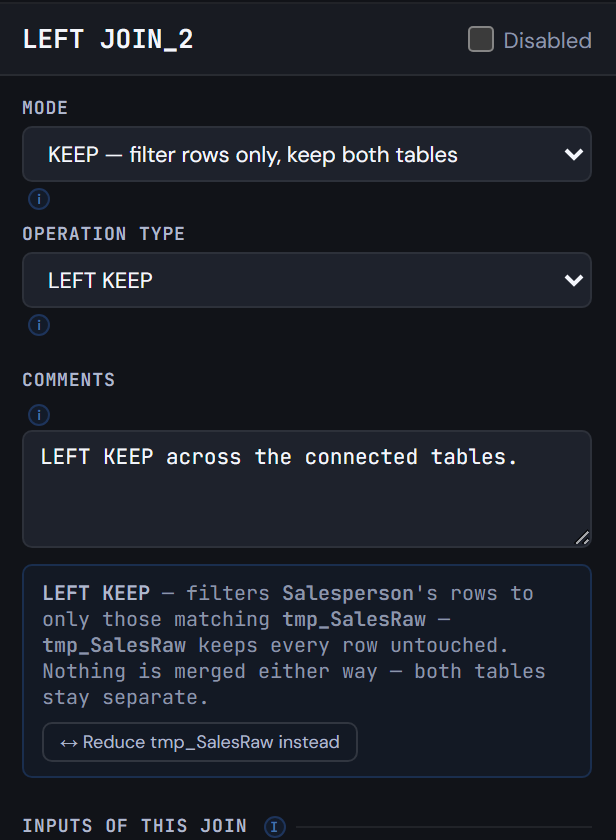
Figura 3.7 — Productos, vendedores y sucursales -
8
Elimina los maestros crudos y genera
Agrega un DROP para las seis tablas crudas. Generate Syntax: las tablas de mapeo se cargan primero, cada una en su pestaña; la pestaña principal termina con las seis líneas
DROP TABLEy elSTOREyEXIT SCRIPTdel checkpoint.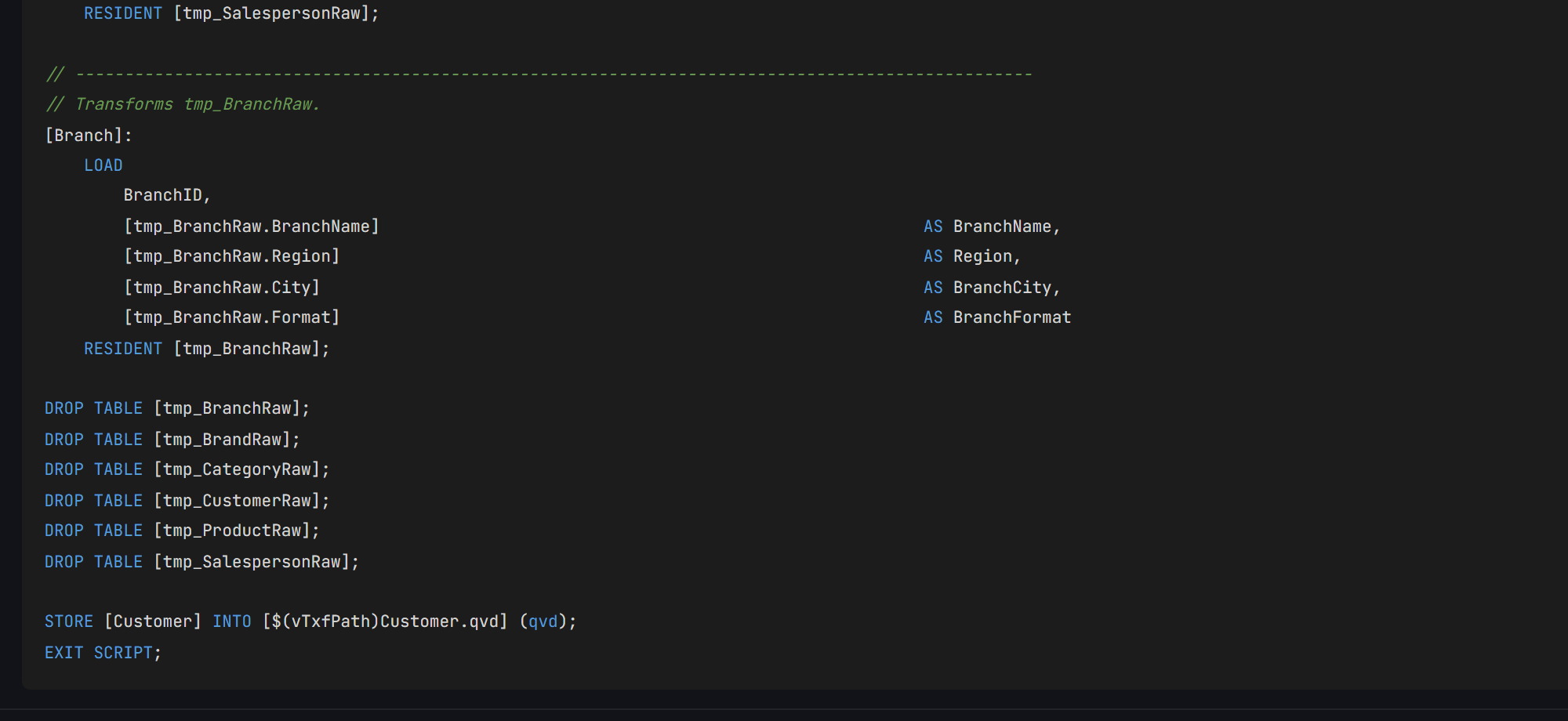
Figura 3.8 — Elimina los maestros crudos y genera
04Revisa tu resultado
- Ejecuta el script en Qlik. Se detiene en el checkpoint, con
Customerguardado enTransform/Customer.qvd. - En memoria:
Customer57 filas (60 en el archivo, 4 repetidos, más el miembro desconocido),Product37 (los activos),Salesperson12,Branch8, ytmp_SalesRawdel episodio 2. - Q-Expert divide el script en
_Main, la única parte que pegas en Qlik, y un archivo.qvspor pestaña que_Mainlee conMUST_INCLUDE. Todos deben coincidir con los de abajo, salvo la fecha del encabezado y una línea// Q-Expert · Ref …con tu propia referencia.
_Main
Se pega en QlikEste es el único script que pegas en Qlik Sense: abre el Editor de carga de datos de la app, reemplaza su contenido por este y recarga. Cada línea $(MUST_INCLUDE=…) lee en su lugar uno de los archivos de abajo, así el resto del modelo nunca entra al editor.
Ver script · 47 líneas
/*----------------------------------------------------------------------------------------
	Description [MAIN]:

	-------------------------------------------------------------------------------------
	Author:	The Q-Fábrica team -
	Date:	[2026-11-02]
	-------------------------------------------------------------------------------------
	Changes
	-------------------------------------------------------------------------------------
	Author		Date		Detail
	-------------------------------------------------------------------------------------

	-------------------------------------------------------------------------------------
	Copyright © Q-Expert Distributors.
	Q-Expert Qlik Developer Framework. www.qfabrica.com
----------------------------------------------------------------------------------------*/

SET ThousandSep=',';
SET DecimalSep='.';
SET MoneyThousandSep=',';
SET MoneyDecimalSep='.';
SET MoneyFormat='$ #,##0.00;-$ #,##0.00';
SET TimeFormat='hh:mm:ss';
SET DateFormat='YYYY-MM-DD';
SET TimestampFormat='YYYY-MM-DD hh:mm:ss';
SET MonthNames='Jan;Feb;Mar;Apr;May;Jun;Jul;Aug;Sep;Oct;Nov;Dec';
SET LongMonthNames='January;February;March;April;May;June;July;August;September;October;November;December';
SET DayNames='Mon;Tue;Wed;Thu;Fri;Sat;Sun';
SET LongDayNames='Monday;Tuesday;Wednesday;Thursday;Friday;Saturday;Sunday';
SET FirstWeekDay=0;
SET BrokenWeeks=1;
SET ReferenceDay=4;
SET FirstMonthOfYear=1;

LET vExecutionDate = Timestamp(Now(), 'YYYY-MM-DD hh:mm:ss');

SET vTxfPath  = 'lib://QXDistributors/Transform/';
SET vPathRaw = 'lib://QXDistributors/';
SET vEnvironment = 'PROD';   // PROD, QA or DEV
SET vBaseCurrency = 'COP';   // Currency every amount is converted to
SET vPathModel = 'lib://QXDistributors/Model/';   // The model QVDs the apps load

$(MUST_INCLUDE=$(vTxfPath)_QVS/Flow_1.qvs);
$(MUST_INCLUDE=$(vTxfPath)_QVS/Flow_2.qvs);
$(MUST_INCLUDE=$(vTxfPath)_QVS/Flow_3.qvs);
$(MUST_INCLUDE=$(vTxfPath)_QVS/Flow_4.qvs);
$(MUST_INCLUDE=$(vTxfPath)_QVS/Customer.qvs);
Flow_1.qvs
Archivo · lo lee MUST_INCLUDENo se pega: se guarda como archivo. En la pestaña Flow_1 de Generate Syntax, Export descarga Flow_1.qvs (Deploy escribe todas las pestañas en una carpeta de una vez). Ponlo en lib://QXDistributors/Transform/_QVS/Flow_1.qvs, la carpeta Transform/_QVS dentro de tu carpeta QXDistributors. Si el archivo no está, la recarga se detiene con un error: para eso existe MUST_INCLUDE.
Ver script · 35 líneas
/*----------------------------------------------------------------------------------------
	Description [Flow_1]:

	-------------------------------------------------------------------------------------
	Author:	The Q-Fábrica team -
	Date:	[2026-11-02]
	-------------------------------------------------------------------------------------
	Changes
	-------------------------------------------------------------------------------------
	Author		Date		Detail
	-------------------------------------------------------------------------------------

	-------------------------------------------------------------------------------------
	Copyright © Q-Expert Distributors.
	Q-Expert Qlik Developer Framework. www.qfabrica.com
----------------------------------------------------------------------------------------*/

// -------------------------------------------------------------------------------------------------
// Table defined directly in the script (2 columns).
[map_DocType_Src]:
    LOAD * INLINE [
    "DocType", "DocTypeName"
    "NIT", "Company"
    "CC", "Person"
    ];

// -------------------------------------------------------------------------------------------------
// Mapping table (DocType → DocTypeName) from map_DocType_Src, for ApplyMap.
[map_DocType]:
    MAPPING LOAD
        DocType,
        DocTypeName
    RESIDENT [map_DocType_Src];

DROP TABLE [map_DocType_Src];
Flow_2.qvs
Archivo · lo lee MUST_INCLUDENo se pega: se guarda como archivo. En la pestaña Flow_2 de Generate Syntax, Export descarga Flow_2.qvs (Deploy escribe todas las pestañas en una carpeta de una vez). Ponlo en lib://QXDistributors/Transform/_QVS/Flow_2.qvs, la carpeta Transform/_QVS dentro de tu carpeta QXDistributors. Si el archivo no está, la recarga se detiene con un error: para eso existe MUST_INCLUDE.
Ver script · 36 líneas
/*----------------------------------------------------------------------------------------
	Description [Flow_2]:

	-------------------------------------------------------------------------------------
	Author:	The Q-Fábrica team -
	Date:	[2026-11-02]
	-------------------------------------------------------------------------------------
	Changes
	-------------------------------------------------------------------------------------
	Author		Date		Detail
	-------------------------------------------------------------------------------------

	-------------------------------------------------------------------------------------
	Copyright © Q-Expert Distributors.
	Q-Expert Qlik Developer Framework. www.qfabrica.com
----------------------------------------------------------------------------------------*/

// -------------------------------------------------------------------------------------------------
// Table defined directly in the script (2 columns).
[map_CustomerStatus_Src]:
    LOAD * INLINE [
    "Status", "CustomerStatus"
    "A", "Active"
    "I", "Inactive"
    "B", "Blocked"
    ];

// -------------------------------------------------------------------------------------------------
// Mapping table (Status → CustomerStatus) from map_CustomerStatus_Src, for ApplyMap.
[map_CustomerStatus]:
    MAPPING LOAD
        Status,
        CustomerStatus
    RESIDENT [map_CustomerStatus_Src];

DROP TABLE [map_CustomerStatus_Src];
Flow_3.qvs
Archivo · lo lee MUST_INCLUDENo se pega: se guarda como archivo. En la pestaña Flow_3 de Generate Syntax, Export descarga Flow_3.qvs (Deploy escribe todas las pestañas en una carpeta de una vez). Ponlo en lib://QXDistributors/Transform/_QVS/Flow_3.qvs, la carpeta Transform/_QVS dentro de tu carpeta QXDistributors. Si el archivo no está, la recarga se detiene con un error: para eso existe MUST_INCLUDE.
Ver script · 36 líneas
/*----------------------------------------------------------------------------------------
	Description [Flow_3]:

	-------------------------------------------------------------------------------------
	Author:	The Q-Fábrica team -
	Date:	[2026-11-02]
	-------------------------------------------------------------------------------------
	Changes
	-------------------------------------------------------------------------------------
	Author		Date		Detail
	-------------------------------------------------------------------------------------

	-------------------------------------------------------------------------------------
	Copyright © Q-Expert Distributors.
	Q-Expert Qlik Developer Framework. www.qfabrica.com
----------------------------------------------------------------------------------------*/

// -------------------------------------------------------------------------------------------------
// Table defined directly in the script (2 columns).
[map_ChannelName_Src]:
    LOAD * INLINE [
    "Channel", "ChannelName"
    "P", "Phone"
    "T", "In store"
    "W", "Web"
    ];

// -------------------------------------------------------------------------------------------------
// Mapping table (Channel → ChannelName) from map_ChannelName_Src, for ApplyMap.
[map_ChannelName]:
    MAPPING LOAD
        Channel,
        ChannelName
    RESIDENT [map_ChannelName_Src];

DROP TABLE [map_ChannelName_Src];
Flow_4.qvs
Archivo · lo lee MUST_INCLUDENo se pega: se guarda como archivo. En la pestaña Flow_4 de Generate Syntax, Export descarga Flow_4.qvs (Deploy escribe todas las pestañas en una carpeta de una vez). Ponlo en lib://QXDistributors/Transform/_QVS/Flow_4.qvs, la carpeta Transform/_QVS dentro de tu carpeta QXDistributors. Si el archivo no está, la recarga se detiene con un error: para eso existe MUST_INCLUDE.
Ver script · 24 líneas
/*----------------------------------------------------------------------------------------
	Description [Flow_4]:

	-------------------------------------------------------------------------------------
	Author:	The Q-Fábrica team -
	Date:	[2026-11-02]
	-------------------------------------------------------------------------------------
	Changes
	-------------------------------------------------------------------------------------
	Author		Date		Detail
	-------------------------------------------------------------------------------------

	-------------------------------------------------------------------------------------
	Copyright © Q-Expert Distributors.
	Q-Expert Qlik Developer Framework. www.qfabrica.com
----------------------------------------------------------------------------------------*/

// -------------------------------------------------------------------------------------------------
// Mapping table (BrandID → BrandName) from $(vPathRaw)Brands.txt, for ApplyMap.
[map_BrandName]:
    MAPPING LOAD
        BrandID,
        BrandName
    FROM [$(vPathRaw)Brands.txt] (txt, utf8, delimiter is '|', embedded labels, msq);
Customer.qvs
Archivo · lo lee MUST_INCLUDENo se pega: se guarda como archivo. En la pestaña Customer de Generate Syntax, Export descarga Customer.qvs (Deploy escribe todas las pestañas en una carpeta de una vez). Ponlo en lib://QXDistributors/Transform/_QVS/Customer.qvs, la carpeta Transform/_QVS dentro de tu carpeta QXDistributors. Si el archivo no está, la recarga se detiene con un error: para eso existe MUST_INCLUDE.
Ver script · 273 líneas
/*----------------------------------------------------------------------------------------
	Description [Customer]:

	-------------------------------------------------------------------------------------
	Author:	The Q-Fábrica team -
	Date:	[2026-11-02]
	-------------------------------------------------------------------------------------
	Changes
	-------------------------------------------------------------------------------------
	Author		Date		Detail
	-------------------------------------------------------------------------------------

	-------------------------------------------------------------------------------------
	Copyright © Q-Expert Distributors.
	Q-Expert Qlik Developer Framework. www.qfabrica.com
----------------------------------------------------------------------------------------*/

// -------------------------------------------------------------------------------------------------
// Empty table with 1 column (WHERE 1=0), schema only.
[tmp_SalesRaw]:
    LOAD * INLINE [
    "Dummy"
    ] WHERE 1=0;

// -------------------------------------------------------------------------------------------------
// Loop FOR EACH … IN FileList() over $(vFile).
FOR EACH vFile IN FileList('$(vPathRaw)Sales_*.csv')

    // -------------------------------------------------------------------------------------------------
    // Raw load from $(vFile), concatenated into [tmp_SalesRaw].
    CONCATENATE ([tmp_SalesRaw])
    LOAD
        SaleID,
        SaleDate,
        CustomerID,
        ProductID,
        SalespersonID,
        BranchID,
        Quantity,
        UnitPrice,
        DiscountPct,
        Currency,
        Channel,
        FileName()                                                                       AS SourceFile
    FROM [$(vFile)] (txt, utf8, delimiter is ',', embedded labels, msq);

NEXT vFile;

DROP FIELD Dummy FROM [tmp_SalesRaw];

LET vSalesRawRows = NoOfRows('tmp_SalesRaw');

TRACE Sales rows read from the monthly files: $(vSalesRawRows);

// -------------------------------------------------------------------------------------------------
// Raw load of tmp_Parameter (no source set yet).
[tmp_Parameter]:
    LOAD
        Parameter,
        Value
    FROM [$(vPathRaw)Parameters.txt] (txt, utf8, delimiter is '	', embedded labels, msq);

LET vCreditThreshold = Lookup('Value', 'Parameter', 'CreditThreshold', 'tmp_Parameter');

DROP TABLE [tmp_Parameter];

// -------------------------------------------------------------------------------------------------
// Mapping table (Num(Date#(HolidayDate, 'YYYY-MM-DD')) AS HolidayDate → HolidayName) from $(vPathRaw)Holidays.csv, for ApplyMap.
[map_Holiday]:
    MAPPING LOAD DISTINCT
        Num(Date#(HolidayDate, 'YYYY-MM-DD')) AS HolidayDate,
        HolidayName
    FROM [$(vPathRaw)Holidays.csv] (txt, utf8, delimiter is ',', embedded labels, msq);

QUALIFY *;

UNQUALIFY CustomerID, ProductID, SalespersonID, BranchID, CategoryID, BrandID, DocNumber;

// -------------------------------------------------------------------------------------------------
// Raw load of tmp_CustomerRaw (no source set yet).
[tmp_CustomerRaw]:
    LOAD
        CustomerID,
        CustomerName,
        DocType,
        DocNumber,
        City,
        Segment,
        SignupDate,
        Status,
        CreditLimit
    FROM [$(vPathRaw)Customers.csv] (txt, utf8, delimiter is ',', embedded labels, msq);

// -------------------------------------------------------------------------------------------------
// Raw load of tmp_ProductRaw (no source set yet).
[tmp_ProductRaw]:
    LOAD
        ProductID,
        SKU,
        ProductName,
        CategoryID,
        BrandID,
        ListPrice,
        UnitCost,
        UnitOfMeasure,
        Status
    FROM [$(vPathRaw)Products.csv] (txt, utf8, delimiter is ',', embedded labels, msq);

// -------------------------------------------------------------------------------------------------
// Raw load of tmp_SalespersonRaw (no source set yet).
[tmp_SalespersonRaw]:
    LOAD
        SalespersonID,
        SalespersonName,
        BranchID,
        HireDate,
        MonthlyTarget
    FROM [$(vPathRaw)Salespeople.csv] (txt, utf8, delimiter is ',', embedded labels, msq);

// -------------------------------------------------------------------------------------------------
// Raw load of tmp_BranchRaw (no source set yet).
[tmp_BranchRaw]:
    LOAD
        BranchID,
        BranchName,
        Region,
        City,
        Format
    FROM [$(vPathRaw)Branches.csv] (txt, utf8, delimiter is ',', embedded labels, msq);

// -------------------------------------------------------------------------------------------------
// Raw load of tmp_CategoryRaw (no source set yet).
[tmp_CategoryRaw]:
    LOAD
        CategoryID,
        CategoryName,
        Family
    FROM [$(vPathRaw)Categories.csv] (txt, utf8, delimiter is ',', embedded labels, msq);

UNQUALIFY *;

// -------------------------------------------------------------------------------------------------
// Raw load of tmp_BrandRaw (no source set yet).
[tmp_BrandRaw]:
    LOAD
        BrandID,
        BrandName,
        CountryOfOrigin
    FROM [$(vPathRaw)Brands.txt] (txt, utf8, delimiter is '|', embedded labels, msq);

// -------------------------------------------------------------------------------------------------
// Transforms tmp_CustomerRaw.
[tmp_CustomerClean]:
    LOAD
        CustomerID,
        DocNumber,
        [tmp_CustomerRaw.Segment]                                                        AS Segment,
        [tmp_CustomerRaw.CreditLimit]                                                    AS CreditLimit,
        Capitalize(Trim(tmp_CustomerRaw.CustomerName))                                   AS CustomerName,
        ApplyMap('map_DocType', tmp_CustomerRaw.DocType, 'Other')                        AS DocTypeName,
        If(Len(Trim(tmp_CustomerRaw.City)) = 0, 'No city', Trim(tmp_CustomerRaw.City))   AS CustomerCity,
        Date(Date#(tmp_CustomerRaw.SignupDate, 'DD/MM/YYYY'))                            AS SignupDate,
        ApplyMap('map_CustomerStatus', tmp_CustomerRaw.Status, 'Unknown')                AS CustomerStatus,
        If(tmp_CustomerRaw.CreditLimit >= $(vCreditThreshold), 'High', 'Standard')       AS CreditProfile,
        If(DocNumber = Previous(DocNumber), Peek('SurvivorID'), CustomerID)              AS SurvivorID
    RESIDENT [tmp_CustomerRaw]
    ORDER BY DocNumber, CustomerID;

// -------------------------------------------------------------------------------------------------
// Mapping table (CustomerID → SurvivorID) from tmp_CustomerClean, for ApplyMap.
[map_CustomerSurvivor]:
    MAPPING LOAD
        CustomerID,
        SurvivorID
    RESIDENT [tmp_CustomerClean];

// -------------------------------------------------------------------------------------------------
// Transforms tmp_CustomerClean, combined via CONCATENATE.
[Customer]:
    NOCONCATENATE
    LOAD
        CustomerID,
        DocNumber,
        Segment,
        CreditLimit,
        CustomerName,
        DocTypeName,
        CustomerCity,
        SignupDate,
        CustomerStatus,
        CreditProfile
    RESIDENT [tmp_CustomerClean]
    WHERE CustomerID = SurvivorID;

    CONCATENATE ([Customer])
    // -------------------------------------------------------------------------------------------------
    // Table defined directly in the script (3 columns).
    LOAD * INLINE [
    "CustomerID", "CustomerName", "CustomerStatus"
    "-1", "Unknown customer", "Unknown"
    ];

DROP TABLE [tmp_CustomerClean];

// -------------------------------------------------------------------------------------------------
// Transforms tmp_ProductRaw, combined via LEFT JOIN.
[Product]:
    LOAD
        ProductID,
        [tmp_ProductRaw.SKU]                                                             AS SKU,
        CategoryID,
        BrandID,
        [tmp_ProductRaw.ListPrice]                                                       AS ListPrice,
        [tmp_ProductRaw.UnitCost]                                                        AS UnitCost,
        [tmp_ProductRaw.UnitOfMeasure]                                                   AS UnitOfMeasure,
        Capitalize(Trim(tmp_ProductRaw.ProductName))                                     AS ProductName,
        ApplyMap('map_BrandName', BrandID, 'No brand')                                   AS BrandName,
        Round(
            (tmp_ProductRaw.ListPrice - tmp_ProductRaw.UnitCost) / tmp_ProductRaw.ListPrice,
            0.0001
        )                                                                                AS MarginPct
    RESIDENT [tmp_ProductRaw]
    WHERE tmp_ProductRaw.Status = 'ACTIVE';

    LEFT JOIN ([Product])
    // -------------------------------------------------------------------------------------------------
    // Transforms tmp_CategoryRaw.
    LOAD DISTINCT
        CategoryID,
        [tmp_CategoryRaw.CategoryName]                                                   AS CategoryName,
        [tmp_CategoryRaw.Family]                                                         AS Family
    RESIDENT [tmp_CategoryRaw];

    LEFT JOIN ([Product])
    // -------------------------------------------------------------------------------------------------
    // Transforms tmp_BrandRaw.
    LOAD
        BrandID,
        CountryOfOrigin
    RESIDENT [tmp_BrandRaw];

// -------------------------------------------------------------------------------------------------
// Transforms tmp_SalespersonRaw, combined via LEFT JOIN.
[Salesperson]:
    LEFT KEEP ([tmp_SalesRaw])
    LOAD
        SalespersonID,
        BranchID                                                                         AS HomeBranchID,
        [tmp_SalespersonRaw.MonthlyTarget]                                               AS MonthlyTarget,
        Capitalize(Trim(tmp_SalespersonRaw.SalespersonName))                             AS SalespersonName,
        Date(Date#(tmp_SalespersonRaw.HireDate, 'YYYY-MM-DD'))                           AS HireDate
    RESIDENT [tmp_SalespersonRaw];

// -------------------------------------------------------------------------------------------------
// Transforms tmp_BranchRaw.
[Branch]:
    LOAD
        BranchID,
        [tmp_BranchRaw.BranchName]                                                       AS BranchName,
        [tmp_BranchRaw.Region]                                                           AS Region,
        [tmp_BranchRaw.City]                                                             AS BranchCity,
        [tmp_BranchRaw.Format]                                                           AS BranchFormat
    RESIDENT [tmp_BranchRaw];

DROP TABLE [tmp_BranchRaw];
DROP TABLE [tmp_BrandRaw];
DROP TABLE [tmp_CategoryRaw];
DROP TABLE [tmp_CustomerRaw];
DROP TABLE [tmp_ProductRaw];
DROP TABLE [tmp_SalespersonRaw];

STORE [Customer] INTO [$(vTxfPath)Customer.qvd] (qvd);
EXIT SCRIPT;
05Por qué se hace así
- Primero califica, luego decide.
CityyStatusexisten en varios maestros. Calificados, nunca pueden enlazar dos tablas por accidente; solo las llaves quedan como están, porque enlazar es su trabajo. - Redirige, nunca borres. Un cliente repetido sigue teniendo ventas. Mapear los IDs posteriores al primero conserva todas las ventas y deja una fila por cliente real.
- Los códigos se vuelven nombres en un solo lugar. Una tabla de mapeo es el único lugar donde
AsignificaActive. Cámbialo ahí y cadaApplyMaplo sigue. - Un checkpoint es una herramienta de depuración. Detiene la recarga a propósito. El episodio 4 empieza quitándolo, y el episodio 6 apaga todos los checkpoints de una vez.
06Lo que sigue
Episodio 4: vendemos en dos monedas.
Antes de modelar
Q-Explorator es la herramienta de escritorio del equipo de Q-Fábrica para explorar archivos QVD, CSV, Excel y Parquet, y para convertir archivos CSV, TXT y Excel en QVD. Abre en ella los archivos de cada episodio para ver primero su contenido y su calidad.
Conoce Q-Explorator