Dos monedas
Manual paso a paso
Las capturas muestran Q-Expert en inglés; la interfaz en español llegará pronto.
01La pregunta de negocio
Q-Expert Distributors vende en pesos y en dólares. Cada venta debe valorarse en pesos con la tasa de cambio vigente en su propia fecha y ubicarse en una banda de monto. En el camino, los errores de captura y los productos descontinuados deben salir del análisis.
02Antes de empezar
- Descomprime el paquete del episodio:
ExchangeRates.csv,AmountBands.csv, los archivos de los episodios anteriores ystart.qep(el final del episodio 3). Agrega los dos archivos nuevos a la Library. - Importa
start.qepcon Import QEP. Primero, borra el CHECKPOINT de depuración del episodio 3 después deCustomer: detiene la recarga ahí. - ¿Quieres revisar las tasas antes de modelar? Abre
ExchangeRates.csven Q-Explorator, la herramienta de escritorio del equipo de Q-Fábrica: cada fila es una moneda con un rango de vigencia.
03Paso a paso
-
1
Limpia las ventas
Agrega un TXF
tmp_Salesdespués detmp_SalesRaw. En Expressions:Date(Date#(SaleDate, 'YYYY-MM-DD'))comoSaleDateApplyMap('map_CustomerSurvivor', CustomerID, -1)comoCustomerIDApplyMap('map_ChannelName', Channel, 'Other')comoChannelNameQuantity * UnitPrice * (1 - DiscountPct / 100)comoNetAmount
Activa WHERE con
Quantity > 0. Luego un DROP detmp_SalesRaw.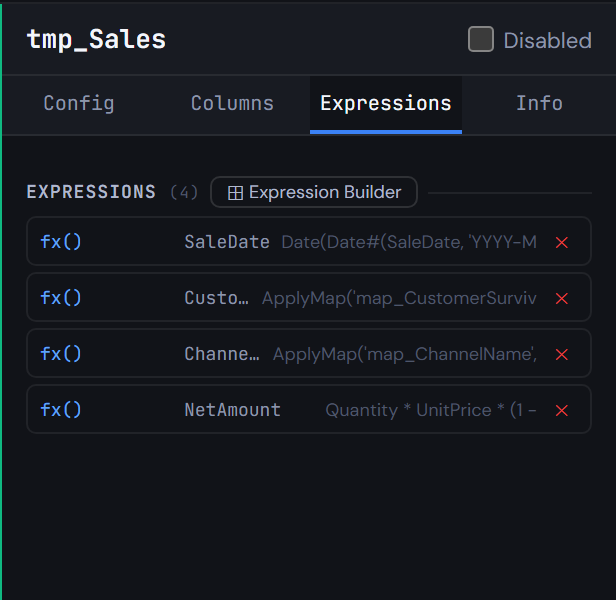
Figura 4.1 — Limpia las ventas -
2
Conserva solo productos activos
Agrega un nodo JOIN, operación
INNER JOIN, entreProduct(solo suProductID) ytmp_Sales. Las ventas de productos descontinuados salen del análisis.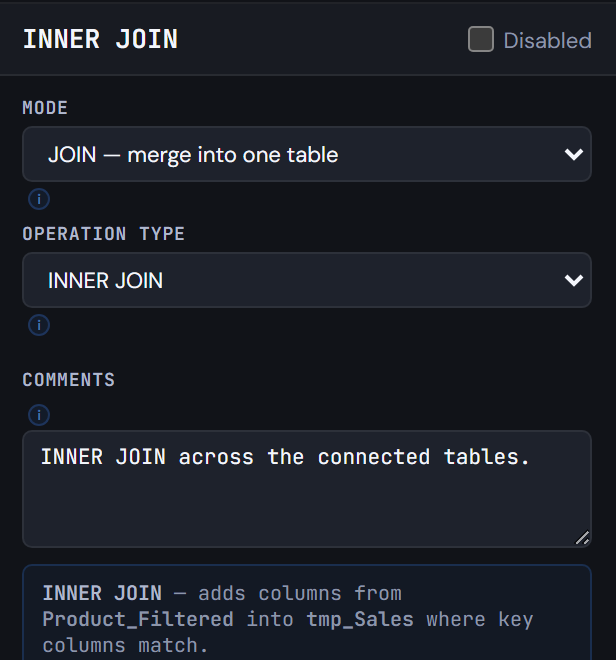
Figura 4.2 — Conserva solo productos activos -
3
Encuentra la tasa vigente de cada venta
Carga
ExchangeRates.csvcomotmp_ExchangeRate, conDate#(…, 'YYYY-MM-DD')enValidFromDateyValidToDate. Luego agrega un INTERVALMATCHtmp_RateBridge:- Campo de coincidencia
SaleDate - Inicio
ValidFromDate, finValidToDate - Llave adicional
Currency
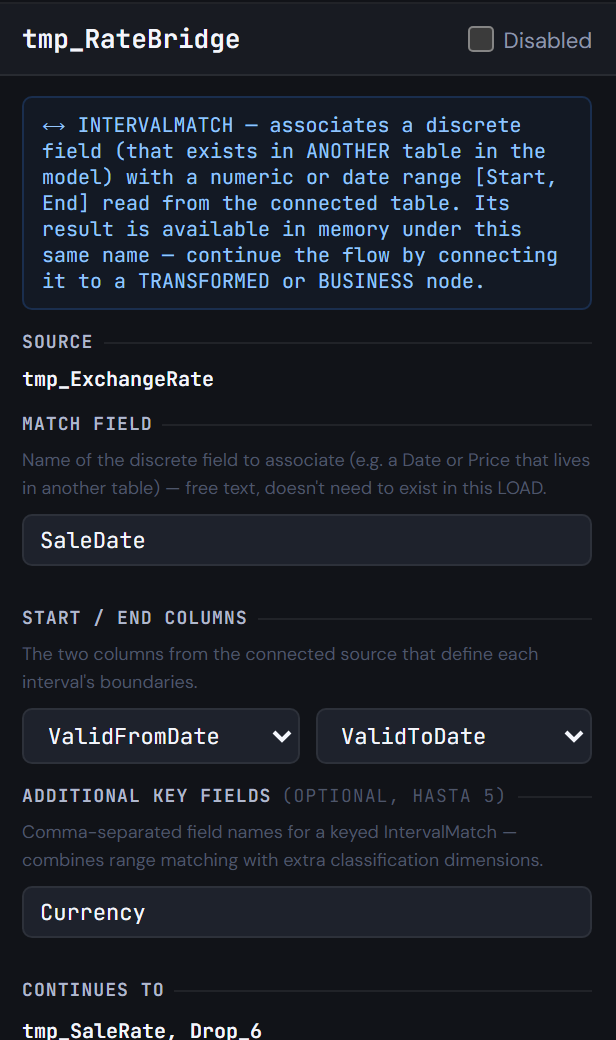
Figura 4.3 — Encuentra la tasa vigente de cada venta - Campo de coincidencia
-
4
Lleva la tasa a las ventas
Tres nodos y una limpieza:
- Un TXF
tmp_SaleRate(NoConcatenate) lee el puente. - Un LEFT JOIN le agrega
Ratedesdetmp_ExchangeRate. - Un segundo LEFT JOIN lleva
SaleDate, Currency, Rateatmp_Sales, con el WHERECurrency <> '$(vBaseCurrency)'. - Un DROP de las tres tablas de trabajo.
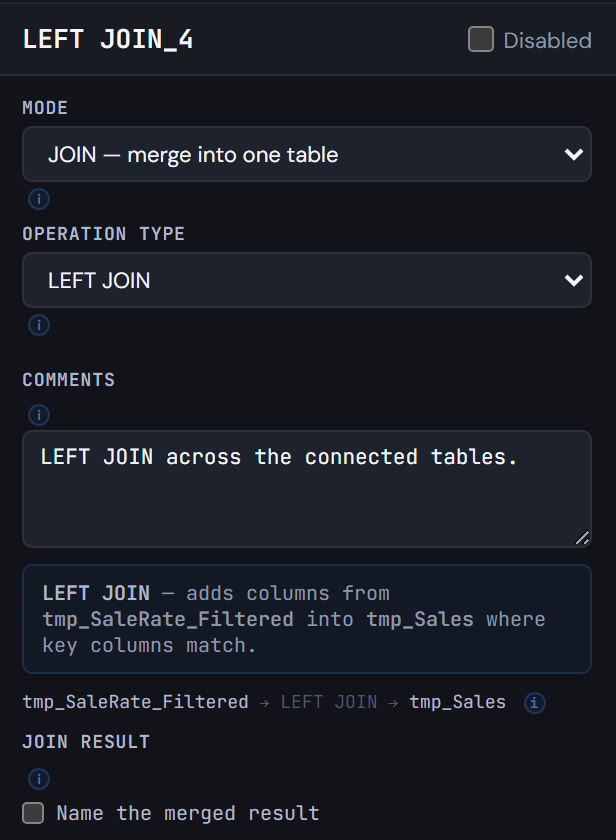
Figura 4.4 — Lleva la tasa a las ventas - Un TXF
-
5
Valora cada venta en pesos
Un TXF
Sales(NoConcatenate) leetmp_Salesy agregaRound(NetAmount * Alt(Rate, 1))comoNetAmountCOP. Luego un DROP detmp_Sales.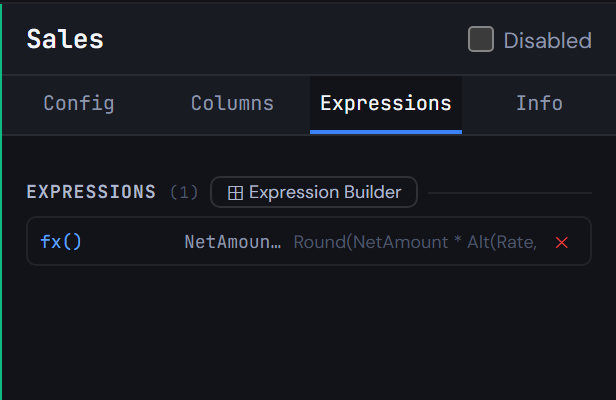
Figura 4.5 — Valora cada venta en pesos -
6
Ubica cada venta en una banda de monto
El mismo patrón otra vez:
tmp_AmountBanddesdeAmountBands.csv.- Un INTERVALMATCH
tmp_BandBridgesobreNetAmountCOPentreFromAmountyToAmount. - Un puente
tmp_SaleBandcon la banda unida. - Un LEFT JOIN de
AmountBandenSales. - Un DROP de las tablas de trabajo y del campo
SourceFile.
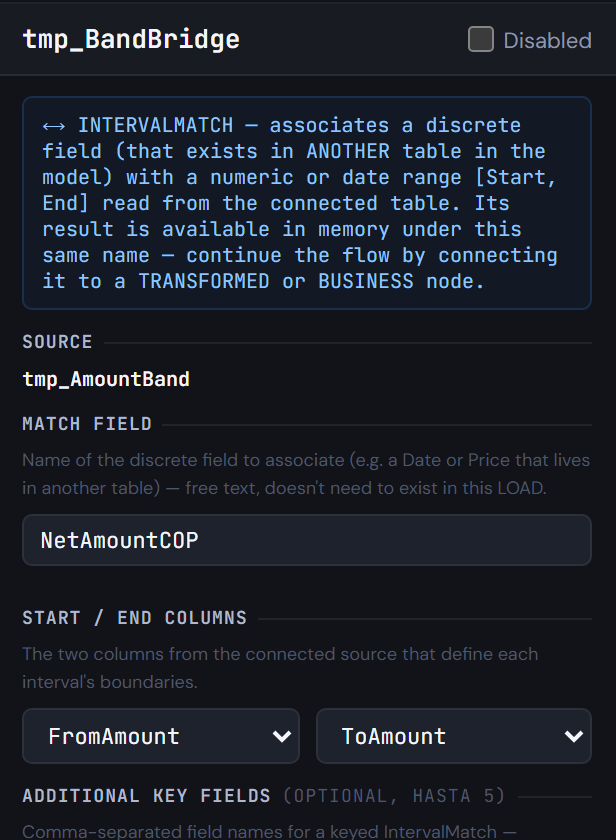
Figura 4.6 — Ubica cada venta en una banda de monto -
7
Guarda las ventas y luego detente a mirar
Dos checkpoints después de
Sales:- STORE a
$(vTxfPath)Sales.qvd: la tabla de ventas de la capa Transform. - Uno de depuración que guarda
$(vTxfPath)Sales_Check.qvdcon Exit Script marcado, así la recarga se detiene mientras revisas las ventas.
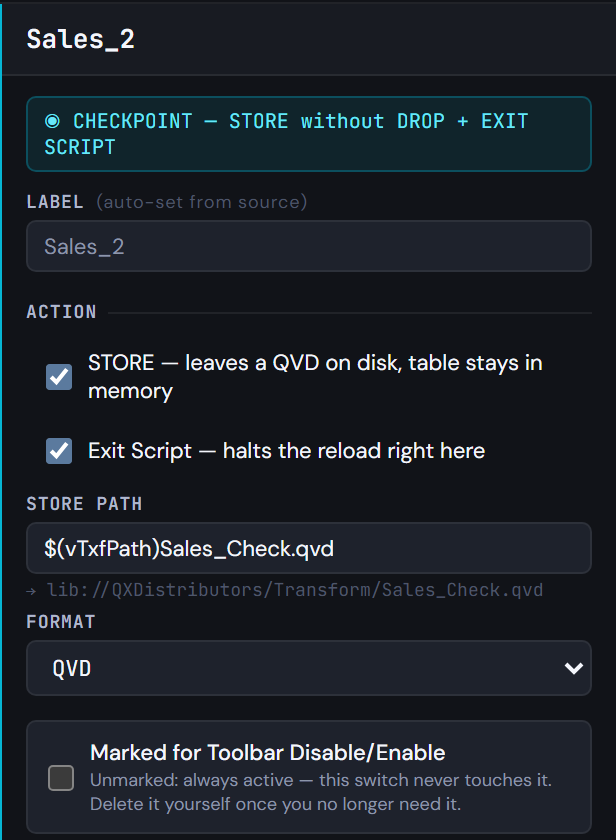
Figura 4.7 — Guarda las ventas y luego detente a mirar - STORE a
-
8
Genera el script
Generate Syntax. Las tablas de mapeo se cargan primero; la última pestaña termina con las tablas de trabajo eliminadas,
DROP FIELD SourceFile,STORE [Sales] INTO …Sales.qvdy elSTORE+EXIT SCRIPTde depuración.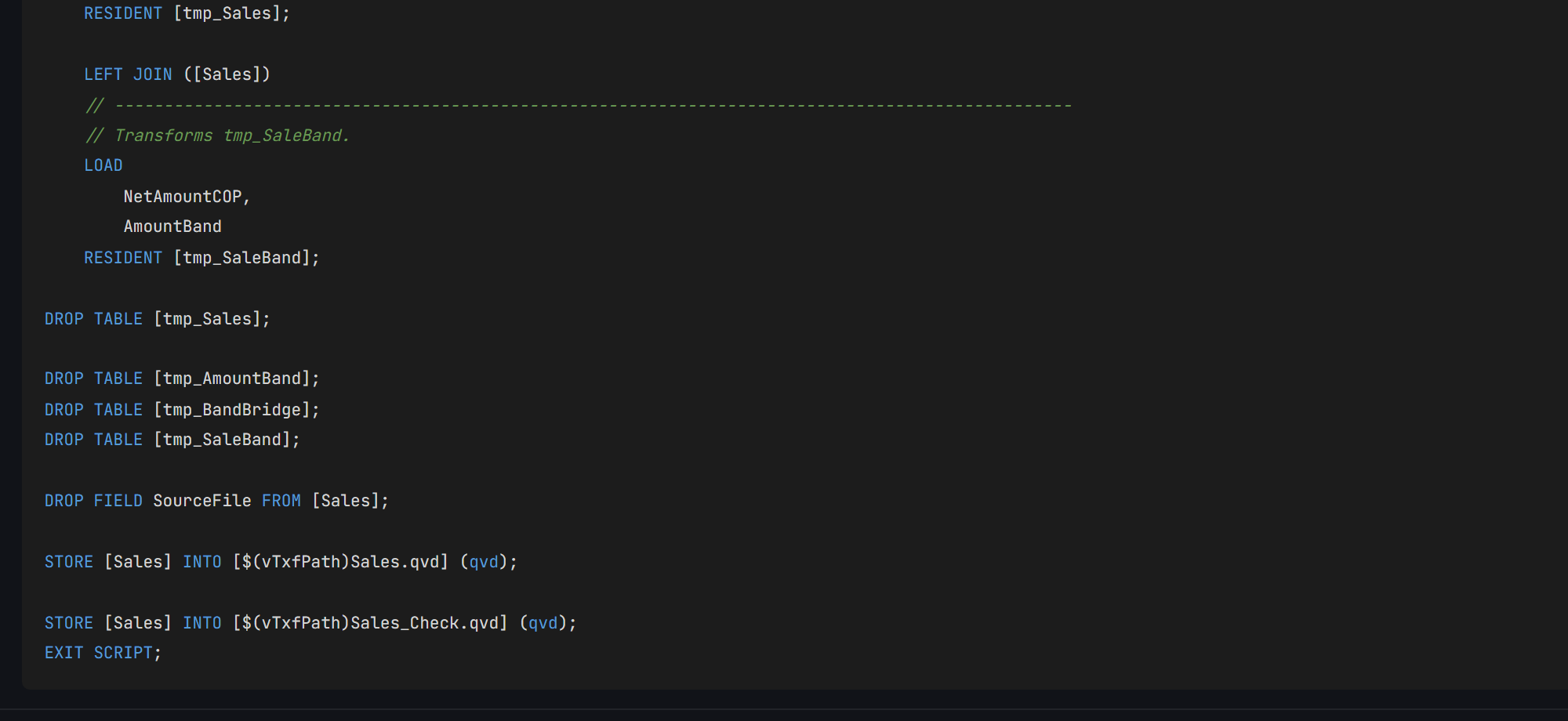
Figura 4.8 — Genera el script
04Revisa tu resultado
- Ejecuta el script en Qlik. Se detiene en el checkpoint de depuración, con
Transform/Sales.qvdyTransform/Sales_Check.qvdescritos. Salestiene 298 filas: 330 leídas, 8 con cantidad cero o menor que el WHERE deja por fuera, 24 de productos descontinuados que el INNER JOIN deja por fuera. 37 están en USD y llevanRate; las 261 en COP no. 11 van al cliente desconocido (-1).- Q-Expert divide el script en
_Main, la única parte que pegas en Qlik, y un archivo.qvspor pestaña que_Mainlee conMUST_INCLUDE. Todos deben coincidir con los de abajo, salvo la fecha del encabezado y una línea// Q-Expert · Ref …con tu propia referencia.
_Main
Se pega en QlikEste es el único script que pegas en Qlik Sense: abre el Editor de carga de datos de la app, reemplaza su contenido por este y recarga. Cada línea $(MUST_INCLUDE=…) lee en su lugar uno de los archivos de abajo, así el resto del modelo nunca entra al editor.
Ver script · 47 líneas
/*----------------------------------------------------------------------------------------
	Description [MAIN]:

	-------------------------------------------------------------------------------------
	Author:	The Q-Fábrica team -
	Date:	[2026-11-02]
	-------------------------------------------------------------------------------------
	Changes
	-------------------------------------------------------------------------------------
	Author		Date		Detail
	-------------------------------------------------------------------------------------

	-------------------------------------------------------------------------------------
	Copyright © Q-Expert Distributors.
	Q-Expert Qlik Developer Framework. www.qfabrica.com
----------------------------------------------------------------------------------------*/

SET ThousandSep=',';
SET DecimalSep='.';
SET MoneyThousandSep=',';
SET MoneyDecimalSep='.';
SET MoneyFormat='$ #,##0.00;-$ #,##0.00';
SET TimeFormat='hh:mm:ss';
SET DateFormat='YYYY-MM-DD';
SET TimestampFormat='YYYY-MM-DD hh:mm:ss';
SET MonthNames='Jan;Feb;Mar;Apr;May;Jun;Jul;Aug;Sep;Oct;Nov;Dec';
SET LongMonthNames='January;February;March;April;May;June;July;August;September;October;November;December';
SET DayNames='Mon;Tue;Wed;Thu;Fri;Sat;Sun';
SET LongDayNames='Monday;Tuesday;Wednesday;Thursday;Friday;Saturday;Sunday';
SET FirstWeekDay=0;
SET BrokenWeeks=1;
SET ReferenceDay=4;
SET FirstMonthOfYear=1;

LET vExecutionDate = Timestamp(Now(), 'YYYY-MM-DD hh:mm:ss');

SET vTxfPath  = 'lib://QXDistributors/Transform/';
SET vPathRaw = 'lib://QXDistributors/';
SET vEnvironment = 'PROD';   // PROD, QA or DEV
SET vBaseCurrency = 'COP';   // Currency every amount is converted to
SET vPathModel = 'lib://QXDistributors/Model/';   // The model QVDs the apps load

$(MUST_INCLUDE=$(vTxfPath)_QVS/Flow_1.qvs);
$(MUST_INCLUDE=$(vTxfPath)_QVS/Flow_2.qvs);
$(MUST_INCLUDE=$(vTxfPath)_QVS/Flow_3.qvs);
$(MUST_INCLUDE=$(vTxfPath)_QVS/Flow_4.qvs);
$(MUST_INCLUDE=$(vTxfPath)_QVS/Sales.qvs);
Flow_1.qvs
Archivo · lo lee MUST_INCLUDENo se pega: se guarda como archivo. En la pestaña Flow_1 de Generate Syntax, Export descarga Flow_1.qvs (Deploy escribe todas las pestañas en una carpeta de una vez). Ponlo en lib://QXDistributors/Transform/_QVS/Flow_1.qvs, la carpeta Transform/_QVS dentro de tu carpeta QXDistributors. Si el archivo no está, la recarga se detiene con un error: para eso existe MUST_INCLUDE.
Ver script · 35 líneas
/*----------------------------------------------------------------------------------------
	Description [Flow_1]:

	-------------------------------------------------------------------------------------
	Author:	The Q-Fábrica team -
	Date:	[2026-11-02]
	-------------------------------------------------------------------------------------
	Changes
	-------------------------------------------------------------------------------------
	Author		Date		Detail
	-------------------------------------------------------------------------------------

	-------------------------------------------------------------------------------------
	Copyright © Q-Expert Distributors.
	Q-Expert Qlik Developer Framework. www.qfabrica.com
----------------------------------------------------------------------------------------*/

// -------------------------------------------------------------------------------------------------
// Table defined directly in the script (2 columns).
[map_DocType_Src]:
    LOAD * INLINE [
    "DocType", "DocTypeName"
    "NIT", "Company"
    "CC", "Person"
    ];

// -------------------------------------------------------------------------------------------------
// Mapping table (DocType → DocTypeName) from map_DocType_Src, for ApplyMap.
[map_DocType]:
    MAPPING LOAD
        DocType,
        DocTypeName
    RESIDENT [map_DocType_Src];

DROP TABLE [map_DocType_Src];
Flow_2.qvs
Archivo · lo lee MUST_INCLUDENo se pega: se guarda como archivo. En la pestaña Flow_2 de Generate Syntax, Export descarga Flow_2.qvs (Deploy escribe todas las pestañas en una carpeta de una vez). Ponlo en lib://QXDistributors/Transform/_QVS/Flow_2.qvs, la carpeta Transform/_QVS dentro de tu carpeta QXDistributors. Si el archivo no está, la recarga se detiene con un error: para eso existe MUST_INCLUDE.
Ver script · 36 líneas
/*----------------------------------------------------------------------------------------
	Description [Flow_2]:

	-------------------------------------------------------------------------------------
	Author:	The Q-Fábrica team -
	Date:	[2026-11-02]
	-------------------------------------------------------------------------------------
	Changes
	-------------------------------------------------------------------------------------
	Author		Date		Detail
	-------------------------------------------------------------------------------------

	-------------------------------------------------------------------------------------
	Copyright © Q-Expert Distributors.
	Q-Expert Qlik Developer Framework. www.qfabrica.com
----------------------------------------------------------------------------------------*/

// -------------------------------------------------------------------------------------------------
// Table defined directly in the script (2 columns).
[map_CustomerStatus_Src]:
    LOAD * INLINE [
    "Status", "CustomerStatus"
    "A", "Active"
    "I", "Inactive"
    "B", "Blocked"
    ];

// -------------------------------------------------------------------------------------------------
// Mapping table (Status → CustomerStatus) from map_CustomerStatus_Src, for ApplyMap.
[map_CustomerStatus]:
    MAPPING LOAD
        Status,
        CustomerStatus
    RESIDENT [map_CustomerStatus_Src];

DROP TABLE [map_CustomerStatus_Src];
Flow_3.qvs
Archivo · lo lee MUST_INCLUDENo se pega: se guarda como archivo. En la pestaña Flow_3 de Generate Syntax, Export descarga Flow_3.qvs (Deploy escribe todas las pestañas en una carpeta de una vez). Ponlo en lib://QXDistributors/Transform/_QVS/Flow_3.qvs, la carpeta Transform/_QVS dentro de tu carpeta QXDistributors. Si el archivo no está, la recarga se detiene con un error: para eso existe MUST_INCLUDE.
Ver script · 36 líneas
/*----------------------------------------------------------------------------------------
	Description [Flow_3]:

	-------------------------------------------------------------------------------------
	Author:	The Q-Fábrica team -
	Date:	[2026-11-02]
	-------------------------------------------------------------------------------------
	Changes
	-------------------------------------------------------------------------------------
	Author		Date		Detail
	-------------------------------------------------------------------------------------

	-------------------------------------------------------------------------------------
	Copyright © Q-Expert Distributors.
	Q-Expert Qlik Developer Framework. www.qfabrica.com
----------------------------------------------------------------------------------------*/

// -------------------------------------------------------------------------------------------------
// Table defined directly in the script (2 columns).
[map_ChannelName_Src]:
    LOAD * INLINE [
    "Channel", "ChannelName"
    "P", "Phone"
    "T", "In store"
    "W", "Web"
    ];

// -------------------------------------------------------------------------------------------------
// Mapping table (Channel → ChannelName) from map_ChannelName_Src, for ApplyMap.
[map_ChannelName]:
    MAPPING LOAD
        Channel,
        ChannelName
    RESIDENT [map_ChannelName_Src];

DROP TABLE [map_ChannelName_Src];
Flow_4.qvs
Archivo · lo lee MUST_INCLUDENo se pega: se guarda como archivo. En la pestaña Flow_4 de Generate Syntax, Export descarga Flow_4.qvs (Deploy escribe todas las pestañas en una carpeta de una vez). Ponlo en lib://QXDistributors/Transform/_QVS/Flow_4.qvs, la carpeta Transform/_QVS dentro de tu carpeta QXDistributors. Si el archivo no está, la recarga se detiene con un error: para eso existe MUST_INCLUDE.
Ver script · 24 líneas
/*----------------------------------------------------------------------------------------
	Description [Flow_4]:

	-------------------------------------------------------------------------------------
	Author:	The Q-Fábrica team -
	Date:	[2026-11-02]
	-------------------------------------------------------------------------------------
	Changes
	-------------------------------------------------------------------------------------
	Author		Date		Detail
	-------------------------------------------------------------------------------------

	-------------------------------------------------------------------------------------
	Copyright © Q-Expert Distributors.
	Q-Expert Qlik Developer Framework. www.qfabrica.com
----------------------------------------------------------------------------------------*/

// -------------------------------------------------------------------------------------------------
// Mapping table (BrandID → BrandName) from $(vPathRaw)Brands.txt, for ApplyMap.
[map_BrandName]:
    MAPPING LOAD
        BrandID,
        BrandName
    FROM [$(vPathRaw)Brands.txt] (txt, utf8, delimiter is '|', embedded labels, msq);
Sales.qvs
Archivo · lo lee MUST_INCLUDENo se pega: se guarda como archivo. En la pestaña Sales de Generate Syntax, Export descarga Sales.qvs (Deploy escribe todas las pestañas en una carpeta de una vez). Ponlo en lib://QXDistributors/Transform/_QVS/Sales.qvs, la carpeta Transform/_QVS dentro de tu carpeta QXDistributors. Si el archivo no está, la recarga se detiene con un error: para eso existe MUST_INCLUDE.
Ver script · 421 líneas
/*----------------------------------------------------------------------------------------
	Description [Sales]:

	-------------------------------------------------------------------------------------
	Author:	The Q-Fábrica team -
	Date:	[2026-11-02]
	-------------------------------------------------------------------------------------
	Changes
	-------------------------------------------------------------------------------------
	Author		Date		Detail
	-------------------------------------------------------------------------------------

	-------------------------------------------------------------------------------------
	Copyright © Q-Expert Distributors.
	Q-Expert Qlik Developer Framework. www.qfabrica.com
----------------------------------------------------------------------------------------*/

// -------------------------------------------------------------------------------------------------
// Empty table with 1 column (WHERE 1=0), schema only.
[tmp_SalesRaw]:
    LOAD * INLINE [
    "Dummy"
    ] WHERE 1=0;

// -------------------------------------------------------------------------------------------------
// Loop FOR EACH … IN FileList() over $(vFile).
FOR EACH vFile IN FileList('$(vPathRaw)Sales_*.csv')

    // -------------------------------------------------------------------------------------------------
    // Raw load from $(vFile), concatenated into [tmp_SalesRaw].
    CONCATENATE ([tmp_SalesRaw])
    LOAD
        SaleID,
        SaleDate,
        CustomerID,
        ProductID,
        SalespersonID,
        BranchID,
        Quantity,
        UnitPrice,
        DiscountPct,
        Currency,
        Channel,
        FileName()                                                                       AS SourceFile
    FROM [$(vFile)] (txt, utf8, delimiter is ',', embedded labels, msq);

NEXT vFile;

DROP FIELD Dummy FROM [tmp_SalesRaw];

LET vSalesRawRows = NoOfRows('tmp_SalesRaw');

TRACE Sales rows read from the monthly files: $(vSalesRawRows);

// -------------------------------------------------------------------------------------------------
// Raw load of tmp_Parameter (no source set yet).
[tmp_Parameter]:
    LOAD
        Parameter,
        Value
    FROM [$(vPathRaw)Parameters.txt] (txt, utf8, delimiter is '	', embedded labels, msq);

LET vCreditThreshold = Lookup('Value', 'Parameter', 'CreditThreshold', 'tmp_Parameter');

DROP TABLE [tmp_Parameter];

// -------------------------------------------------------------------------------------------------
// Mapping table (Num(Date#(HolidayDate, 'YYYY-MM-DD')) AS HolidayDate → HolidayName) from $(vPathRaw)Holidays.csv, for ApplyMap.
[map_Holiday]:
    MAPPING LOAD DISTINCT
        Num(Date#(HolidayDate, 'YYYY-MM-DD')) AS HolidayDate,
        HolidayName
    FROM [$(vPathRaw)Holidays.csv] (txt, utf8, delimiter is ',', embedded labels, msq);

QUALIFY *;

UNQUALIFY CustomerID, ProductID, SalespersonID, BranchID, CategoryID, BrandID, DocNumber;

// -------------------------------------------------------------------------------------------------
// Raw load of tmp_CustomerRaw (no source set yet).
[tmp_CustomerRaw]:
    LOAD
        CustomerID,
        CustomerName,
        DocType,
        DocNumber,
        City,
        Segment,
        SignupDate,
        Status,
        CreditLimit
    FROM [$(vPathRaw)Customers.csv] (txt, utf8, delimiter is ',', embedded labels, msq);

// -------------------------------------------------------------------------------------------------
// Raw load of tmp_ProductRaw (no source set yet).
[tmp_ProductRaw]:
    LOAD
        ProductID,
        SKU,
        ProductName,
        CategoryID,
        BrandID,
        ListPrice,
        UnitCost,
        UnitOfMeasure,
        Status
    FROM [$(vPathRaw)Products.csv] (txt, utf8, delimiter is ',', embedded labels, msq);

// -------------------------------------------------------------------------------------------------
// Raw load of tmp_SalespersonRaw (no source set yet).
[tmp_SalespersonRaw]:
    LOAD
        SalespersonID,
        SalespersonName,
        BranchID,
        HireDate,
        MonthlyTarget
    FROM [$(vPathRaw)Salespeople.csv] (txt, utf8, delimiter is ',', embedded labels, msq);

// -------------------------------------------------------------------------------------------------
// Raw load of tmp_BranchRaw (no source set yet).
[tmp_BranchRaw]:
    LOAD
        BranchID,
        BranchName,
        Region,
        City,
        Format
    FROM [$(vPathRaw)Branches.csv] (txt, utf8, delimiter is ',', embedded labels, msq);

// -------------------------------------------------------------------------------------------------
// Raw load of tmp_CategoryRaw (no source set yet).
[tmp_CategoryRaw]:
    LOAD
        CategoryID,
        CategoryName,
        Family
    FROM [$(vPathRaw)Categories.csv] (txt, utf8, delimiter is ',', embedded labels, msq);

UNQUALIFY *;

// -------------------------------------------------------------------------------------------------
// Raw load of tmp_BrandRaw (no source set yet).
[tmp_BrandRaw]:
    LOAD
        BrandID,
        BrandName,
        CountryOfOrigin
    FROM [$(vPathRaw)Brands.txt] (txt, utf8, delimiter is '|', embedded labels, msq);

// -------------------------------------------------------------------------------------------------
// Transforms tmp_CustomerRaw.
[tmp_CustomerClean]:
    LOAD
        CustomerID,
        DocNumber,
        [tmp_CustomerRaw.Segment]                                                        AS Segment,
        [tmp_CustomerRaw.CreditLimit]                                                    AS CreditLimit,
        Capitalize(Trim(tmp_CustomerRaw.CustomerName))                                   AS CustomerName,
        ApplyMap('map_DocType', tmp_CustomerRaw.DocType, 'Other')                        AS DocTypeName,
        If(Len(Trim(tmp_CustomerRaw.City)) = 0, 'No city', Trim(tmp_CustomerRaw.City))   AS CustomerCity,
        Date(Date#(tmp_CustomerRaw.SignupDate, 'DD/MM/YYYY'))                            AS SignupDate,
        ApplyMap('map_CustomerStatus', tmp_CustomerRaw.Status, 'Unknown')                AS CustomerStatus,
        If(tmp_CustomerRaw.CreditLimit >= $(vCreditThreshold), 'High', 'Standard')       AS CreditProfile,
        If(DocNumber = Previous(DocNumber), Peek('SurvivorID'), CustomerID)              AS SurvivorID
    RESIDENT [tmp_CustomerRaw]
    ORDER BY DocNumber, CustomerID;

// -------------------------------------------------------------------------------------------------
// Mapping table (CustomerID → SurvivorID) from tmp_CustomerClean, for ApplyMap.
[map_CustomerSurvivor]:
    MAPPING LOAD
        CustomerID,
        SurvivorID
    RESIDENT [tmp_CustomerClean];

// -------------------------------------------------------------------------------------------------
// Transforms tmp_CustomerClean, combined via CONCATENATE.
[Customer]:
    NOCONCATENATE
    LOAD
        CustomerID,
        DocNumber,
        Segment,
        CreditLimit,
        CustomerName,
        DocTypeName,
        CustomerCity,
        SignupDate,
        CustomerStatus,
        CreditProfile
    RESIDENT [tmp_CustomerClean]
    WHERE CustomerID = SurvivorID;

    CONCATENATE ([Customer])
    // -------------------------------------------------------------------------------------------------
    // Table defined directly in the script (3 columns).
    LOAD * INLINE [
    "CustomerID", "CustomerName", "CustomerStatus"
    "-1", "Unknown customer", "Unknown"
    ];

DROP TABLE [tmp_CustomerClean];

// -------------------------------------------------------------------------------------------------
// Transforms tmp_ProductRaw, combined via LEFT JOIN.
[Product]:
    LOAD
        ProductID,
        [tmp_ProductRaw.SKU]                                                             AS SKU,
        CategoryID,
        BrandID,
        [tmp_ProductRaw.ListPrice]                                                       AS ListPrice,
        [tmp_ProductRaw.UnitCost]                                                        AS UnitCost,
        [tmp_ProductRaw.UnitOfMeasure]                                                   AS UnitOfMeasure,
        Capitalize(Trim(tmp_ProductRaw.ProductName))                                     AS ProductName,
        ApplyMap('map_BrandName', BrandID, 'No brand')                                   AS BrandName,
        Round(
            (tmp_ProductRaw.ListPrice - tmp_ProductRaw.UnitCost) / tmp_ProductRaw.ListPrice,
            0.0001
        )                                                                                AS MarginPct
    RESIDENT [tmp_ProductRaw]
    WHERE tmp_ProductRaw.Status = 'ACTIVE';

    LEFT JOIN ([Product])
    // -------------------------------------------------------------------------------------------------
    // Transforms tmp_CategoryRaw.
    LOAD DISTINCT
        CategoryID,
        [tmp_CategoryRaw.CategoryName]                                                   AS CategoryName,
        [tmp_CategoryRaw.Family]                                                         AS Family
    RESIDENT [tmp_CategoryRaw];

    LEFT JOIN ([Product])
    // -------------------------------------------------------------------------------------------------
    // Transforms tmp_BrandRaw.
    LOAD
        BrandID,
        CountryOfOrigin
    RESIDENT [tmp_BrandRaw];

// -------------------------------------------------------------------------------------------------
// Transforms tmp_SalespersonRaw, combined via LEFT JOIN.
[Salesperson]:
    LEFT KEEP ([tmp_SalesRaw])
    LOAD
        SalespersonID,
        BranchID                                                                         AS HomeBranchID,
        [tmp_SalespersonRaw.MonthlyTarget]                                               AS MonthlyTarget,
        Capitalize(Trim(tmp_SalespersonRaw.SalespersonName))                             AS SalespersonName,
        Date(Date#(tmp_SalespersonRaw.HireDate, 'YYYY-MM-DD'))                           AS HireDate
    RESIDENT [tmp_SalespersonRaw];

// -------------------------------------------------------------------------------------------------
// Transforms tmp_BranchRaw.
[Branch]:
    LOAD
        BranchID,
        [tmp_BranchRaw.BranchName]                                                       AS BranchName,
        [tmp_BranchRaw.Region]                                                           AS Region,
        [tmp_BranchRaw.City]                                                             AS BranchCity,
        [tmp_BranchRaw.Format]                                                           AS BranchFormat
    RESIDENT [tmp_BranchRaw];

DROP TABLE [tmp_BranchRaw];
DROP TABLE [tmp_BrandRaw];
DROP TABLE [tmp_CategoryRaw];
DROP TABLE [tmp_CustomerRaw];
DROP TABLE [tmp_ProductRaw];
DROP TABLE [tmp_SalespersonRaw];

// -------------------------------------------------------------------------------------------------
// Raw load of tmp_ExchangeRate (no source set yet).
[tmp_ExchangeRate]:
    LOAD
        Currency,
        Rate,
        Date#(ValidFromDate, 'YYYY-MM-DD')                                               AS ValidFromDate,
        Date#(ValidToDate, 'YYYY-MM-DD')                                                 AS ValidToDate
    FROM [$(vPathRaw)ExchangeRates.csv] (txt, utf8, delimiter is ',', embedded labels, msq);

// -------------------------------------------------------------------------------------------------
// Associates SaleDate with the range [ValidFromDate, ValidToDate] from tmp_ExchangeRate.
[tmp_RateBridge]:
    INTERVALMATCH (SaleDate, Currency)
    LOAD
      ValidFromDate,
      ValidToDate,
      Currency
    RESIDENT [tmp_ExchangeRate];

// -------------------------------------------------------------------------------------------------
// Transforms tmp_RateBridge, combined via LEFT JOIN.
[tmp_SaleRate]:
    NOCONCATENATE
    LOAD
        SaleDate,
        ValidFromDate,
        ValidToDate,
        Currency
    RESIDENT [tmp_RateBridge];

    LEFT JOIN ([tmp_SaleRate])
    // -------------------------------------------------------------------------------------------------
    // Transforms tmp_ExchangeRate.
    LOAD
        Currency,
        Rate,
        ValidFromDate,
        ValidToDate
    RESIDENT [tmp_ExchangeRate];

// -------------------------------------------------------------------------------------------------
// Transforms tmp_SalesRaw, combined via INNER JOIN.
[tmp_Sales]:
    LOAD
        SaleID,
        ProductID,
        SalespersonID,
        BranchID,
        Quantity,
        UnitPrice,
        DiscountPct,
        Currency,
        SourceFile,
        Date(Date#(SaleDate, 'YYYY-MM-DD'))                                              AS SaleDate,
        ApplyMap('map_CustomerSurvivor', CustomerID, -1)                                 AS CustomerID,
        ApplyMap('map_ChannelName', Channel, 'Other')                                    AS ChannelName,
        Quantity * UnitPrice * (1 - DiscountPct / 100)                                   AS NetAmount
    RESIDENT [tmp_SalesRaw]
    WHERE Quantity > 0;

    INNER JOIN ([tmp_Sales])
    // -------------------------------------------------------------------------------------------------
    // Transforms Product.
    LOAD
        ProductID
    RESIDENT [Product];

    LEFT JOIN ([tmp_Sales])
    // -------------------------------------------------------------------------------------------------
    // Transforms tmp_SaleRate.
    LOAD
        SaleDate,
        Currency,
        Rate
    RESIDENT [tmp_SaleRate]
    WHERE Currency <> '$(vBaseCurrency)';

DROP TABLE [tmp_SalesRaw];

DROP TABLE [tmp_ExchangeRate];
DROP TABLE [tmp_RateBridge];
DROP TABLE [tmp_SaleRate];

// -------------------------------------------------------------------------------------------------
// Raw load of tmp_AmountBand (no source set yet).
[tmp_AmountBand]:
    LOAD
        FromAmount,
        ToAmount,
        Band                                                                             AS AmountBand
    FROM [$(vPathRaw)AmountBands.csv] (txt, utf8, delimiter is ',', embedded labels, msq);

// -------------------------------------------------------------------------------------------------
// Associates NetAmountCOP with the range [FromAmount, ToAmount] from tmp_AmountBand.
[tmp_BandBridge]:
    INTERVALMATCH (NetAmountCOP)
    LOAD
      FromAmount,
      ToAmount
    RESIDENT [tmp_AmountBand];

// -------------------------------------------------------------------------------------------------
// Transforms tmp_BandBridge, combined via LEFT JOIN.
[tmp_SaleBand]:
    NOCONCATENATE
    LOAD
        NetAmountCOP,
        FromAmount,
        ToAmount
    RESIDENT [tmp_BandBridge];

    LEFT JOIN ([tmp_SaleBand])
    // -------------------------------------------------------------------------------------------------
    // Transforms tmp_AmountBand.
    LOAD
        FromAmount,
        ToAmount,
        AmountBand
    RESIDENT [tmp_AmountBand];

// -------------------------------------------------------------------------------------------------
// Transforms tmp_Sales, combined via LEFT JOIN.
[Sales]:
    NOCONCATENATE
    LOAD
        *,
        Round(NetAmount * Alt(Rate, 1))                                                  AS NetAmountCOP
    RESIDENT [tmp_Sales];

    LEFT JOIN ([Sales])
    // -------------------------------------------------------------------------------------------------
    // Transforms tmp_SaleBand.
    LOAD
        NetAmountCOP,
        AmountBand
    RESIDENT [tmp_SaleBand];

DROP TABLE [tmp_Sales];

DROP TABLE [tmp_AmountBand];
DROP TABLE [tmp_BandBridge];
DROP TABLE [tmp_SaleBand];

DROP FIELD SourceFile FROM [Sales];

STORE [Sales] INTO [$(vTxfPath)Sales.qvd] (qvd);

STORE [Sales] INTO [$(vTxfPath)Sales_Check.qvd] (qvd);
EXIT SCRIPT;
05Por qué se hace así
- IntervalMatch con llave. La tasa depende de la fecha y de la moneda. Agregar
Currencycomo llave hace que cada venta coincida solo con los rangos de su propia moneda. - Primero un puente, luego un join. La tabla puente dice en qué rango cae cada venta; la tasa entra con un join. Separar los pasos deja cada uno revisable.
- La moneda base en una variable.
$(vBaseCurrency)decide qué ventas necesitan tasa. Otra empresa en otro país cambia una variable del proyecto. - Transform guarda la tabla limpia.
Sales.qvden Transform es lo que el modelo lee en el episodio 6; el segundo STORE es solo de depuración y se va.
06Lo que sigue
Episodio 5: presupuesto contra real, neto de devoluciones.
Antes de modelar
Q-Explorator es la herramienta de escritorio del equipo de Q-Fábrica para explorar archivos QVD, CSV, Excel y Parquet, y para convertir archivos CSV, TXT y Excel en QVD. Abre en ella los archivos de cada episodio para ver primero su contenido y su calidad.
Conoce Q-Explorator