Budget against actual
Step-by-step manual
01The business question
Each branch has a monthly budget. Management wants to see, per branch and month, the budget against what was actually sold, net of returns. The budget arrives as a spreadsheet with one column per month.
02Before you start
- Unzip the episode package:
Returns.csv,Budget.csv, the files of the previous episodes andstart.qep(episode 4's end). Add the two new files to the Library. - Import
start.qepwith Import QEP, then delete episode 4's debugging CHECKPOINT (the one that storesSales_Check.qvdand stops). Keep the checkpoint that storesSales.qvd. - Open
Budget.csvin Q-Explorator, the Q-Fábrica team's desktop tool, to see the wide shape before the crosstable turns it into rows.
03Step by step
-
1
Load the returns as a preceding load
Two loads on one table:
- Drag
Returns.csvonto the canvas: this RAW is the inner load, withDate(Date#(ReturnDate, 'YYYY-MM-DD'))andQuantityrenamedReturnedQty. - Connect it to a TXF
SaleReturnand tick Preceding load on the connection. - On the TXF's Expressions:
If(Match(Reason, 'DAMAGED', 'EXPIRED'), 'Quality', 'Commercial')asReasonType.
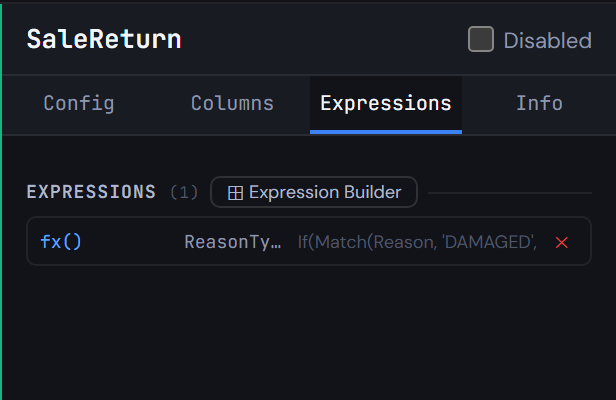
Figure 5.1 — Load the returns as a preceding load - Drag
-
2
Give each return its sale's data
An INNER JOIN into
SaleReturnfromSales, bringing:SaleID, CustomerID, ProductID, BranchID, SalespersonID, ChannelName, CurrencyNetAmountCOP / QuantityasUnitNetCOP
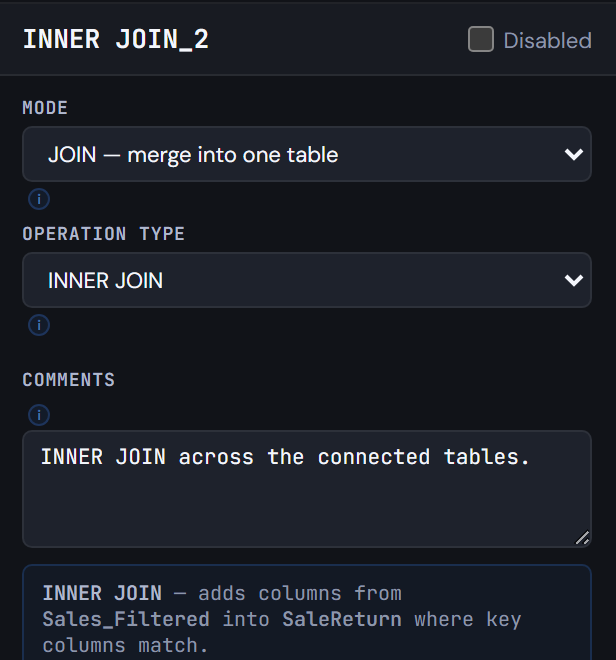
Figure 5.2 — Give each return its sale's data -
3
One movement table, net of returns
Three nodes:
- A TXF
Movement(NoConcatenate) readsSales, withSaleDateasMovementDateand'Sale'asMovementType. - A CONCATENATE adds
SaleReturn, withReturnDateasMovementDate,'Return',-ReturnedQtyasQuantityandRound(-ReturnedQty * UnitNetCOP)asNetAmountCOP. - A CHECKPOINT stores it into
$(vTxfPath)Movement.qvd.
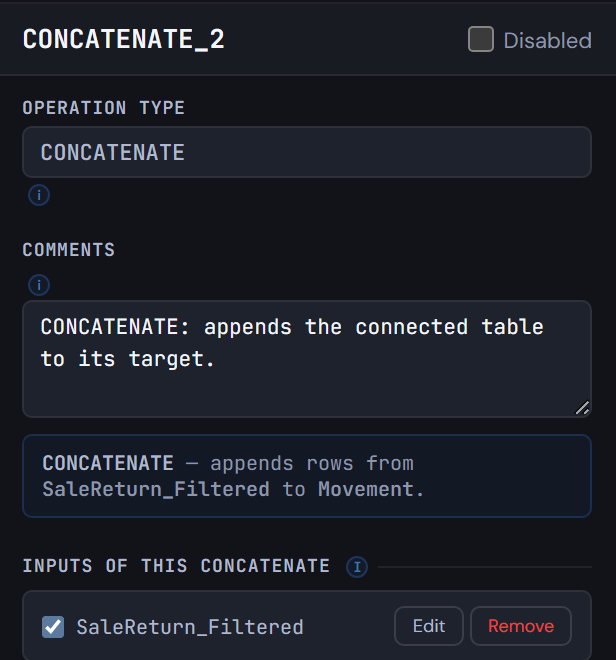
Figure 5.3 — One movement table, net of returns - A TXF
-
4
Turn the budget's month columns into rows
Drag
Budget.csvonto the canvas and connect it to a CROSSTABLE nodetmp_Budget:- Attribute field
BudgetMonthName - Data field
BudgetAmount - 1 qualifier column (
BranchID)
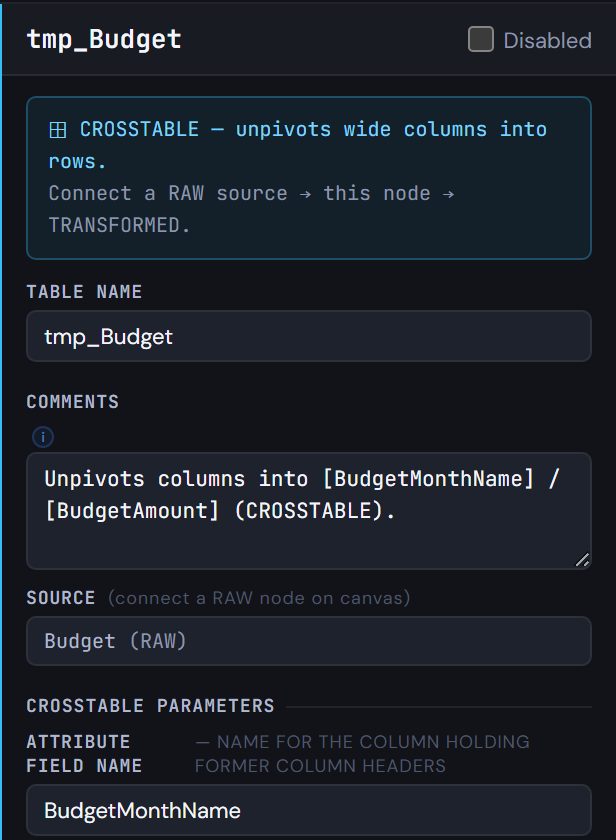
Figure 5.4 — Turn the budget's month columns into rows - Attribute field
-
5
Budget and actual side by side
Two steps:
- A TXF
BudgetVsActualreadstmp_BudgetwithMatch(BudgetMonthName, 'Jan', 'Feb', 'Mar')asMonthNum; then DROPtmp_Budget. - An OUTER JOIN brings from
MovementNum(Month(MovementDate))asMonthNumandSum(NetAmountCOP)asActualAmountCOP, with GROUP BYBranchID, Num(Month(MovementDate)).
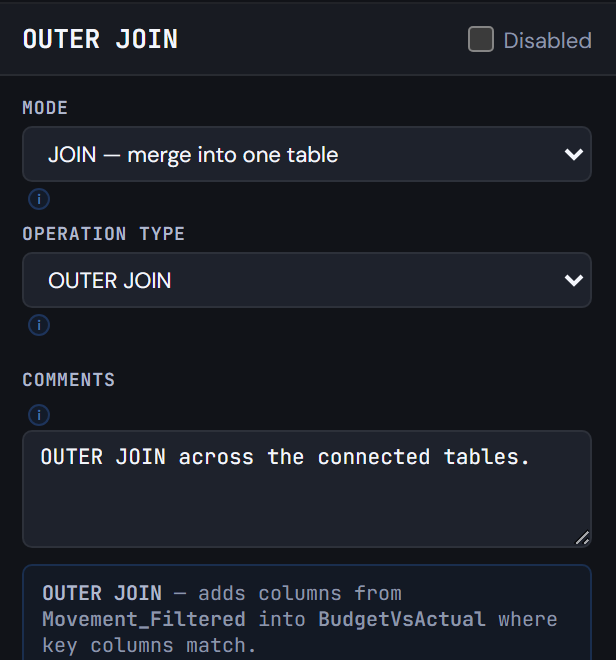
Figure 5.5 — Budget and actual side by side - A TXF
-
6
Stop and check the comparison
A debugging CHECKPOINT after
BudgetVsActualstores$(vTxfPath)BudgetVsActual.qvdwith Exit Script ticked.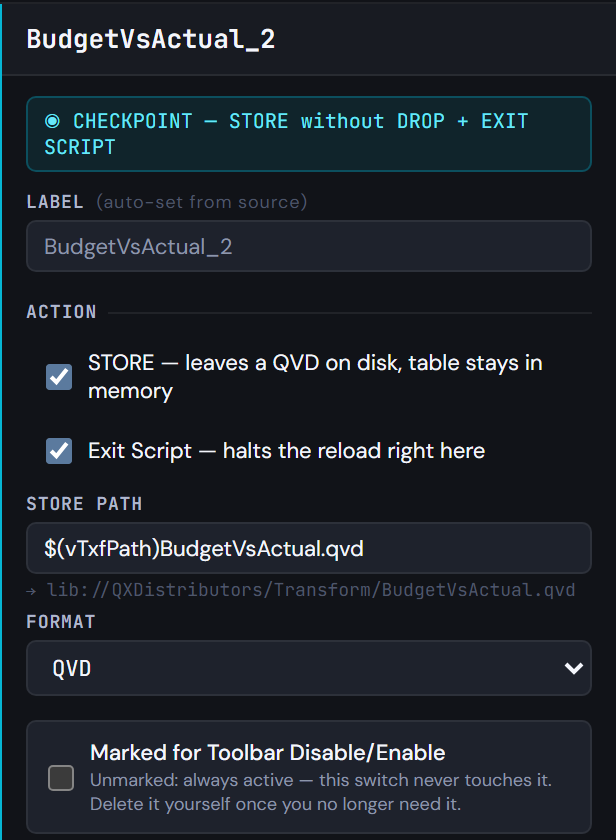
Figure 5.6 — Stop and check the comparison -
7
Generate the script
Generate Syntax. The last tab ends with
BudgetVsActual, theOUTER JOINwith itsGROUP BY, theDROP TABLE [tmp_Budget], and the checkpoint'sSTOREandEXIT SCRIPT. TheSTOREof the movements comes earlier, right afterMovement.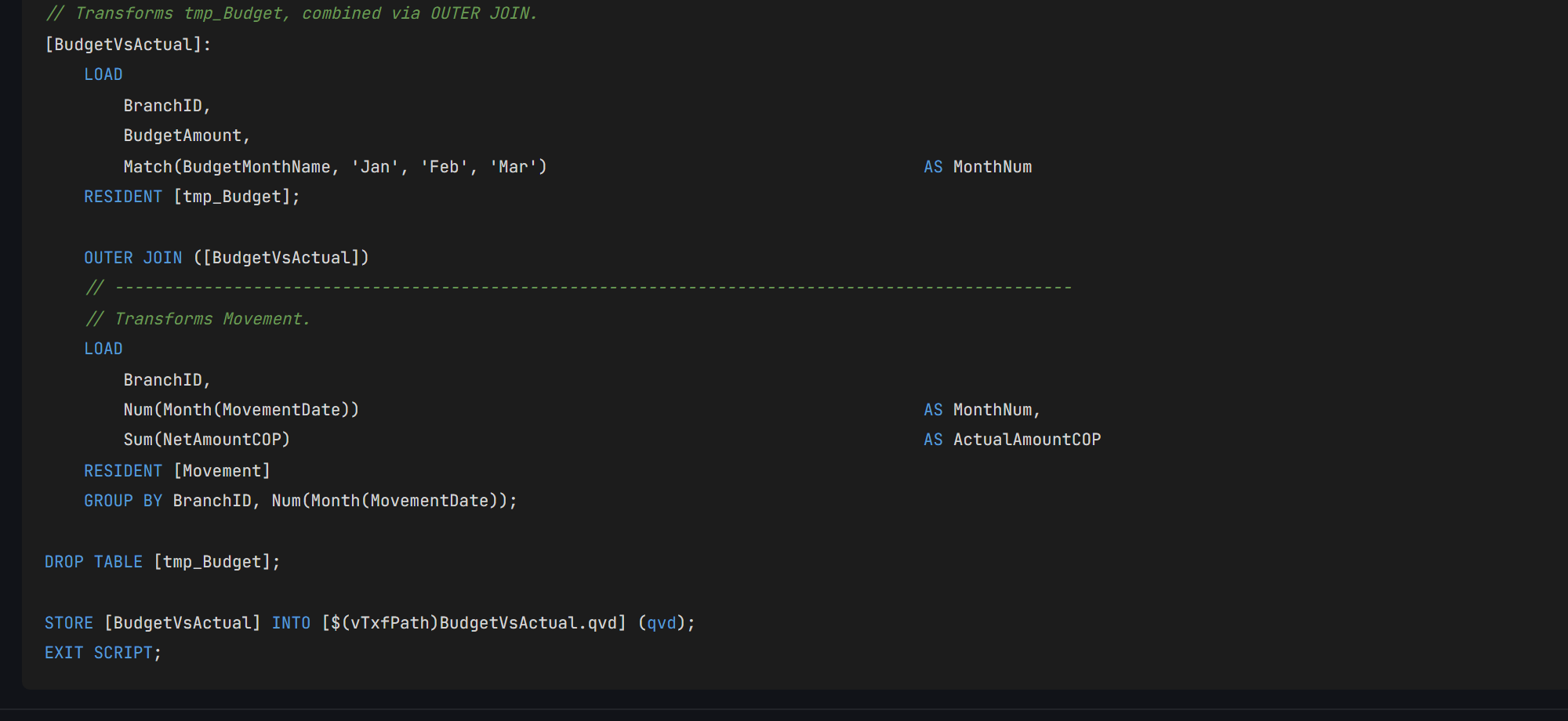
Figure 5.7 — Generate the script
04Check your result
- Run the script in Qlik. It stops at the checkpoint, with
Transform/Movement.qvdandTransform/BudgetVsActual.qvdwritten. Movementhas 319 rows: 298 sales and 21 returns (3 of the 24 returns belong to sales that never loaded).BudgetVsActualhas 24 rows, 8 branches by 3 months, each withBudgetAmountandActualAmountCOP.- Q-Expert splits the script into
_Main, the only part you paste into Qlik, and one.qvsfile per tab that_Mainreads withMUST_INCLUDE. All of them should match the ones below, except the date in the header and a// Q-Expert · Ref …line with your own reference.
_Main
Paste into QlikThis is the only script you paste into Qlik Sense: open the app's Data load editor, replace its content with this and reload. Each $(MUST_INCLUDE=…) line reads one of the files below in its place, so the rest of the model never goes into the editor.
Show script · 47 lines
/*----------------------------------------------------------------------------------------
	Description [MAIN]:

	-------------------------------------------------------------------------------------
	Author:	The Q-Fábrica team -
	Date:	[2026-11-02]
	-------------------------------------------------------------------------------------
	Changes
	-------------------------------------------------------------------------------------
	Author		Date		Detail
	-------------------------------------------------------------------------------------

	-------------------------------------------------------------------------------------
	Copyright © Q-Expert Distributors.
	Q-Expert Qlik Developer Framework. www.qfabrica.com
----------------------------------------------------------------------------------------*/

SET ThousandSep=',';
SET DecimalSep='.';
SET MoneyThousandSep=',';
SET MoneyDecimalSep='.';
SET MoneyFormat='$ #,##0.00;-$ #,##0.00';
SET TimeFormat='hh:mm:ss';
SET DateFormat='YYYY-MM-DD';
SET TimestampFormat='YYYY-MM-DD hh:mm:ss';
SET MonthNames='Jan;Feb;Mar;Apr;May;Jun;Jul;Aug;Sep;Oct;Nov;Dec';
SET LongMonthNames='January;February;March;April;May;June;July;August;September;October;November;December';
SET DayNames='Mon;Tue;Wed;Thu;Fri;Sat;Sun';
SET LongDayNames='Monday;Tuesday;Wednesday;Thursday;Friday;Saturday;Sunday';
SET FirstWeekDay=0;
SET BrokenWeeks=1;
SET ReferenceDay=4;
SET FirstMonthOfYear=1;

LET vExecutionDate = Timestamp(Now(), 'YYYY-MM-DD hh:mm:ss');

SET vTxfPath  = 'lib://QXDistributors/Transform/';
SET vPathRaw = 'lib://QXDistributors/';
SET vEnvironment = 'PROD';   // PROD, QA or DEV
SET vBaseCurrency = 'COP';   // Currency every amount is converted to
SET vPathModel = 'lib://QXDistributors/Model/';   // The model QVDs the apps load

$(MUST_INCLUDE=$(vTxfPath)_QVS/Flow_1.qvs);
$(MUST_INCLUDE=$(vTxfPath)_QVS/Flow_2.qvs);
$(MUST_INCLUDE=$(vTxfPath)_QVS/Flow_3.qvs);
$(MUST_INCLUDE=$(vTxfPath)_QVS/Flow_4.qvs);
$(MUST_INCLUDE=$(vTxfPath)_QVS/Sales.qvs);
Flow_1.qvs
File · read by MUST_INCLUDENot pasted: saved as a file. On the Flow_1 tab of Generate Syntax, Export downloads Flow_1.qvs (Deploy writes every tab into a folder at once). Put it in lib://QXDistributors/Transform/_QVS/Flow_1.qvs, the Transform/_QVS folder inside your QXDistributors folder. If the file is not there, the reload stops with an error: that is what MUST_INCLUDE is for.
Show script · 35 lines
/*----------------------------------------------------------------------------------------
	Description [Flow_1]:

	-------------------------------------------------------------------------------------
	Author:	The Q-Fábrica team -
	Date:	[2026-11-02]
	-------------------------------------------------------------------------------------
	Changes
	-------------------------------------------------------------------------------------
	Author		Date		Detail
	-------------------------------------------------------------------------------------

	-------------------------------------------------------------------------------------
	Copyright © Q-Expert Distributors.
	Q-Expert Qlik Developer Framework. www.qfabrica.com
----------------------------------------------------------------------------------------*/

// -------------------------------------------------------------------------------------------------
// Table defined directly in the script (2 columns).
[map_DocType_Src]:
    LOAD * INLINE [
    "DocType", "DocTypeName"
    "NIT", "Company"
    "CC", "Person"
    ];

// -------------------------------------------------------------------------------------------------
// Mapping table (DocType → DocTypeName) from map_DocType_Src, for ApplyMap.
[map_DocType]:
    MAPPING LOAD
        DocType,
        DocTypeName
    RESIDENT [map_DocType_Src];

DROP TABLE [map_DocType_Src];
Flow_2.qvs
File · read by MUST_INCLUDENot pasted: saved as a file. On the Flow_2 tab of Generate Syntax, Export downloads Flow_2.qvs (Deploy writes every tab into a folder at once). Put it in lib://QXDistributors/Transform/_QVS/Flow_2.qvs, the Transform/_QVS folder inside your QXDistributors folder. If the file is not there, the reload stops with an error: that is what MUST_INCLUDE is for.
Show script · 36 lines
/*----------------------------------------------------------------------------------------
	Description [Flow_2]:

	-------------------------------------------------------------------------------------
	Author:	The Q-Fábrica team -
	Date:	[2026-11-02]
	-------------------------------------------------------------------------------------
	Changes
	-------------------------------------------------------------------------------------
	Author		Date		Detail
	-------------------------------------------------------------------------------------

	-------------------------------------------------------------------------------------
	Copyright © Q-Expert Distributors.
	Q-Expert Qlik Developer Framework. www.qfabrica.com
----------------------------------------------------------------------------------------*/

// -------------------------------------------------------------------------------------------------
// Table defined directly in the script (2 columns).
[map_CustomerStatus_Src]:
    LOAD * INLINE [
    "Status", "CustomerStatus"
    "A", "Active"
    "I", "Inactive"
    "B", "Blocked"
    ];

// -------------------------------------------------------------------------------------------------
// Mapping table (Status → CustomerStatus) from map_CustomerStatus_Src, for ApplyMap.
[map_CustomerStatus]:
    MAPPING LOAD
        Status,
        CustomerStatus
    RESIDENT [map_CustomerStatus_Src];

DROP TABLE [map_CustomerStatus_Src];
Flow_3.qvs
File · read by MUST_INCLUDENot pasted: saved as a file. On the Flow_3 tab of Generate Syntax, Export downloads Flow_3.qvs (Deploy writes every tab into a folder at once). Put it in lib://QXDistributors/Transform/_QVS/Flow_3.qvs, the Transform/_QVS folder inside your QXDistributors folder. If the file is not there, the reload stops with an error: that is what MUST_INCLUDE is for.
Show script · 36 lines
/*----------------------------------------------------------------------------------------
	Description [Flow_3]:

	-------------------------------------------------------------------------------------
	Author:	The Q-Fábrica team -
	Date:	[2026-11-02]
	-------------------------------------------------------------------------------------
	Changes
	-------------------------------------------------------------------------------------
	Author		Date		Detail
	-------------------------------------------------------------------------------------

	-------------------------------------------------------------------------------------
	Copyright © Q-Expert Distributors.
	Q-Expert Qlik Developer Framework. www.qfabrica.com
----------------------------------------------------------------------------------------*/

// -------------------------------------------------------------------------------------------------
// Table defined directly in the script (2 columns).
[map_ChannelName_Src]:
    LOAD * INLINE [
    "Channel", "ChannelName"
    "P", "Phone"
    "T", "In store"
    "W", "Web"
    ];

// -------------------------------------------------------------------------------------------------
// Mapping table (Channel → ChannelName) from map_ChannelName_Src, for ApplyMap.
[map_ChannelName]:
    MAPPING LOAD
        Channel,
        ChannelName
    RESIDENT [map_ChannelName_Src];

DROP TABLE [map_ChannelName_Src];
Flow_4.qvs
File · read by MUST_INCLUDENot pasted: saved as a file. On the Flow_4 tab of Generate Syntax, Export downloads Flow_4.qvs (Deploy writes every tab into a folder at once). Put it in lib://QXDistributors/Transform/_QVS/Flow_4.qvs, the Transform/_QVS folder inside your QXDistributors folder. If the file is not there, the reload stops with an error: that is what MUST_INCLUDE is for.
Show script · 24 lines
/*----------------------------------------------------------------------------------------
	Description [Flow_4]:

	-------------------------------------------------------------------------------------
	Author:	The Q-Fábrica team -
	Date:	[2026-11-02]
	-------------------------------------------------------------------------------------
	Changes
	-------------------------------------------------------------------------------------
	Author		Date		Detail
	-------------------------------------------------------------------------------------

	-------------------------------------------------------------------------------------
	Copyright © Q-Expert Distributors.
	Q-Expert Qlik Developer Framework. www.qfabrica.com
----------------------------------------------------------------------------------------*/

// -------------------------------------------------------------------------------------------------
// Mapping table (BrandID → BrandName) from $(vPathRaw)Brands.txt, for ApplyMap.
[map_BrandName]:
    MAPPING LOAD
        BrandID,
        BrandName
    FROM [$(vPathRaw)Brands.txt] (txt, utf8, delimiter is '|', embedded labels, msq);
Sales.qvs
File · read by MUST_INCLUDENot pasted: saved as a file. On the Sales tab of Generate Syntax, Export downloads Sales.qvs (Deploy writes every tab into a folder at once). Put it in lib://QXDistributors/Transform/_QVS/Sales.qvs, the Transform/_QVS folder inside your QXDistributors folder. If the file is not there, the reload stops with an error: that is what MUST_INCLUDE is for.
Show script · 535 lines
/*----------------------------------------------------------------------------------------
	Description [Sales]:

	-------------------------------------------------------------------------------------
	Author:	The Q-Fábrica team -
	Date:	[2026-11-02]
	-------------------------------------------------------------------------------------
	Changes
	-------------------------------------------------------------------------------------
	Author		Date		Detail
	-------------------------------------------------------------------------------------

	-------------------------------------------------------------------------------------
	Copyright © Q-Expert Distributors.
	Q-Expert Qlik Developer Framework. www.qfabrica.com
----------------------------------------------------------------------------------------*/

// -------------------------------------------------------------------------------------------------
// Empty table with 1 column (WHERE 1=0), schema only.
[tmp_SalesRaw]:
    LOAD * INLINE [
    "Dummy"
    ] WHERE 1=0;

// -------------------------------------------------------------------------------------------------
// Loop FOR EACH … IN FileList() over $(vFile).
FOR EACH vFile IN FileList('$(vPathRaw)Sales_*.csv')

    // -------------------------------------------------------------------------------------------------
    // Raw load from $(vFile), concatenated into [tmp_SalesRaw].
    CONCATENATE ([tmp_SalesRaw])
    LOAD
        SaleID,
        SaleDate,
        CustomerID,
        ProductID,
        SalespersonID,
        BranchID,
        Quantity,
        UnitPrice,
        DiscountPct,
        Currency,
        Channel,
        FileName()                                                                       AS SourceFile
    FROM [$(vFile)] (txt, utf8, delimiter is ',', embedded labels, msq);

NEXT vFile;

DROP FIELD Dummy FROM [tmp_SalesRaw];

LET vSalesRawRows = NoOfRows('tmp_SalesRaw');

TRACE Sales rows read from the monthly files: $(vSalesRawRows);

// -------------------------------------------------------------------------------------------------
// Raw load of tmp_Parameter (no source set yet).
[tmp_Parameter]:
    LOAD
        Parameter,
        Value
    FROM [$(vPathRaw)Parameters.txt] (txt, utf8, delimiter is '	', embedded labels, msq);

LET vCreditThreshold = Lookup('Value', 'Parameter', 'CreditThreshold', 'tmp_Parameter');

DROP TABLE [tmp_Parameter];

// -------------------------------------------------------------------------------------------------
// Mapping table (Num(Date#(HolidayDate, 'YYYY-MM-DD')) AS HolidayDate → HolidayName) from $(vPathRaw)Holidays.csv, for ApplyMap.
[map_Holiday]:
    MAPPING LOAD DISTINCT
        Num(Date#(HolidayDate, 'YYYY-MM-DD')) AS HolidayDate,
        HolidayName
    FROM [$(vPathRaw)Holidays.csv] (txt, utf8, delimiter is ',', embedded labels, msq);

QUALIFY *;

UNQUALIFY CustomerID, ProductID, SalespersonID, BranchID, CategoryID, BrandID, DocNumber;

// -------------------------------------------------------------------------------------------------
// Raw load of tmp_CustomerRaw (no source set yet).
[tmp_CustomerRaw]:
    LOAD
        CustomerID,
        CustomerName,
        DocType,
        DocNumber,
        City,
        Segment,
        SignupDate,
        Status,
        CreditLimit
    FROM [$(vPathRaw)Customers.csv] (txt, utf8, delimiter is ',', embedded labels, msq);

// -------------------------------------------------------------------------------------------------
// Raw load of tmp_ProductRaw (no source set yet).
[tmp_ProductRaw]:
    LOAD
        ProductID,
        SKU,
        ProductName,
        CategoryID,
        BrandID,
        ListPrice,
        UnitCost,
        UnitOfMeasure,
        Status
    FROM [$(vPathRaw)Products.csv] (txt, utf8, delimiter is ',', embedded labels, msq);

// -------------------------------------------------------------------------------------------------
// Raw load of tmp_SalespersonRaw (no source set yet).
[tmp_SalespersonRaw]:
    LOAD
        SalespersonID,
        SalespersonName,
        BranchID,
        HireDate,
        MonthlyTarget
    FROM [$(vPathRaw)Salespeople.csv] (txt, utf8, delimiter is ',', embedded labels, msq);

// -------------------------------------------------------------------------------------------------
// Raw load of tmp_BranchRaw (no source set yet).
[tmp_BranchRaw]:
    LOAD
        BranchID,
        BranchName,
        Region,
        City,
        Format
    FROM [$(vPathRaw)Branches.csv] (txt, utf8, delimiter is ',', embedded labels, msq);

// -------------------------------------------------------------------------------------------------
// Raw load of tmp_CategoryRaw (no source set yet).
[tmp_CategoryRaw]:
    LOAD
        CategoryID,
        CategoryName,
        Family
    FROM [$(vPathRaw)Categories.csv] (txt, utf8, delimiter is ',', embedded labels, msq);

UNQUALIFY *;

// -------------------------------------------------------------------------------------------------
// Raw load of tmp_BrandRaw (no source set yet).
[tmp_BrandRaw]:
    LOAD
        BrandID,
        BrandName,
        CountryOfOrigin
    FROM [$(vPathRaw)Brands.txt] (txt, utf8, delimiter is '|', embedded labels, msq);

// -------------------------------------------------------------------------------------------------
// Transforms tmp_CustomerRaw.
[tmp_CustomerClean]:
    LOAD
        CustomerID,
        DocNumber,
        [tmp_CustomerRaw.Segment]                                                        AS Segment,
        [tmp_CustomerRaw.CreditLimit]                                                    AS CreditLimit,
        Capitalize(Trim(tmp_CustomerRaw.CustomerName))                                   AS CustomerName,
        ApplyMap('map_DocType', tmp_CustomerRaw.DocType, 'Other')                        AS DocTypeName,
        If(Len(Trim(tmp_CustomerRaw.City)) = 0, 'No city', Trim(tmp_CustomerRaw.City))   AS CustomerCity,
        Date(Date#(tmp_CustomerRaw.SignupDate, 'DD/MM/YYYY'))                            AS SignupDate,
        ApplyMap('map_CustomerStatus', tmp_CustomerRaw.Status, 'Unknown')                AS CustomerStatus,
        If(tmp_CustomerRaw.CreditLimit >= $(vCreditThreshold), 'High', 'Standard')       AS CreditProfile,
        If(DocNumber = Previous(DocNumber), Peek('SurvivorID'), CustomerID)              AS SurvivorID
    RESIDENT [tmp_CustomerRaw]
    ORDER BY DocNumber, CustomerID;

// -------------------------------------------------------------------------------------------------
// Mapping table (CustomerID → SurvivorID) from tmp_CustomerClean, for ApplyMap.
[map_CustomerSurvivor]:
    MAPPING LOAD
        CustomerID,
        SurvivorID
    RESIDENT [tmp_CustomerClean];

// -------------------------------------------------------------------------------------------------
// Transforms tmp_CustomerClean, combined via CONCATENATE.
[Customer]:
    NOCONCATENATE
    LOAD
        CustomerID,
        DocNumber,
        Segment,
        CreditLimit,
        CustomerName,
        DocTypeName,
        CustomerCity,
        SignupDate,
        CustomerStatus,
        CreditProfile
    RESIDENT [tmp_CustomerClean]
    WHERE CustomerID = SurvivorID;

    CONCATENATE ([Customer])
    // -------------------------------------------------------------------------------------------------
    // Table defined directly in the script (3 columns).
    LOAD * INLINE [
    "CustomerID", "CustomerName", "CustomerStatus"
    "-1", "Unknown customer", "Unknown"
    ];

DROP TABLE [tmp_CustomerClean];

// -------------------------------------------------------------------------------------------------
// Transforms tmp_ProductRaw, combined via LEFT JOIN.
[Product]:
    LOAD
        ProductID,
        [tmp_ProductRaw.SKU]                                                             AS SKU,
        CategoryID,
        BrandID,
        [tmp_ProductRaw.ListPrice]                                                       AS ListPrice,
        [tmp_ProductRaw.UnitCost]                                                        AS UnitCost,
        [tmp_ProductRaw.UnitOfMeasure]                                                   AS UnitOfMeasure,
        Capitalize(Trim(tmp_ProductRaw.ProductName))                                     AS ProductName,
        ApplyMap('map_BrandName', BrandID, 'No brand')                                   AS BrandName,
        Round(
            (tmp_ProductRaw.ListPrice - tmp_ProductRaw.UnitCost) / tmp_ProductRaw.ListPrice,
            0.0001
        )                                                                                AS MarginPct
    RESIDENT [tmp_ProductRaw]
    WHERE tmp_ProductRaw.Status = 'ACTIVE';

    LEFT JOIN ([Product])
    // -------------------------------------------------------------------------------------------------
    // Transforms tmp_CategoryRaw.
    LOAD DISTINCT
        CategoryID,
        [tmp_CategoryRaw.CategoryName]                                                   AS CategoryName,
        [tmp_CategoryRaw.Family]                                                         AS Family
    RESIDENT [tmp_CategoryRaw];

    LEFT JOIN ([Product])
    // -------------------------------------------------------------------------------------------------
    // Transforms tmp_BrandRaw.
    LOAD
        BrandID,
        CountryOfOrigin
    RESIDENT [tmp_BrandRaw];

// -------------------------------------------------------------------------------------------------
// Transforms tmp_SalespersonRaw, combined via LEFT JOIN.
[Salesperson]:
    LEFT KEEP ([tmp_SalesRaw])
    LOAD
        SalespersonID,
        BranchID                                                                         AS HomeBranchID,
        [tmp_SalespersonRaw.MonthlyTarget]                                               AS MonthlyTarget,
        Capitalize(Trim(tmp_SalespersonRaw.SalespersonName))                             AS SalespersonName,
        Date(Date#(tmp_SalespersonRaw.HireDate, 'YYYY-MM-DD'))                           AS HireDate
    RESIDENT [tmp_SalespersonRaw];

// -------------------------------------------------------------------------------------------------
// Transforms tmp_BranchRaw.
[Branch]:
    LOAD
        BranchID,
        [tmp_BranchRaw.BranchName]                                                       AS BranchName,
        [tmp_BranchRaw.Region]                                                           AS Region,
        [tmp_BranchRaw.City]                                                             AS BranchCity,
        [tmp_BranchRaw.Format]                                                           AS BranchFormat
    RESIDENT [tmp_BranchRaw];

DROP TABLE [tmp_BranchRaw];
DROP TABLE [tmp_BrandRaw];
DROP TABLE [tmp_CategoryRaw];
DROP TABLE [tmp_CustomerRaw];
DROP TABLE [tmp_ProductRaw];
DROP TABLE [tmp_SalespersonRaw];

// -------------------------------------------------------------------------------------------------
// Raw load of tmp_ExchangeRate (no source set yet).
[tmp_ExchangeRate]:
    LOAD
        Currency,
        Rate,
        Date#(ValidFromDate, 'YYYY-MM-DD')                                               AS ValidFromDate,
        Date#(ValidToDate, 'YYYY-MM-DD')                                                 AS ValidToDate
    FROM [$(vPathRaw)ExchangeRates.csv] (txt, utf8, delimiter is ',', embedded labels, msq);

// -------------------------------------------------------------------------------------------------
// Associates SaleDate with the range [ValidFromDate, ValidToDate] from tmp_ExchangeRate.
[tmp_RateBridge]:
    INTERVALMATCH (SaleDate, Currency)
    LOAD
      ValidFromDate,
      ValidToDate,
      Currency
    RESIDENT [tmp_ExchangeRate];

// -------------------------------------------------------------------------------------------------
// Transforms tmp_RateBridge, combined via LEFT JOIN.
[tmp_SaleRate]:
    NOCONCATENATE
    LOAD
        SaleDate,
        ValidFromDate,
        ValidToDate,
        Currency
    RESIDENT [tmp_RateBridge];

    LEFT JOIN ([tmp_SaleRate])
    // -------------------------------------------------------------------------------------------------
    // Transforms tmp_ExchangeRate.
    LOAD
        Currency,
        Rate,
        ValidFromDate,
        ValidToDate
    RESIDENT [tmp_ExchangeRate];

// -------------------------------------------------------------------------------------------------
// Transforms tmp_SalesRaw, combined via INNER JOIN.
[tmp_Sales]:
    LOAD
        SaleID,
        ProductID,
        SalespersonID,
        BranchID,
        Quantity,
        UnitPrice,
        DiscountPct,
        Currency,
        SourceFile,
        Date(Date#(SaleDate, 'YYYY-MM-DD'))                                              AS SaleDate,
        ApplyMap('map_CustomerSurvivor', CustomerID, -1)                                 AS CustomerID,
        ApplyMap('map_ChannelName', Channel, 'Other')                                    AS ChannelName,
        Quantity * UnitPrice * (1 - DiscountPct / 100)                                   AS NetAmount
    RESIDENT [tmp_SalesRaw]
    WHERE Quantity > 0;

    INNER JOIN ([tmp_Sales])
    // -------------------------------------------------------------------------------------------------
    // Transforms Product.
    LOAD
        ProductID
    RESIDENT [Product];

    LEFT JOIN ([tmp_Sales])
    // -------------------------------------------------------------------------------------------------
    // Transforms tmp_SaleRate.
    LOAD
        SaleDate,
        Currency,
        Rate
    RESIDENT [tmp_SaleRate]
    WHERE Currency <> '$(vBaseCurrency)';

DROP TABLE [tmp_SalesRaw];

DROP TABLE [tmp_ExchangeRate];
DROP TABLE [tmp_RateBridge];
DROP TABLE [tmp_SaleRate];

// -------------------------------------------------------------------------------------------------
// Raw load of tmp_AmountBand (no source set yet).
[tmp_AmountBand]:
    LOAD
        FromAmount,
        ToAmount,
        Band                                                                             AS AmountBand
    FROM [$(vPathRaw)AmountBands.csv] (txt, utf8, delimiter is ',', embedded labels, msq);

// -------------------------------------------------------------------------------------------------
// Associates NetAmountCOP with the range [FromAmount, ToAmount] from tmp_AmountBand.
[tmp_BandBridge]:
    INTERVALMATCH (NetAmountCOP)
    LOAD
      FromAmount,
      ToAmount
    RESIDENT [tmp_AmountBand];

// -------------------------------------------------------------------------------------------------
// Transforms tmp_BandBridge, combined via LEFT JOIN.
[tmp_SaleBand]:
    NOCONCATENATE
    LOAD
        NetAmountCOP,
        FromAmount,
        ToAmount
    RESIDENT [tmp_BandBridge];

    LEFT JOIN ([tmp_SaleBand])
    // -------------------------------------------------------------------------------------------------
    // Transforms tmp_AmountBand.
    LOAD
        FromAmount,
        ToAmount,
        AmountBand
    RESIDENT [tmp_AmountBand];

// -------------------------------------------------------------------------------------------------
// Transforms tmp_Sales, combined via LEFT JOIN.
[Sales]:
    NOCONCATENATE
    LOAD
        *,
        Round(NetAmount * Alt(Rate, 1))                                                  AS NetAmountCOP
    RESIDENT [tmp_Sales];

    LEFT JOIN ([Sales])
    // -------------------------------------------------------------------------------------------------
    // Transforms tmp_SaleBand.
    LOAD
        NetAmountCOP,
        AmountBand
    RESIDENT [tmp_SaleBand];

DROP TABLE [tmp_Sales];

DROP TABLE [tmp_AmountBand];
DROP TABLE [tmp_BandBridge];
DROP TABLE [tmp_SaleBand];

DROP FIELD SourceFile FROM [Sales];

STORE [Sales] INTO [$(vTxfPath)Sales.qvd] (qvd);

// -------------------------------------------------------------------------------------------------
// Transforms SaleReturn_PrecedingLoad, combined via INNER JOIN.
[SaleReturn]:
    LOAD
        ReturnID,
        SaleID,
        Reason,
        ReturnedQty,
        ReturnDate,
        If(Match(Reason, 'DAMAGED', 'EXPIRED'), 'Quality', 'Commercial')                 AS ReasonType
    ;
    // -------------------------------------------------------------------------------------------------
    // Raw load of SaleReturn_PrecedingLoad (no source set yet).
    LOAD
        ReturnID,
        SaleID,
        Reason,
        Quantity                                                                         AS ReturnedQty,
        Date(Date#(ReturnDate, 'YYYY-MM-DD'))                                            AS ReturnDate
    FROM [$(vPathRaw)Returns.csv] (txt, utf8, delimiter is ',', embedded labels, msq);

    INNER JOIN ([SaleReturn])
    // -------------------------------------------------------------------------------------------------
    // Transforms Sales.
    LOAD
        SaleID,
        CustomerID,
        ProductID,
        SalespersonID,
        BranchID,
        Currency,
        ChannelName,
        NetAmountCOP / Quantity                                                          AS UnitNetCOP
    RESIDENT [Sales];

// -------------------------------------------------------------------------------------------------
// Transforms Sales, combined via CONCATENATE.
[Movement]:
    NOCONCATENATE
    LOAD
        SaleID,
        SaleDate                                                                         AS MovementDate,
        CustomerID,
        ProductID,
        SalespersonID,
        BranchID,
        Quantity,
        Currency,
        ChannelName,
        NetAmountCOP,
        AmountBand,
        'Sale'                                                                           AS MovementType
    RESIDENT [Sales];

    CONCATENATE ([Movement])
    // -------------------------------------------------------------------------------------------------
    // Transforms SaleReturn.
    LOAD
        SaleID,
        ReturnDate                                                                       AS MovementDate,
        CustomerID,
        ProductID,
        SalespersonID,
        BranchID,
        Currency,
        ChannelName,
        ReasonType,
        'Return'                                                                         AS MovementType,
        -ReturnedQty                                                                     AS Quantity,
        Round(-ReturnedQty * UnitNetCOP)                                                 AS NetAmountCOP
    RESIDENT [SaleReturn];

// -------------------------------------------------------------------------------------------------
// Raw load of Budget (no source set yet).
[Budget]:
    LOAD
        BranchID,
        Jan,
        Feb,
        Mar
    FROM [$(vPathRaw)Budget.csv] (txt, utf8, delimiter is ',', embedded labels, msq);

STORE [Movement] INTO [$(vTxfPath)Movement.qvd] (qvd);

// -------------------------------------------------------------------------------------------------
// Unpivots columns into [BudgetMonthName] / [BudgetAmount] (CROSSTABLE).
[tmp_Budget]:
    CROSSTABLE('BudgetMonthName', 'BudgetAmount', 1)
    LOAD BranchID, Jan, Feb, Mar
    RESIDENT [Budget];

DROP TABLE [Budget];

// -------------------------------------------------------------------------------------------------
// Transforms tmp_Budget, combined via OUTER JOIN.
[BudgetVsActual]:
    LOAD
        BranchID,
        BudgetAmount,
        Match(BudgetMonthName, 'Jan', 'Feb', 'Mar')                                      AS MonthNum
    RESIDENT [tmp_Budget];

    OUTER JOIN ([BudgetVsActual])
    // -------------------------------------------------------------------------------------------------
    // Transforms Movement.
    LOAD
        BranchID,
        Num(Month(MovementDate))                                                         AS MonthNum,
        Sum(NetAmountCOP)                                                                AS ActualAmountCOP
    RESIDENT [Movement]
    GROUP BY BranchID, Num(Month(MovementDate));

DROP TABLE [tmp_Budget];

STORE [BudgetVsActual] INTO [$(vTxfPath)BudgetVsActual.qvd] (qvd);
EXIT SCRIPT;
05Why this way
- Concatenate, do not subtract tables. Sales and returns in one table, returns with negative signs, let every chart net them out by itself. No expression has to know there were two sources.
- A return is worth what the sale charged. Taking the unit amount from the sale keeps returns in the same pesos as the sale, rate included.
- Crosstable for wide files. A spreadsheet with one column per month is easy to type and hard to model. Unpivoted, the month is a value you can link and filter.
- Aggregate on the way in. The GROUP BY in the OUTER JOIN brings exactly one actual per branch and month, the grain of the budget.
06What comes next
Episode 6: get it ready for the app.
Before you model
Q-Explorator is the Q-Fábrica team's desktop tool to explore QVD, CSV, Excel and Parquet files and to convert CSV, TXT and Excel files into QVD. Open the files of each episode in it to see their content and quality first.
About Q-Explorator