Heredé este script
Manual paso a paso
Las capturas muestran Q-Expert en inglés; la interfaz en español llegará pronto.
01La pregunta de negocio
Un colega se fue y lo único que queda es el script de carga, QX_Distributors_Full.qvs. Sin diagrama, sin notas. Antes de que alguien lo cambie, el equipo necesita ver qué hace y documentarlo.
02Antes de empezar
- Descomprime el paquete del episodio:
QX_Distributors_Full.qvsy todos los archivos de datos. No haystart.qep: este episodio empieza solo desde el script. - El script es el modelo completo de los episodios 1 a 6, escrito a mano como lo haría un desarrollador Qlik.
03Paso a paso
-
1
Importa el script
Haz clic en Reverse Engineering en la barra superior y elige
QX_Distributors_Full.qvs. Q-Expert lo lee sentencia por sentencia y lo dibuja como un proyecto nuevo.
Figura 7.1 — Importa el script -
2
Lee el log
La ventana de resultados cuenta los nodos creados y lista cada supuesto con su línea de origen. Dos sentencias quedan como Raw Script a propósito:
DECLARE FIELD DEFINITIONyDERIVE FIELDS, el AutoCalendar de la fecha de alta, que no tiene nodo propio. Download log lo guarda como archivo de texto.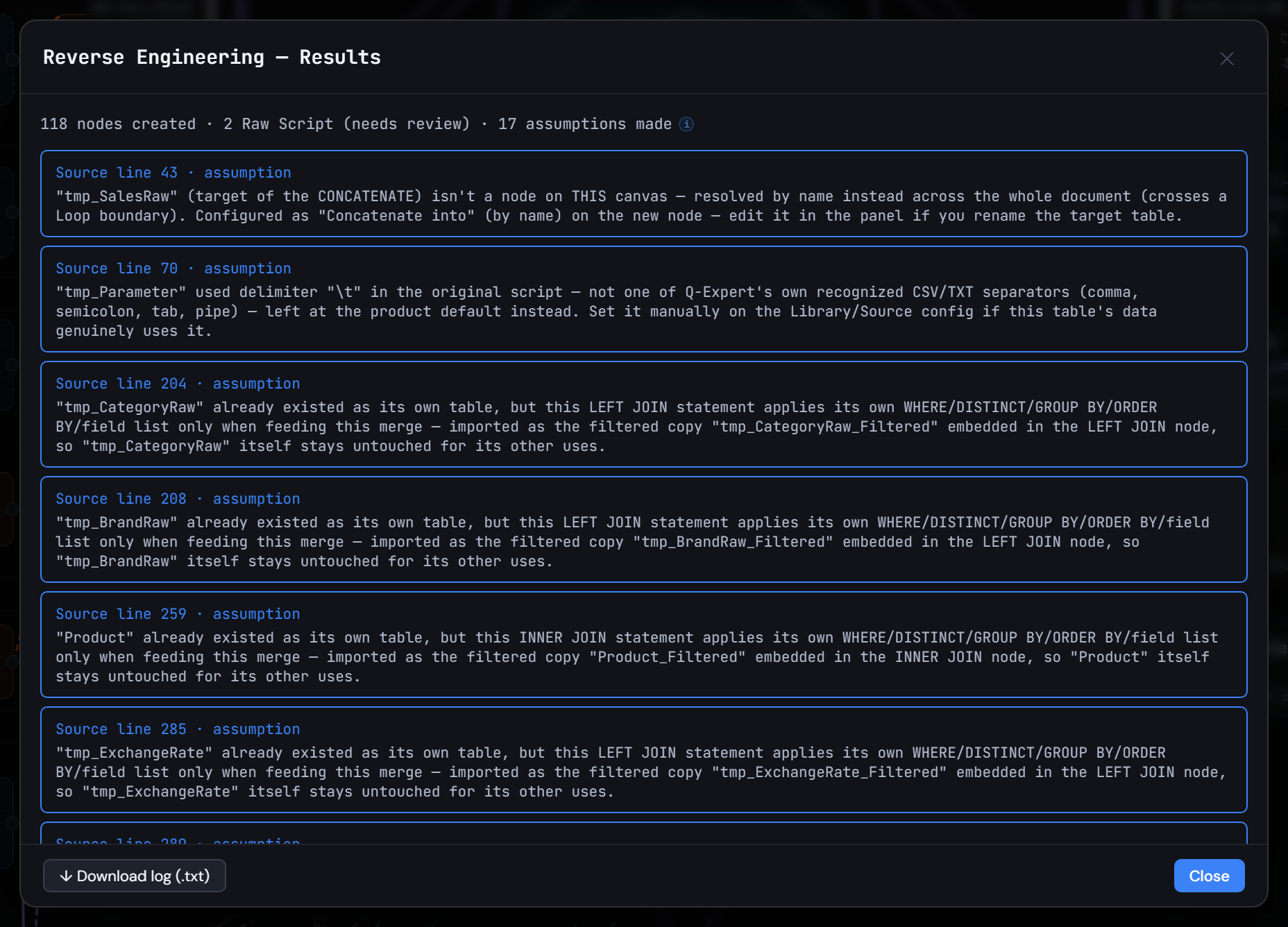
Figura 7.2 — Lee el log -
3
Recorre el canvas
Aleja el zoom: maestros, ventas, tasas, devoluciones, presupuesto y el modelo, la misma historia construida a mano en los episodios 1 a 6. Auto Layout la ordena por capas si la quieres más limpia.
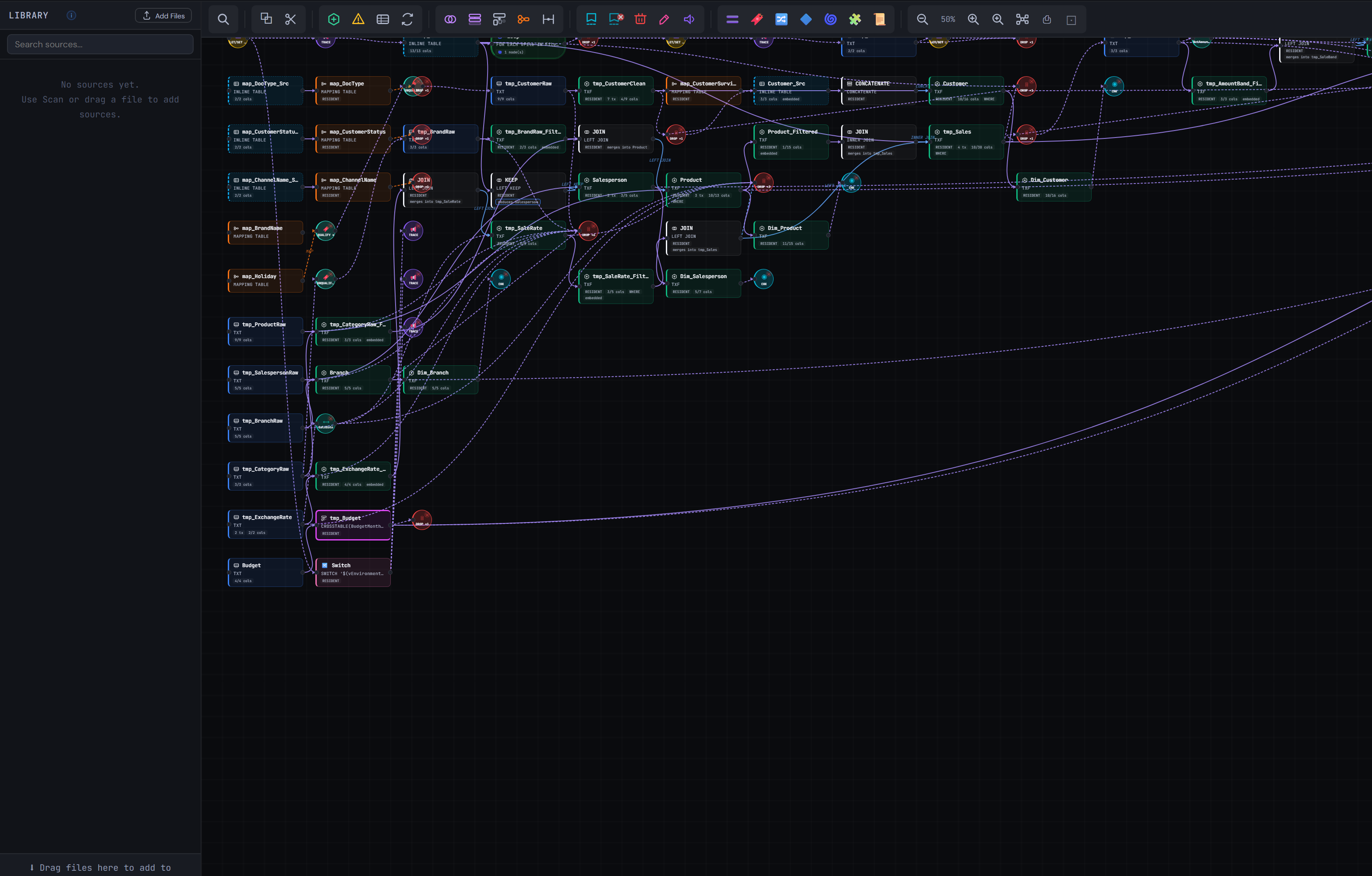
Figura 7.3 — Recorre el canvas -
4
Cada nodo se puede editar
Selecciona
Fact_Sales: en Columns tiene las mismas llaves%y los mismos campos que el modelo del episodio 6. Cualquier nodo se puede cambiar como uno que dibujaste tú.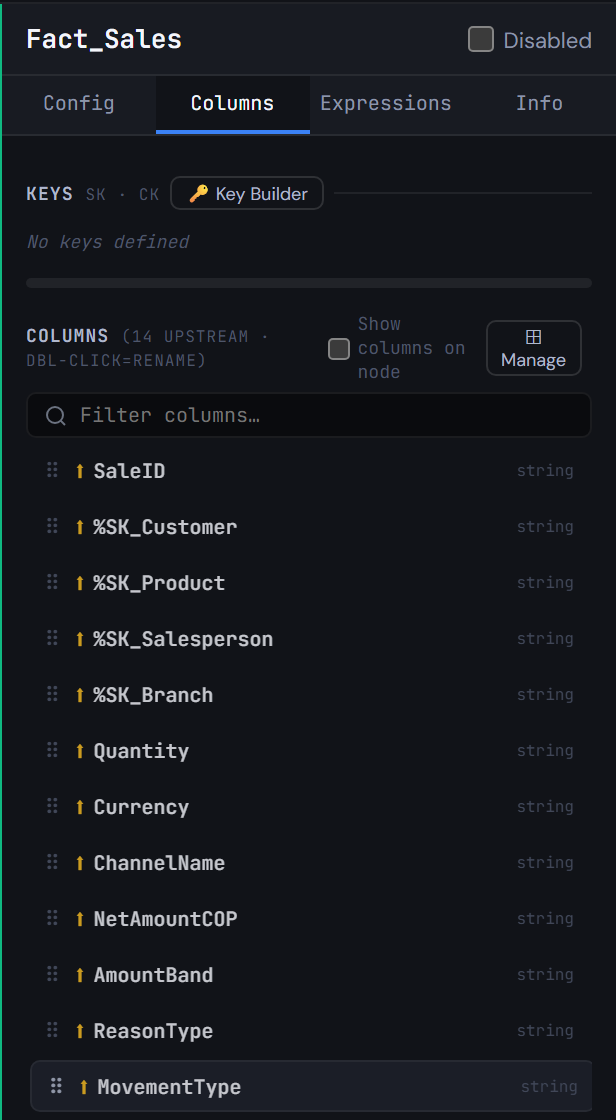
Figura 7.4 — Cada nodo se puede editar -
5
Genera, vuelve a importar, documenta
Generate Syntax y luego importa otra vez el script generado: vuelve el mismo canvas. Export escribe el script, su Documentation (una página HTML en inglés o español, paso a paso) o una descripción JSON, así la siguiente persona recibe un documento, no solo un script.
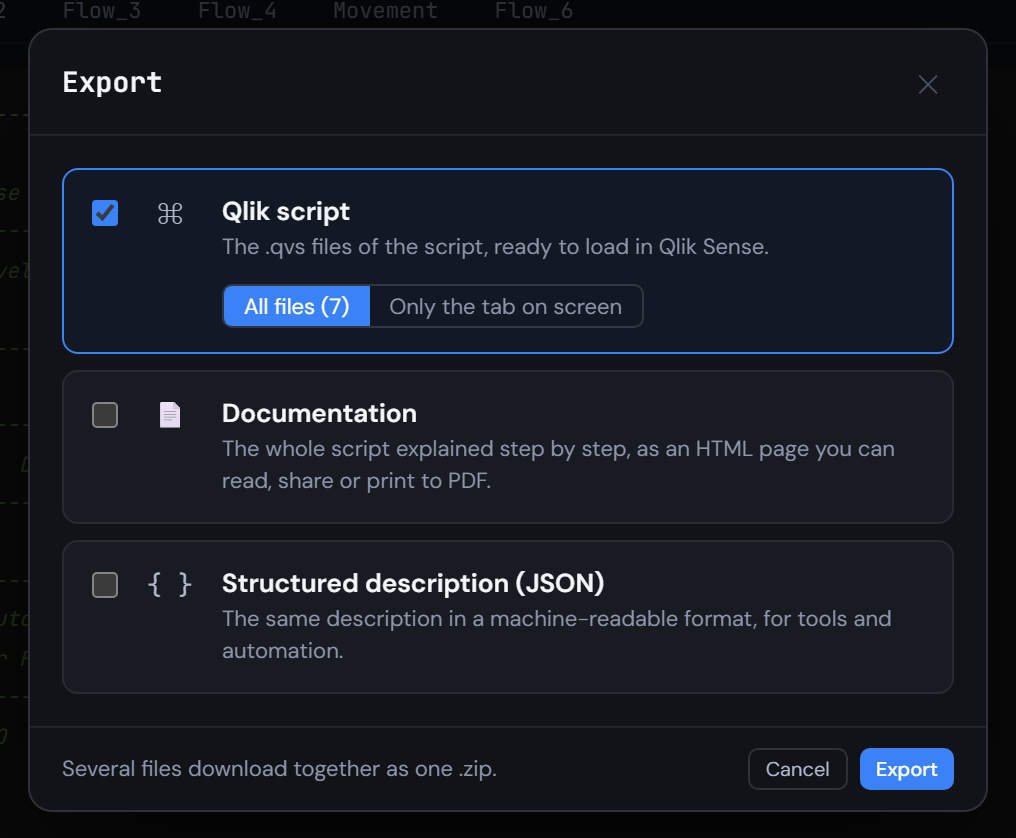
Figura 7.5 — Genera, vuelve a importar, documenta
04Revisa tu resultado
- El modelo importado tiene las mismas siete tablas del episodio 6, con los mismos campos:
Fact_Sales,Fact_BudgetVsActual,Dim_Customer,Dim_Product,Dim_Branch,Dim_SalespersonyDim_Calendar. - Ejecuta el script generado en Qlik: los mismos siete QVD en
Model/, con los mismos conteos de filas del episodio 6. - Q-Expert reescribe el script importado como
_Main, la única parte que pegas en Qlik, y un archivo.qvspor pestaña que_Mainlee conMUST_INCLUDE. Todos deben coincidir con los de abajo, salvo la fecha del encabezado y una línea// Q-Expert · Ref …con tu propia referencia.
_Main
Se pega en QlikEste es el único script que pegas en Qlik Sense: abre el Editor de carga de datos de la app, reemplaza su contenido por este y recarga. Cada línea $(MUST_INCLUDE=…) lee en su lugar uno de los archivos de abajo, así el resto del modelo nunca entra al editor.
Ver script · 61 líneas
/*----------------------------------------------------------------------------------------
	Description [MAIN]:
		Imported via Reverse Engineering
	-------------------------------------------------------------------------------------
	Author:	Unknown -
	Date:	[2026-11-02]
	-------------------------------------------------------------------------------------
	Changes
	-------------------------------------------------------------------------------------
	Author		Date		Detail
	-------------------------------------------------------------------------------------

	-------------------------------------------------------------------------------------
	Copyright © Q-Expert Distributors.
	Q-Expert Qlik Developer Framework. www.qfabrica.com
----------------------------------------------------------------------------------------*/

SET ThousandSep=',';
SET DecimalSep='.';
SET MoneyThousandSep=',';
SET MoneyDecimalSep='.';
SET MoneyFormat='$ #,##0.00;-$ #,##0.00';
SET TimeFormat='hh:mm:ss';
SET DateFormat='YYYY-MM-DD';
SET TimestampFormat='YYYY-MM-DD hh:mm:ss';
SET MonthNames='Jan;Feb;Mar;Apr;May;Jun;Jul;Aug;Sep;Oct;Nov;Dec';
SET LongMonthNames='January;February;March;April;May;June;July;August;September;October;November;December';
SET DayNames='Mon;Tue;Wed;Thu;Fri;Sat;Sun';
SET LongDayNames='Monday;Tuesday;Wednesday;Thursday;Friday;Saturday;Sunday';
SET FirstWeekDay=0;
SET BrokenWeeks=1;
SET ReferenceDay=4;
SET FirstMonthOfYear=1;

LET vExecutionDate = Timestamp(Now(), 'YYYY-MM-DD hh:mm:ss');

SET vTxfPath  = 'lib://Transformed/';

SET ThousandSep = ',';
SET DecimalSep = '.';
SET MoneyThousandSep = ',';
SET MoneyDecimalSep = '.';
SET MoneyFormat = '$#,##0.00;-$#,##0.00';
SET DateFormat = 'YYYY-MM-DD';
SET TimestampFormat = 'YYYY-MM-DD hh:mm:ss';
SET MonthNames = 'Jan;Feb;Mar;Apr;May;Jun;Jul;Aug;Sep;Oct;Nov;Dec';
SET HidePrefix = '%';
SET vEnvironment = 'PROD';
SET vBaseCurrency = 'COP';
SET vPathRaw = 'lib://QXDistributors/';
SET vPathTransform = 'lib://QXDistributors/Transform/';
SET vPathModel = 'lib://QXDistributors/Model/';

TRACE Q-Expert Distributors reload started ($(vEnvironment));

$(MUST_INCLUDE=$(vTxfPath)_QVS/Flow_1.qvs);
$(MUST_INCLUDE=$(vTxfPath)_QVS/Flow_2.qvs);
$(MUST_INCLUDE=$(vTxfPath)_QVS/Flow_3.qvs);
$(MUST_INCLUDE=$(vTxfPath)_QVS/Flow_4.qvs);
$(MUST_INCLUDE=$(vTxfPath)_QVS/Movement.qvs);
$(MUST_INCLUDE=$(vTxfPath)_QVS/Flow_6.qvs);
Flow_1.qvs
Archivo · lo lee MUST_INCLUDENo se pega: se guarda como archivo. En la pestaña Flow_1 de Generate Syntax, Export descarga Flow_1.qvs (Deploy escribe todas las pestañas en una carpeta de una vez). Ponlo en lib://Transformed/_QVS/Flow_1.qvs, la carpeta Transform/_QVS dentro de tu carpeta QXDistributors. Si el archivo no está, la recarga se detiene con un error: para eso existe MUST_INCLUDE.
Ver script · 35 líneas
/*----------------------------------------------------------------------------------------
	Description [Flow_1]:
		Imported via Reverse Engineering
	-------------------------------------------------------------------------------------
	Author:	Unknown -
	Date:	[2026-11-02]
	-------------------------------------------------------------------------------------
	Changes
	-------------------------------------------------------------------------------------
	Author		Date		Detail
	-------------------------------------------------------------------------------------

	-------------------------------------------------------------------------------------
	Copyright © Q-Expert Distributors.
	Q-Expert Qlik Developer Framework. www.qfabrica.com
----------------------------------------------------------------------------------------*/

// -------------------------------------------------------------------------------------------------
// Table defined directly in the script (2 columns).
[map_DocType_Src]:
    LOAD * INLINE [
    "DocType", "DocTypeName"
    "NIT", "Company"
    "CC", "Person"
    ];

// -------------------------------------------------------------------------------------------------
// Mapping table (DocType → DocTypeName) from map_DocType_Src, for ApplyMap.
[map_DocType]:
    MAPPING LOAD
        DocType,
        DocTypeName
    RESIDENT [map_DocType_Src];

DROP TABLE [map_DocType_Src];
Flow_2.qvs
Archivo · lo lee MUST_INCLUDENo se pega: se guarda como archivo. En la pestaña Flow_2 de Generate Syntax, Export descarga Flow_2.qvs (Deploy escribe todas las pestañas en una carpeta de una vez). Ponlo en lib://Transformed/_QVS/Flow_2.qvs, la carpeta Transform/_QVS dentro de tu carpeta QXDistributors. Si el archivo no está, la recarga se detiene con un error: para eso existe MUST_INCLUDE.
Ver script · 36 líneas
/*----------------------------------------------------------------------------------------
	Description [Flow_2]:
		Imported via Reverse Engineering
	-------------------------------------------------------------------------------------
	Author:	Unknown -
	Date:	[2026-11-02]
	-------------------------------------------------------------------------------------
	Changes
	-------------------------------------------------------------------------------------
	Author		Date		Detail
	-------------------------------------------------------------------------------------

	-------------------------------------------------------------------------------------
	Copyright © Q-Expert Distributors.
	Q-Expert Qlik Developer Framework. www.qfabrica.com
----------------------------------------------------------------------------------------*/

// -------------------------------------------------------------------------------------------------
// Table defined directly in the script (2 columns).
[map_CustomerStatus_Src]:
    LOAD * INLINE [
    "Status", "CustomerStatus"
    "A", "Active"
    "I", "Inactive"
    "B", "Blocked"
    ];

// -------------------------------------------------------------------------------------------------
// Mapping table (Status → CustomerStatus) from map_CustomerStatus_Src, for ApplyMap.
[map_CustomerStatus]:
    MAPPING LOAD
        Status,
        CustomerStatus
    RESIDENT [map_CustomerStatus_Src];

DROP TABLE [map_CustomerStatus_Src];
Flow_3.qvs
Archivo · lo lee MUST_INCLUDENo se pega: se guarda como archivo. En la pestaña Flow_3 de Generate Syntax, Export descarga Flow_3.qvs (Deploy escribe todas las pestañas en una carpeta de una vez). Ponlo en lib://Transformed/_QVS/Flow_3.qvs, la carpeta Transform/_QVS dentro de tu carpeta QXDistributors. Si el archivo no está, la recarga se detiene con un error: para eso existe MUST_INCLUDE.
Ver script · 36 líneas
/*----------------------------------------------------------------------------------------
	Description [Flow_3]:
		Imported via Reverse Engineering
	-------------------------------------------------------------------------------------
	Author:	Unknown -
	Date:	[2026-11-02]
	-------------------------------------------------------------------------------------
	Changes
	-------------------------------------------------------------------------------------
	Author		Date		Detail
	-------------------------------------------------------------------------------------

	-------------------------------------------------------------------------------------
	Copyright © Q-Expert Distributors.
	Q-Expert Qlik Developer Framework. www.qfabrica.com
----------------------------------------------------------------------------------------*/

// -------------------------------------------------------------------------------------------------
// Table defined directly in the script (2 columns).
[map_ChannelName_Src]:
    LOAD * INLINE [
    "Channel", "ChannelName"
    "P", "Phone"
    "T", "In store"
    "W", "Web"
    ];

// -------------------------------------------------------------------------------------------------
// Mapping table (Channel → ChannelName) from map_ChannelName_Src, for ApplyMap.
[map_ChannelName]:
    MAPPING LOAD
        Channel,
        ChannelName
    RESIDENT [map_ChannelName_Src];

DROP TABLE [map_ChannelName_Src];
Flow_4.qvs
Archivo · lo lee MUST_INCLUDENo se pega: se guarda como archivo. En la pestaña Flow_4 de Generate Syntax, Export descarga Flow_4.qvs (Deploy escribe todas las pestañas en una carpeta de una vez). Ponlo en lib://Transformed/_QVS/Flow_4.qvs, la carpeta Transform/_QVS dentro de tu carpeta QXDistributors. Si el archivo no está, la recarga se detiene con un error: para eso existe MUST_INCLUDE.
Ver script · 24 líneas
/*----------------------------------------------------------------------------------------
	Description [Flow_4]:
		Imported via Reverse Engineering
	-------------------------------------------------------------------------------------
	Author:	Unknown -
	Date:	[2026-11-02]
	-------------------------------------------------------------------------------------
	Changes
	-------------------------------------------------------------------------------------
	Author		Date		Detail
	-------------------------------------------------------------------------------------

	-------------------------------------------------------------------------------------
	Copyright © Q-Expert Distributors.
	Q-Expert Qlik Developer Framework. www.qfabrica.com
----------------------------------------------------------------------------------------*/

// -------------------------------------------------------------------------------------------------
// Mapping table (BrandID → BrandName) from $(vPathRaw)Brands.txt, for ApplyMap.
[map_BrandName]:
    MAPPING LOAD
        BrandID,
        BrandName
    FROM [$(vPathRaw)Brands.txt] (txt, utf8, delimiter is '|', embedded labels, msq);
Movement.qvs
Archivo · lo lee MUST_INCLUDENo se pega: se guarda como archivo. En la pestaña Movement de Generate Syntax, Export descarga Movement.qvs (Deploy escribe todas las pestañas en una carpeta de una vez). Ponlo en lib://Transformed/_QVS/Movement.qvs, la carpeta Transform/_QVS dentro de tu carpeta QXDistributors. Si el archivo no está, la recarga se detiene con un error: para eso existe MUST_INCLUDE.
Ver script · 731 líneas
/*---------------------------------------------------------------------------------------- Description [Movement]: Imported via Reverse Engineering ------------------------------------------------------------------------------------- Author: Unknown - Date: [2026-11-02] ------------------------------------------------------------------------------------- Changes ------------------------------------------------------------------------------------- Author Date Detail ------------------------------------------------------------------------------------- ------------------------------------------------------------------------------------- Copyright © Q-Expert Distributors. Q-Expert Qlik Developer Framework. www.qfabrica.com ----------------------------------------------------------------------------------------*/ // ------------------------------------------------------------------------------------------------- // Empty table with 1 column (WHERE 1=0), schema only. [tmp_SalesRaw]: LOAD * INLINE [ "Dummy" ] WHERE 1=0; // ------------------------------------------------------------------------------------------------- // Loop FOR EACH … IN FileList() over $(vFile). FOR EACH vFile IN FileList('$(vPathRaw)Sales_*.csv') // ------------------------------------------------------------------------------------------------- // Raw load from $(vFile), concatenated into [tmp_SalesRaw]. CONCATENATE ([tmp_SalesRaw]) LOAD SaleID, SaleDate, CustomerID, ProductID, SalespersonID, BranchID, Quantity, UnitPrice, DiscountPct, Currency, Channel, FileName() AS SourceFile FROM [$(vFile)] (txt, utf8, delimiter is ',', embedded labels, msq); NEXT vFile; DROP FIELD Dummy FROM [tmp_SalesRaw]; LET vSalesRawRows = NoOfRows('tmp_SalesRaw'); TRACE Sales rows read from the monthly files: $(vSalesRawRows); // ------------------------------------------------------------------------------------------------- // Raw load of tmp_Parameter (no source set yet). [tmp_Parameter]: LOAD Parameter, Value FROM [$(vPathRaw)Parameters.txt] (txt, utf8, delimiter is ' ', embedded labels, msq); LET vCreditThreshold = Lookup('Value', 'Parameter', 'CreditThreshold', 'tmp_Parameter'); DROP TABLE [tmp_Parameter]; // ------------------------------------------------------------------------------------------------- // Mapping table (Num(Date#(HolidayDate, 'YYYY-MM-DD')) AS HolidayDate → HolidayName) from $(vPathRaw)Holidays.csv, for ApplyMap. [map_Holiday]: MAPPING LOAD DISTINCT Num(Date#(HolidayDate, 'YYYY-MM-DD')) AS HolidayDate, HolidayName FROM [$(vPathRaw)Holidays.csv] (txt, utf8, delimiter is ',', embedded labels, msq); QUALIFY *; UNQUALIFY CustomerID, ProductID, SalespersonID, BranchID, CategoryID, BrandID, DocNumber; // ------------------------------------------------------------------------------------------------- // Raw load of tmp_CustomerRaw (no source set yet). [tmp_CustomerRaw]: LOAD CustomerID, CustomerName, DocType, DocNumber, City, Segment, SignupDate, Status, CreditLimit FROM [$(vPathRaw)Customers.csv] (txt, utf8, delimiter is ',', embedded labels, msq); // ------------------------------------------------------------------------------------------------- // Raw load of tmp_ProductRaw (no source set yet). [tmp_ProductRaw]: LOAD ProductID, SKU, ProductName, CategoryID, BrandID, ListPrice, UnitCost, UnitOfMeasure, Status FROM [$(vPathRaw)Products.csv] (txt, utf8, delimiter is ',', embedded labels, msq); // ------------------------------------------------------------------------------------------------- // Raw load of tmp_SalespersonRaw (no source set yet). [tmp_SalespersonRaw]: LOAD SalespersonID, SalespersonName, BranchID, HireDate, MonthlyTarget FROM [$(vPathRaw)Salespeople.csv] (txt, utf8, delimiter is ',', embedded labels, msq); // ------------------------------------------------------------------------------------------------- // Raw load of tmp_BranchRaw (no source set yet). [tmp_BranchRaw]: LOAD BranchID, BranchName, Region, City, Format FROM [$(vPathRaw)Branches.csv] (txt, utf8, delimiter is ',', embedded labels, msq); // ------------------------------------------------------------------------------------------------- // Raw load of tmp_CategoryRaw (no source set yet). [tmp_CategoryRaw]: LOAD CategoryID, CategoryName, Family FROM [$(vPathRaw)Categories.csv] (txt, utf8, delimiter is ',', embedded labels, msq); UNQUALIFY *; // ------------------------------------------------------------------------------------------------- // Raw load of tmp_BrandRaw (no source set yet). [tmp_BrandRaw]: LOAD BrandID, BrandName, CountryOfOrigin FROM [$(vPathRaw)Brands.txt] (txt, utf8, delimiter is '|', embedded labels, msq); // ------------------------------------------------------------------------------------------------- // Transforms tmp_CustomerRaw. [tmp_CustomerClean]: LOAD CustomerID, DocNumber, [tmp_CustomerRaw.Segment] AS Segment, [tmp_CustomerRaw.CreditLimit] AS CreditLimit, Capitalize(Trim(tmp_CustomerRaw.CustomerName)) AS CustomerName, ApplyMap('map_DocType', tmp_CustomerRaw.DocType, 'Other') AS DocTypeName, If(Len(Trim(tmp_CustomerRaw.City)) = 0, 'No city', Trim(tmp_CustomerRaw.City)) AS CustomerCity, Date(Date#(tmp_CustomerRaw.SignupDate, 'DD/MM/YYYY')) AS SignupDate, ApplyMap('map_CustomerStatus', tmp_CustomerRaw.Status, 'Unknown') AS CustomerStatus, If(tmp_CustomerRaw.CreditLimit >= $(vCreditThreshold), 'High', 'Standard') AS CreditProfile, If(DocNumber = Previous(DocNumber), Peek('SurvivorID'), CustomerID) AS SurvivorID RESIDENT [tmp_CustomerRaw] ORDER BY DocNumber, CustomerID; // ------------------------------------------------------------------------------------------------- // Mapping table (CustomerID → SurvivorID) from tmp_CustomerClean, for ApplyMap. [map_CustomerSurvivor]: MAPPING LOAD CustomerID, SurvivorID RESIDENT [tmp_CustomerClean]; // ------------------------------------------------------------------------------------------------- // Transforms tmp_CustomerClean, combined via CONCATENATE. [Customer]: NOCONCATENATE LOAD CustomerID, DocNumber, Segment, CreditLimit, CustomerName, DocTypeName, CustomerCity, SignupDate, CustomerStatus, CreditProfile RESIDENT [tmp_CustomerClean] WHERE CustomerID = SurvivorID; CONCATENATE ([Customer]) // ------------------------------------------------------------------------------------------------- // Table defined directly in the script (3 columns). LOAD * INLINE [ "CustomerID", "CustomerName", "CustomerStatus" "-1", "Unknown customer", "Unknown" ]; DROP TABLE [tmp_CustomerClean]; // ------------------------------------------------------------------------------------------------- // Transforms tmp_ProductRaw, combined via LEFT JOIN. [Product]: LOAD ProductID, [tmp_ProductRaw.SKU] AS SKU, CategoryID, BrandID, [tmp_ProductRaw.ListPrice] AS ListPrice, [tmp_ProductRaw.UnitCost] AS UnitCost, [tmp_ProductRaw.UnitOfMeasure] AS UnitOfMeasure, Capitalize(Trim(tmp_ProductRaw.ProductName)) AS ProductName, ApplyMap('map_BrandName', BrandID, 'No brand') AS BrandName, Round( (tmp_ProductRaw.ListPrice - tmp_ProductRaw.UnitCost) / tmp_ProductRaw.ListPrice, 0.0001 ) AS MarginPct RESIDENT [tmp_ProductRaw] WHERE tmp_ProductRaw.Status = 'ACTIVE'; LEFT JOIN ([Product]) // ------------------------------------------------------------------------------------------------- // Transforms tmp_CategoryRaw. LOAD DISTINCT CategoryID, [tmp_CategoryRaw.CategoryName] AS CategoryName, [tmp_CategoryRaw.Family] AS Family RESIDENT [tmp_CategoryRaw]; LEFT JOIN ([Product]) // ------------------------------------------------------------------------------------------------- // Transforms tmp_BrandRaw. LOAD BrandID, CountryOfOrigin RESIDENT [tmp_BrandRaw]; // ------------------------------------------------------------------------------------------------- // Transforms tmp_SalespersonRaw, combined via LEFT JOIN. [Salesperson]: LEFT KEEP ([tmp_SalesRaw]) LOAD SalespersonID, BranchID AS HomeBranchID, [tmp_SalespersonRaw.MonthlyTarget] AS MonthlyTarget, Capitalize(Trim(tmp_SalespersonRaw.SalespersonName)) AS SalespersonName, Date(Date#(tmp_SalespersonRaw.HireDate, 'YYYY-MM-DD')) AS HireDate RESIDENT [tmp_SalespersonRaw]; // ------------------------------------------------------------------------------------------------- // Transforms tmp_BranchRaw. [Branch]: LOAD BranchID, [tmp_BranchRaw.BranchName] AS BranchName, [tmp_BranchRaw.Region] AS Region, [tmp_BranchRaw.City] AS BranchCity, [tmp_BranchRaw.Format] AS BranchFormat RESIDENT [tmp_BranchRaw]; DROP TABLE [tmp_BranchRaw]; DROP TABLE [tmp_BrandRaw]; DROP TABLE [tmp_CategoryRaw]; DROP TABLE [tmp_CustomerRaw]; DROP TABLE [tmp_ProductRaw]; DROP TABLE [tmp_SalespersonRaw]; // ------------------------------------------------------------------------------------------------- // Raw load of tmp_ExchangeRate (no source set yet). [tmp_ExchangeRate]: LOAD Currency, Rate, Date#(ValidFromDate, 'YYYY-MM-DD') AS ValidFromDate, Date#(ValidToDate, 'YYYY-MM-DD') AS ValidToDate FROM [$(vPathRaw)ExchangeRates.csv] (txt, utf8, delimiter is ',', embedded labels, msq); // ------------------------------------------------------------------------------------------------- // Associates SaleDate with the range [ValidFromDate, ValidToDate] from tmp_ExchangeRate. [tmp_RateBridge]: INTERVALMATCH (SaleDate, Currency) LOAD ValidFromDate, ValidToDate, Currency RESIDENT [tmp_ExchangeRate]; // ------------------------------------------------------------------------------------------------- // Transforms tmp_RateBridge, combined via LEFT JOIN. [tmp_SaleRate]: NOCONCATENATE LOAD SaleDate, ValidFromDate, ValidToDate, Currency RESIDENT [tmp_RateBridge]; LEFT JOIN ([tmp_SaleRate]) // ------------------------------------------------------------------------------------------------- // Transforms tmp_ExchangeRate. LOAD Currency, Rate, ValidFromDate, ValidToDate RESIDENT [tmp_ExchangeRate]; // ------------------------------------------------------------------------------------------------- // Transforms tmp_SalesRaw, combined via INNER JOIN. [tmp_Sales]: LOAD SaleID, ProductID, SalespersonID, BranchID, Quantity, UnitPrice, DiscountPct, Currency, SourceFile, Date(Date#(SaleDate, 'YYYY-MM-DD')) AS SaleDate, ApplyMap('map_CustomerSurvivor', CustomerID, -1) AS CustomerID, ApplyMap('map_ChannelName', Channel, 'Other') AS ChannelName, Quantity * UnitPrice * (1 - DiscountPct / 100) AS NetAmount RESIDENT [tmp_SalesRaw] WHERE Quantity > 0; INNER JOIN ([tmp_Sales]) // ------------------------------------------------------------------------------------------------- // Transforms Product. LOAD ProductID RESIDENT [Product]; LEFT JOIN ([tmp_Sales]) // ------------------------------------------------------------------------------------------------- // Transforms tmp_SaleRate. LOAD SaleDate, Currency, Rate RESIDENT [tmp_SaleRate] WHERE Currency <> '$(vBaseCurrency)'; DROP TABLE [tmp_SalesRaw]; DROP TABLE [tmp_ExchangeRate]; DROP TABLE [tmp_RateBridge]; DROP TABLE [tmp_SaleRate]; // ------------------------------------------------------------------------------------------------- // Raw load of tmp_AmountBand (no source set yet). [tmp_AmountBand]: LOAD FromAmount, ToAmount, Band AS AmountBand FROM [$(vPathRaw)AmountBands.csv] (txt, utf8, delimiter is ',', embedded labels, msq); // ------------------------------------------------------------------------------------------------- // Associates NetAmountCOP with the range [FromAmount, ToAmount] from tmp_AmountBand. [tmp_BandBridge]: INTERVALMATCH (NetAmountCOP) LOAD FromAmount, ToAmount RESIDENT [tmp_AmountBand]; // ------------------------------------------------------------------------------------------------- // Transforms tmp_BandBridge, combined via LEFT JOIN. [tmp_SaleBand]: NOCONCATENATE LOAD NetAmountCOP, FromAmount, ToAmount RESIDENT [tmp_BandBridge]; LEFT JOIN ([tmp_SaleBand]) // ------------------------------------------------------------------------------------------------- // Transforms tmp_AmountBand. LOAD FromAmount, ToAmount, AmountBand RESIDENT [tmp_AmountBand]; // ------------------------------------------------------------------------------------------------- // Transforms tmp_Sales, combined via LEFT JOIN. [Sales]: NOCONCATENATE LOAD *, Round(NetAmount * Alt(Rate, 1)) AS NetAmountCOP RESIDENT [tmp_Sales]; LEFT JOIN ([Sales]) // ------------------------------------------------------------------------------------------------- // Transforms tmp_SaleBand. LOAD NetAmountCOP, AmountBand RESIDENT [tmp_SaleBand]; DROP TABLE [tmp_Sales]; DROP TABLE [tmp_AmountBand]; DROP TABLE [tmp_BandBridge]; DROP TABLE [tmp_SaleBand]; DROP FIELD SourceFile FROM [Sales]; STORE [Sales] INTO [$(vPathTransform)Sales.qvd] (qvd); // ------------------------------------------------------------------------------------------------- // Transforms SaleReturn_PrecedingLoad, combined via INNER JOIN. [SaleReturn]: LOAD ReturnID, SaleID, Reason, ReturnedQty, ReturnDate, If(Match(Reason, 'DAMAGED', 'EXPIRED'), 'Quality', 'Commercial') AS ReasonType ; // ------------------------------------------------------------------------------------------------- // Raw load of SaleReturn_PrecedingLoad (no source set yet). LOAD ReturnID, SaleID, Reason, Quantity AS ReturnedQty, Date(Date#(ReturnDate, 'YYYY-MM-DD')) AS ReturnDate FROM [$(vPathRaw)Returns.csv] (txt, utf8, delimiter is ',', embedded labels, msq); INNER JOIN ([SaleReturn]) // ------------------------------------------------------------------------------------------------- // Transforms Sales. LOAD SaleID, CustomerID, ProductID, SalespersonID, BranchID, Currency, ChannelName, NetAmountCOP / Quantity AS UnitNetCOP RESIDENT [Sales]; // ------------------------------------------------------------------------------------------------- // Transforms Sales, combined via CONCATENATE. [Movement]: NOCONCATENATE LOAD SaleID, SaleDate AS MovementDate, CustomerID, ProductID, SalespersonID, BranchID, Quantity, Currency, ChannelName, NetAmountCOP, AmountBand, 'Sale' AS MovementType RESIDENT [Sales]; CONCATENATE ([Movement]) // ------------------------------------------------------------------------------------------------- // Transforms SaleReturn. LOAD SaleID, ReturnDate AS MovementDate, CustomerID, ProductID, SalespersonID, BranchID, Currency, ChannelName, ReasonType, 'Return' AS MovementType, -ReturnedQty AS Quantity, Round(-ReturnedQty * UnitNetCOP) AS NetAmountCOP RESIDENT [SaleReturn]; // ------------------------------------------------------------------------------------------------- // Raw load of Budget (no source set yet). [Budget]: LOAD BranchID, Jan, Feb, Mar FROM [$(vPathRaw)Budget.csv] (txt, utf8, delimiter is ',', embedded labels, msq); STORE [Movement] INTO [$(vPathTransform)Movement.qvd] (qvd); // ------------------------------------------------------------------------------------------------- // Unpivots columns into [BudgetMonthName] / [BudgetAmount] (CROSSTABLE). [tmp_Budget]: CROSSTABLE('BudgetMonthName', 'BudgetAmount', 1) LOAD BranchID, Jan, Feb, Mar RESIDENT [Budget]; DROP TABLE [Budget]; // ------------------------------------------------------------------------------------------------- // Transforms tmp_Budget, combined via OUTER JOIN. [BudgetVsActual]: LOAD BranchID, BudgetAmount, Match(BudgetMonthName, 'Jan', 'Feb', 'Mar') AS MonthNum RESIDENT [tmp_Budget]; OUTER JOIN ([BudgetVsActual]) // ------------------------------------------------------------------------------------------------- // Transforms Movement. LOAD BranchID, Num(Month(MovementDate)) AS MonthNum, Sum(NetAmountCOP) AS ActualAmountCOP RESIDENT [Movement] GROUP BY BranchID, Num(Month(MovementDate)); DROP TABLE [tmp_Budget]; LET vMovementRows = NoOfRows('Movement'); // ------------------------------------------------------------------------------------------------- // IF $(vMovementRows) = 0, with ELSE. IF $(vMovementRows) = 0 THEN TRACE ERROR: no sales reached the model, the reload stops here; EXIT SCRIPT; ELSE TRACE Movements ready for the model: $(vMovementRows); ENDIF // ------------------------------------------------------------------------------------------------- // Transforms Movement. [tmp_FactSales]: NOCONCATENATE LOAD SaleID, MovementDate AS [%SK_Date], CustomerID AS [%SK_Customer], ProductID AS [%SK_Product], SalespersonID AS [%SK_Salesperson], BranchID AS [%SK_Branch], Quantity, Currency, ChannelName, NetAmountCOP, AmountBand, ReasonType, MovementType, AutoNumber(BranchID & '|' & Num(Month(MovementDate))) AS [%CK_BranchMonth] RESIDENT [Movement]; // ------------------------------------------------------------------------------------------------- // Transforms Movement. [tmp_DateRange]: LOAD Min(MovementDate) AS MinDate, Max(MovementDate) AS MaxDate RESIDENT [Movement]; LET vMinDate = Num(Peek('MinDate', 0, 'tmp_DateRange')); LET vMaxDate = Num(Peek('MaxDate', 0, 'tmp_DateRange')); DROP TABLE [tmp_DateRange]; // ------------------------------------------------------------------------------------------------- // Builds a range with WHILE (field CalendarDate). [tmp_CalendarBase]: LOAD Date($(vMinDate) + IterNo() - 1) AS [CalendarDate] AUTOGENERATE 1 WHILE $(vMinDate) + IterNo() - 1 <= $(vMaxDate); // ------------------------------------------------------------------------------------------------- // Transforms tmp_FactSales. [Fact_Sales]: LOAD SaleID, [%SK_Customer], [%SK_Product], [%SK_Salesperson], [%SK_Branch], Quantity, Currency, ChannelName, NetAmountCOP, AmountBand, ReasonType, MovementType, [%CK_BranchMonth], [%SK_Date] RESIDENT [tmp_FactSales]; STORE [Fact_Sales] INTO [$(vPathModel)Fact_Sales.qvd] (qvd); // ------------------------------------------------------------------------------------------------- // Transforms BudgetVsActual. [Fact_BudgetVsActual]: LOAD BudgetAmount, ActualAmountCOP, AutoNumber(BranchID & '|' & MonthNum) AS [%CK_BranchMonth] RESIDENT [BudgetVsActual]; RENAME FIELD BudgetAmount TO BudgetAmountCOP; STORE [Fact_BudgetVsActual] INTO [$(vPathModel)Fact_BudgetVsActual.qvd] (qvd); // ------------------------------------------------------------------------------------------------- // Transforms Customer. [Dim_Customer]: LOAD CustomerID AS [%SK_Customer], DocNumber, Segment, CreditLimit, CustomerName, DocTypeName, CustomerCity, SignupDate, CustomerStatus, CreditProfile RESIDENT [Customer]; STORE [Dim_Customer] INTO [$(vPathModel)Dim_Customer.qvd] (qvd); // ------------------------------------------------------------------------------------------------- // Transforms Product. [Dim_Product]: LOAD ProductID AS [%SK_Product], SKU, ListPrice, UnitCost, UnitOfMeasure, CategoryName, Family, BrandName, CountryOfOrigin, ProductName, MarginPct RESIDENT [Product]; STORE [Dim_Product] INTO [$(vPathModel)Dim_Product.qvd] (qvd); // ------------------------------------------------------------------------------------------------- // Transforms Branch. [Dim_Branch]: LOAD BranchID AS [%SK_Branch], BranchName, Region, BranchCity, BranchFormat RESIDENT [Branch]; STORE [Dim_Branch] INTO [$(vPathModel)Dim_Branch.qvd] (qvd); // ------------------------------------------------------------------------------------------------- // Transforms Salesperson. [Dim_Salesperson]: LOAD SalespersonID AS [%SK_Salesperson], HomeBranchID, MonthlyTarget, SalespersonName, HireDate RESIDENT [Salesperson]; STORE [Dim_Salesperson] INTO [$(vPathModel)Dim_Salesperson.qvd] (qvd); // ------------------------------------------------------------------------------------------------- // Transforms tmp_CalendarBase. [Dim_Calendar]: LOAD CalendarDate, CalendarDate AS [%SK_Date], Year(CalendarDate) AS Year, Num(Month(CalendarDate)) AS MonthNum, Month(CalendarDate) AS Month, 'Q' & Ceil(Month(CalendarDate) / 3) AS Quarter, Week(CalendarDate) AS Week, WeekDay(CalendarDate) AS Weekday, If(WeekDay(CalendarDate) >= 5, 1, 0) AS IsWeekend, If(Len(ApplyMap('map_Holiday', Num(CalendarDate), '')) > 0, 1, 0) AS IsHoliday, ApplyMap('map_Holiday', Num(CalendarDate), Null()) AS HolidayName RESIDENT [tmp_CalendarBase]; STORE [Dim_Calendar] INTO [$(vPathModel)Dim_Calendar.qvd] (qvd); // ------------------------------------------------------------------------------------------------- // Kept as written in the imported script (no matching node type). SignupCalendar: DECLARE FIELD DEFINITION Tagged ('$date') FIELDS Dual(Year($1), YearStart($1)) AS [Year] Tagged ('$axis', '$year'), Month($1) AS [Month] Tagged ('$month', '$cyclic'), Dual(Year($1) & '-Q' & Num(Ceil(Month($1)/3)), QuarterStart($1)) AS [YearQuarter] Tagged ('$yearquarter', '$qualified'); // ------------------------------------------------------------------------------------------------- // Kept as written in the imported script (no matching node type). DERIVE FIELDS FROM FIELDS [SignupDate] USING [SignupCalendar]; DROP TABLE [Branch]; DROP TABLE [BudgetVsActual]; DROP TABLE [Customer]; DROP TABLE [Movement]; DROP TABLE [Product]; DROP TABLE [SaleReturn]; DROP TABLE [Sales]; DROP TABLE [Salesperson]; DROP TABLE [tmp_CalendarBase]; DROP TABLE [tmp_FactSales]; TRACE Q-Expert Distributors reload finished;
Flow_6.qvs
Archivo · lo lee MUST_INCLUDENo se pega: se guarda como archivo. En la pestaña Flow_6 de Generate Syntax, Export descarga Flow_6.qvs (Deploy escribe todas las pestañas en una carpeta de una vez). Ponlo en lib://Transformed/_QVS/Flow_6.qvs, la carpeta Transform/_QVS dentro de tu carpeta QXDistributors. Si el archivo no está, la recarga se detiene con un error: para eso existe MUST_INCLUDE.
Ver script · 30 líneas
/*----------------------------------------------------------------------------------------
	Description [Flow_6]:
		Imported via Reverse Engineering
	-------------------------------------------------------------------------------------
	Author:	Unknown -
	Date:	[2026-11-02]
	-------------------------------------------------------------------------------------
	Changes
	-------------------------------------------------------------------------------------
	Author		Date		Detail
	-------------------------------------------------------------------------------------

	-------------------------------------------------------------------------------------
	Copyright © Q-Expert Distributors.
	Q-Expert Qlik Developer Framework. www.qfabrica.com
----------------------------------------------------------------------------------------*/

// -------------------------------------------------------------------------------------------------
// SWITCH '$(vEnvironment)': 2 branches plus DEFAULT.
SWITCH '$(vEnvironment)'
    CASE 'PROD'

        TRACE Production reload: the model QVDs are the ones the apps read;
    CASE 'QA'

        TRACE QA reload: check the model QVDs before promoting them;
    DEFAULT

        TRACE Development reload;
END SWITCH
05Por qué se hace así
- Un script es un diseño que nadie puede ver. Dibujado como canvas, las capas, los joins y los STORE se ven de una vez, y también cualquier cosa rara.
- Equivalente, no una copia. Q-Expert puede reescribir el script en su propio orden y estilo, pero el modelo que carga es el mismo: mismas tablas, mismos campos, nada sobrante.
- Los supuestos quedan escritos. Cada inferencia que hace la importación está en el log, con su línea, así quien revisa puede comprobarla en vez de confiar.
- La documentación es parte de la entrega. La documentación exportada le cuenta al siguiente desarrollador qué hace cada paso, en lenguaje sencillo.
06Lo que sigue
El mismo modelo, a mano o desde un script. Para explorar los archivos mismos, prueba Q-Explorator.
Antes de modelar
Q-Explorator es la herramienta de escritorio del equipo de Q-Fábrica para explorar archivos QVD, CSV, Excel y Parquet, y para convertir archivos CSV, TXT y Excel en QVD. Abre en ella los archivos de cada episodio para ver primero su contenido y su calidad.
Conoce Q-Explorator