Dirty masters
Step-by-step manual
01The business question
Before a single sale is attached, the master data has to be clean. The customers file has stray spaces, codes instead of names, blank cities and four customers registered twice under a new ID. Products, salespeople and branches arrive the same way.
02Before you start
- Unzip the episode package:
Customers.csv,Products.csv,Salespeople.csv,Branches.csv,Categories.csv,Brands.txt,Holidays.csv,Parameters.txt, the sales files andstart.qep(episode 2's end). Add the master files to the Library. - Import
start.qepwith Import QEP in the top bar. - Open the masters in Q-Explorator first, the Q-Fábrica team's desktop tool for CSV, Excel, Parquet and QVD files: the stray spaces, the codes and the repeated document numbers show up before you write a line.
03Step by step
-
1
Read the credit threshold
Three nodes in a row:
- Drag
Parameters.txt(tab-delimited) onto the canvas and name the RAWtmp_Parameter. - A LET/SET node:
LET vCreditThreshold = Lookup('Value', 'Parameter', 'CreditThreshold', 'tmp_Parameter'). - A DROP of
tmp_Parameter: the value now lives in the variable.
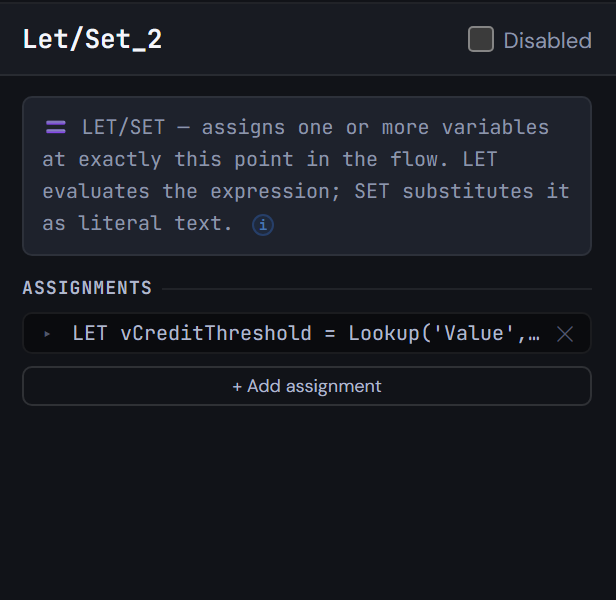
Figure 3.1 — Read the credit threshold - Drag
-
2
Turn codes into names with mapping tables
Add five MAPPING nodes. Three take their rows from an INLINE node:
map_DocType: NIT → Company, CC → Personmap_CustomerStatus: A, I, B → Active, Inactive, Blockedmap_ChannelName: P, T, W → Phone, In store, Web
Two read a file directly:
map_BrandNamefromBrands.txt(pipe-delimited)map_HolidayfromHolidays.csv, withDISTINCTand the date as a number
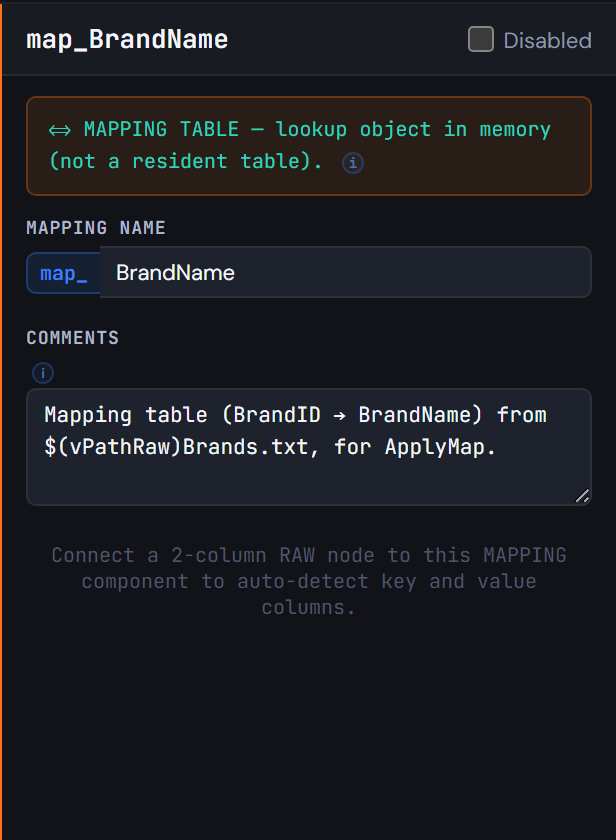
Figure 3.2 — Turn codes into names with mapping tables -
3
Qualify the raw masters
In this order:
- A QUALIFY node with all fields, and
UNQUALIFYfor the keysCustomerID, ProductID, SalespersonID, BranchID, CategoryID, BrandID, DocNumber. - The raw masters from their files:
tmp_CustomerRaw,tmp_ProductRaw,tmp_SalespersonRaw,tmp_BranchRaw,tmp_CategoryRaw. UNQUALIFY *.tmp_BrandRaw.
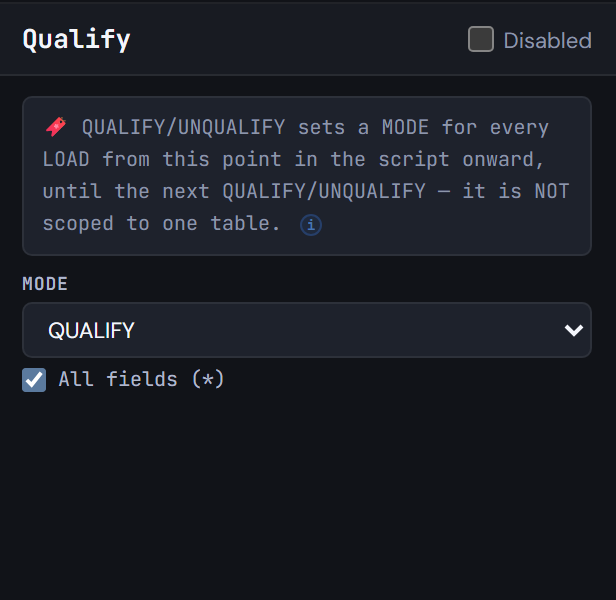
Figure 3.3 — Qualify the raw masters - A QUALIFY node with all fields, and
-
4
Clean the customers
Add a TXF after
tmp_CustomerRaw, namedtmp_CustomerClean. On Columns, switch off what you do not need and rename with an alias (City→CustomerCity). On Expressions, build these columns with the Expression Builder:Capitalize(Trim(CustomerName))asCustomerNameApplyMap('map_DocType', DocType, 'Other')asDocTypeName'No city'for blank cities, asCustomerCityDate(Date#(SignupDate, 'DD/MM/YYYY'))asSignupDateApplyMap('map_CustomerStatus', Status, 'Unknown')asCustomerStatusCreditProfile:'High'or'Standard'against$(vCreditThreshold)
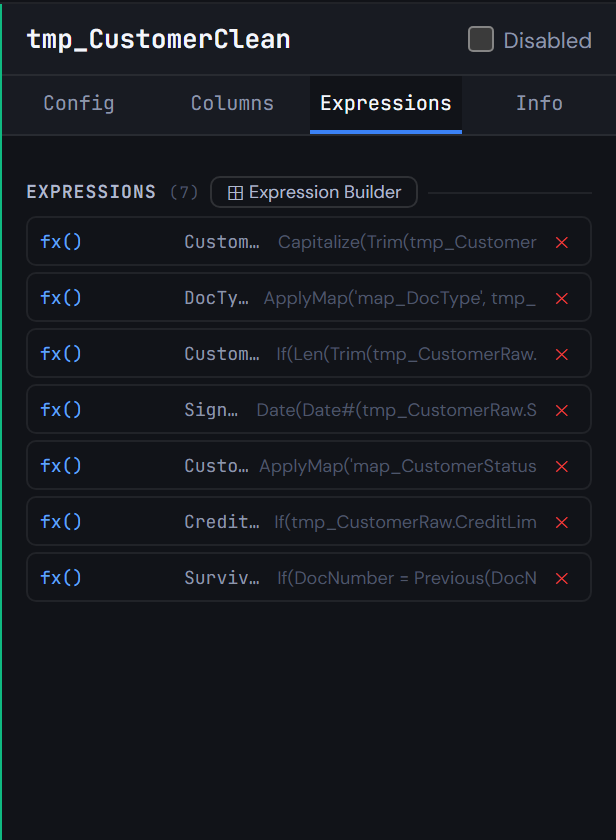
Figure 3.4 — Clean the customers -
5
Keep one ID per customer
Four steps:
- In
tmp_CustomerClean, set ORDER BY toDocNumber, CustomerIDand addIf(DocNumber = Previous(DocNumber), Peek('SurvivorID'), CustomerID) AS SurvivorID. - A MAPPING
map_CustomerSurvivorreads CustomerID → SurvivorID from it. - A TXF
Customer(NoConcatenate) keeps onlyWHERE CustomerID = SurvivorID. - An INLINE row adds the
Unknown customermember (CustomerID = -1) for sales whose customer is missing.
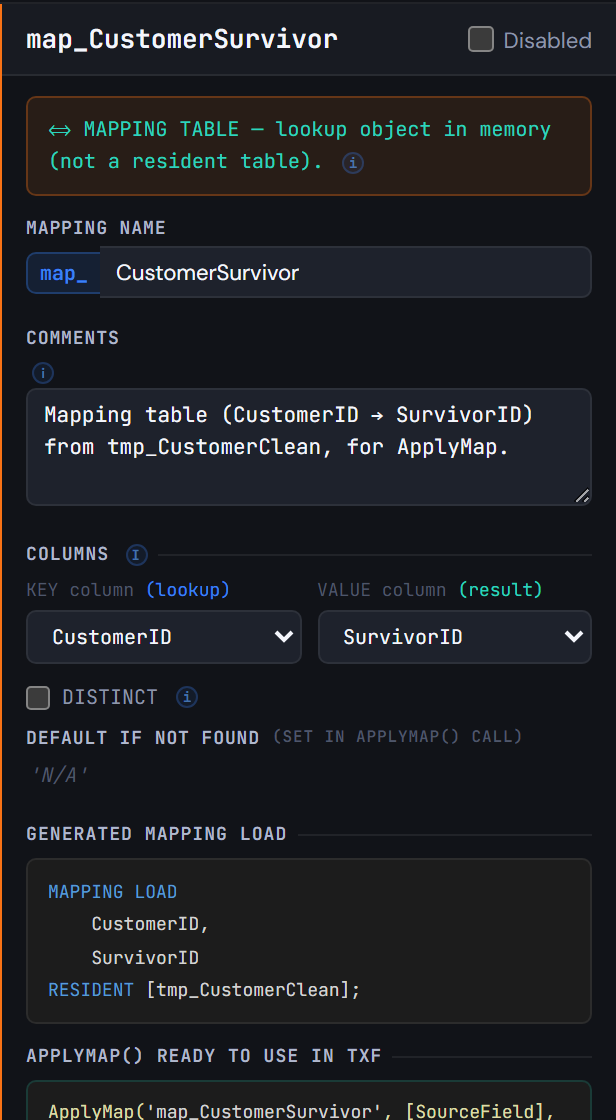
Figure 3.5 — Keep one ID per customer - In
-
6
Stop and look: a checkpoint
Add a CHECKPOINT after
Customerwith STORE to$(vTxfPath)Customer.qvdand Exit Script ticked. The reload stores the clean customers and stops, so you can open the QVD (in Q-Explorator, for instance) before going on.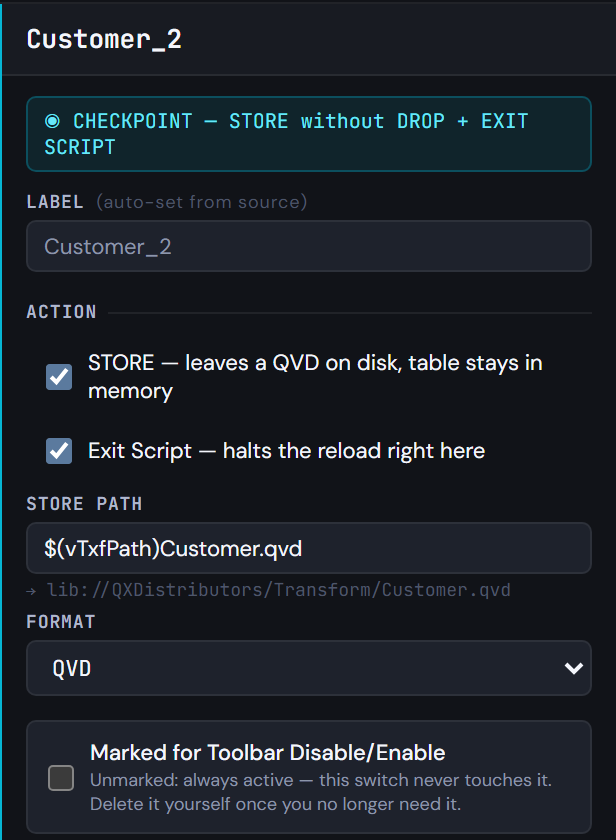
Figure 3.6 — Stop and look: a checkpoint -
7
Products, salespeople and branches
The other three masters:
Productkeeps the active products (WHERE Status = 'ACTIVE'), withApplyMap('map_BrandName', …).- A LEFT JOIN brings
CategoryNameandFamilyfrom the categories (withDISTINCT), and another brings the brand'sCountryOfOrigin. Salespersonuses a LEFT KEEP againsttmp_SalesRaw.Branchrenames its fields.
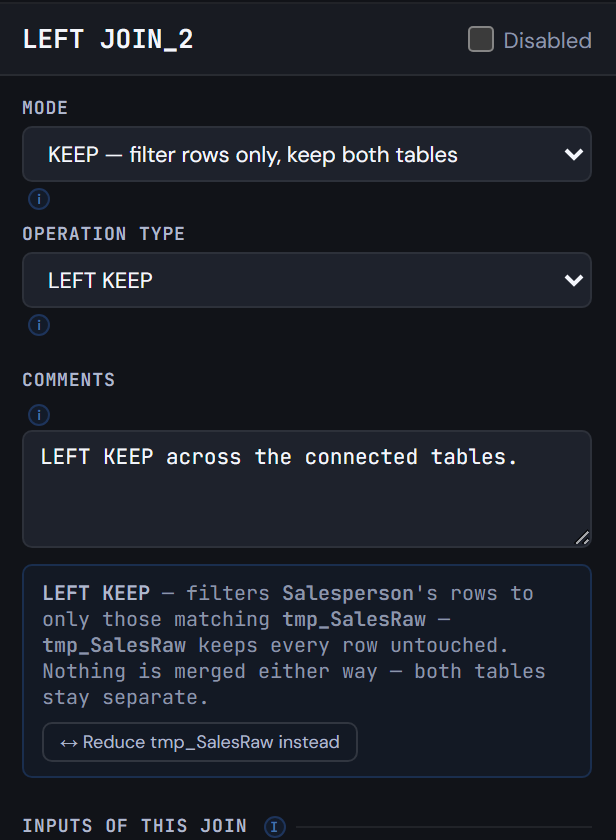
Figure 3.7 — Products, salespeople and branches -
8
Drop the raw masters and generate
Add a DROP for the six raw tables. Generate Syntax: the mapping tables load first, each in its own tab; the main tab ends with the six
DROP TABLElines and the checkpoint'sSTOREandEXIT SCRIPT.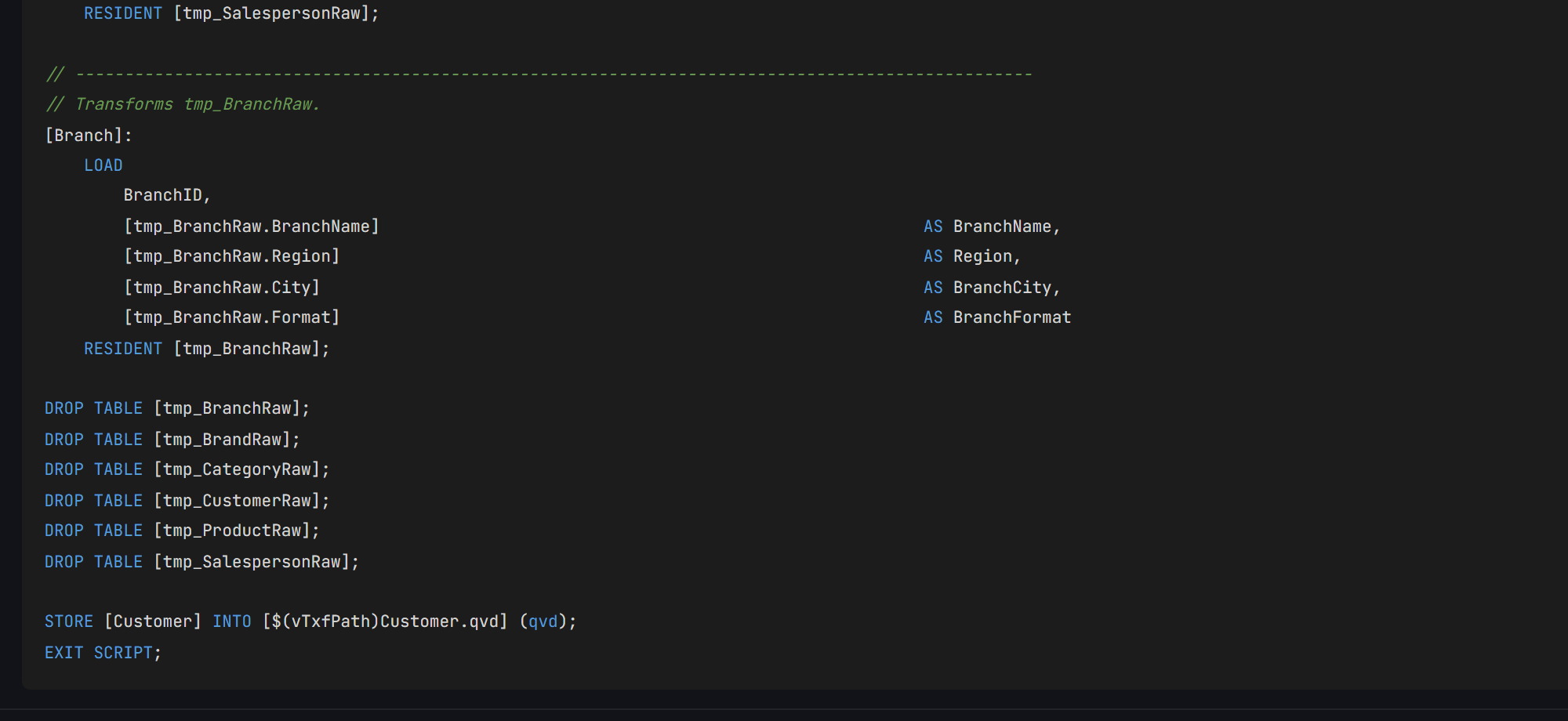
Figure 3.8 — Drop the raw masters and generate
04Check your result
- Run the script in Qlik. It stops at the checkpoint, with
Customerstored inTransform/Customer.qvd. - In memory:
Customer57 rows (60 in the file, 4 repeated, plus the unknown member),Product37 (the active ones),Salesperson12,Branch8, andtmp_SalesRawfrom episode 2. - Q-Expert splits the script into
_Main, the only part you paste into Qlik, and one.qvsfile per tab that_Mainreads withMUST_INCLUDE. All of them should match the ones below, except the date in the header and a// Q-Expert · Ref …line with your own reference.
_Main
Paste into QlikThis is the only script you paste into Qlik Sense: open the app's Data load editor, replace its content with this and reload. Each $(MUST_INCLUDE=…) line reads one of the files below in its place, so the rest of the model never goes into the editor.
Show script · 47 lines
/*----------------------------------------------------------------------------------------
	Description [MAIN]:

	-------------------------------------------------------------------------------------
	Author:	The Q-Fábrica team -
	Date:	[2026-11-02]
	-------------------------------------------------------------------------------------
	Changes
	-------------------------------------------------------------------------------------
	Author		Date		Detail
	-------------------------------------------------------------------------------------

	-------------------------------------------------------------------------------------
	Copyright © Q-Expert Distributors.
	Q-Expert Qlik Developer Framework. www.qfabrica.com
----------------------------------------------------------------------------------------*/

SET ThousandSep=',';
SET DecimalSep='.';
SET MoneyThousandSep=',';
SET MoneyDecimalSep='.';
SET MoneyFormat='$ #,##0.00;-$ #,##0.00';
SET TimeFormat='hh:mm:ss';
SET DateFormat='YYYY-MM-DD';
SET TimestampFormat='YYYY-MM-DD hh:mm:ss';
SET MonthNames='Jan;Feb;Mar;Apr;May;Jun;Jul;Aug;Sep;Oct;Nov;Dec';
SET LongMonthNames='January;February;March;April;May;June;July;August;September;October;November;December';
SET DayNames='Mon;Tue;Wed;Thu;Fri;Sat;Sun';
SET LongDayNames='Monday;Tuesday;Wednesday;Thursday;Friday;Saturday;Sunday';
SET FirstWeekDay=0;
SET BrokenWeeks=1;
SET ReferenceDay=4;
SET FirstMonthOfYear=1;

LET vExecutionDate = Timestamp(Now(), 'YYYY-MM-DD hh:mm:ss');

SET vTxfPath  = 'lib://QXDistributors/Transform/';
SET vPathRaw = 'lib://QXDistributors/';
SET vEnvironment = 'PROD';   // PROD, QA or DEV
SET vBaseCurrency = 'COP';   // Currency every amount is converted to
SET vPathModel = 'lib://QXDistributors/Model/';   // The model QVDs the apps load

$(MUST_INCLUDE=$(vTxfPath)_QVS/Flow_1.qvs);
$(MUST_INCLUDE=$(vTxfPath)_QVS/Flow_2.qvs);
$(MUST_INCLUDE=$(vTxfPath)_QVS/Flow_3.qvs);
$(MUST_INCLUDE=$(vTxfPath)_QVS/Flow_4.qvs);
$(MUST_INCLUDE=$(vTxfPath)_QVS/Customer.qvs);
Flow_1.qvs
File · read by MUST_INCLUDENot pasted: saved as a file. On the Flow_1 tab of Generate Syntax, Export downloads Flow_1.qvs (Deploy writes every tab into a folder at once). Put it in lib://QXDistributors/Transform/_QVS/Flow_1.qvs, the Transform/_QVS folder inside your QXDistributors folder. If the file is not there, the reload stops with an error: that is what MUST_INCLUDE is for.
Show script · 35 lines
/*----------------------------------------------------------------------------------------
	Description [Flow_1]:

	-------------------------------------------------------------------------------------
	Author:	The Q-Fábrica team -
	Date:	[2026-11-02]
	-------------------------------------------------------------------------------------
	Changes
	-------------------------------------------------------------------------------------
	Author		Date		Detail
	-------------------------------------------------------------------------------------

	-------------------------------------------------------------------------------------
	Copyright © Q-Expert Distributors.
	Q-Expert Qlik Developer Framework. www.qfabrica.com
----------------------------------------------------------------------------------------*/

// -------------------------------------------------------------------------------------------------
// Table defined directly in the script (2 columns).
[map_DocType_Src]:
    LOAD * INLINE [
    "DocType", "DocTypeName"
    "NIT", "Company"
    "CC", "Person"
    ];

// -------------------------------------------------------------------------------------------------
// Mapping table (DocType → DocTypeName) from map_DocType_Src, for ApplyMap.
[map_DocType]:
    MAPPING LOAD
        DocType,
        DocTypeName
    RESIDENT [map_DocType_Src];

DROP TABLE [map_DocType_Src];
Flow_2.qvs
File · read by MUST_INCLUDENot pasted: saved as a file. On the Flow_2 tab of Generate Syntax, Export downloads Flow_2.qvs (Deploy writes every tab into a folder at once). Put it in lib://QXDistributors/Transform/_QVS/Flow_2.qvs, the Transform/_QVS folder inside your QXDistributors folder. If the file is not there, the reload stops with an error: that is what MUST_INCLUDE is for.
Show script · 36 lines
/*----------------------------------------------------------------------------------------
	Description [Flow_2]:

	-------------------------------------------------------------------------------------
	Author:	The Q-Fábrica team -
	Date:	[2026-11-02]
	-------------------------------------------------------------------------------------
	Changes
	-------------------------------------------------------------------------------------
	Author		Date		Detail
	-------------------------------------------------------------------------------------

	-------------------------------------------------------------------------------------
	Copyright © Q-Expert Distributors.
	Q-Expert Qlik Developer Framework. www.qfabrica.com
----------------------------------------------------------------------------------------*/

// -------------------------------------------------------------------------------------------------
// Table defined directly in the script (2 columns).
[map_CustomerStatus_Src]:
    LOAD * INLINE [
    "Status", "CustomerStatus"
    "A", "Active"
    "I", "Inactive"
    "B", "Blocked"
    ];

// -------------------------------------------------------------------------------------------------
// Mapping table (Status → CustomerStatus) from map_CustomerStatus_Src, for ApplyMap.
[map_CustomerStatus]:
    MAPPING LOAD
        Status,
        CustomerStatus
    RESIDENT [map_CustomerStatus_Src];

DROP TABLE [map_CustomerStatus_Src];
Flow_3.qvs
File · read by MUST_INCLUDENot pasted: saved as a file. On the Flow_3 tab of Generate Syntax, Export downloads Flow_3.qvs (Deploy writes every tab into a folder at once). Put it in lib://QXDistributors/Transform/_QVS/Flow_3.qvs, the Transform/_QVS folder inside your QXDistributors folder. If the file is not there, the reload stops with an error: that is what MUST_INCLUDE is for.
Show script · 36 lines
/*----------------------------------------------------------------------------------------
	Description [Flow_3]:

	-------------------------------------------------------------------------------------
	Author:	The Q-Fábrica team -
	Date:	[2026-11-02]
	-------------------------------------------------------------------------------------
	Changes
	-------------------------------------------------------------------------------------
	Author		Date		Detail
	-------------------------------------------------------------------------------------

	-------------------------------------------------------------------------------------
	Copyright © Q-Expert Distributors.
	Q-Expert Qlik Developer Framework. www.qfabrica.com
----------------------------------------------------------------------------------------*/

// -------------------------------------------------------------------------------------------------
// Table defined directly in the script (2 columns).
[map_ChannelName_Src]:
    LOAD * INLINE [
    "Channel", "ChannelName"
    "P", "Phone"
    "T", "In store"
    "W", "Web"
    ];

// -------------------------------------------------------------------------------------------------
// Mapping table (Channel → ChannelName) from map_ChannelName_Src, for ApplyMap.
[map_ChannelName]:
    MAPPING LOAD
        Channel,
        ChannelName
    RESIDENT [map_ChannelName_Src];

DROP TABLE [map_ChannelName_Src];
Flow_4.qvs
File · read by MUST_INCLUDENot pasted: saved as a file. On the Flow_4 tab of Generate Syntax, Export downloads Flow_4.qvs (Deploy writes every tab into a folder at once). Put it in lib://QXDistributors/Transform/_QVS/Flow_4.qvs, the Transform/_QVS folder inside your QXDistributors folder. If the file is not there, the reload stops with an error: that is what MUST_INCLUDE is for.
Show script · 24 lines
/*----------------------------------------------------------------------------------------
	Description [Flow_4]:

	-------------------------------------------------------------------------------------
	Author:	The Q-Fábrica team -
	Date:	[2026-11-02]
	-------------------------------------------------------------------------------------
	Changes
	-------------------------------------------------------------------------------------
	Author		Date		Detail
	-------------------------------------------------------------------------------------

	-------------------------------------------------------------------------------------
	Copyright © Q-Expert Distributors.
	Q-Expert Qlik Developer Framework. www.qfabrica.com
----------------------------------------------------------------------------------------*/

// -------------------------------------------------------------------------------------------------
// Mapping table (BrandID → BrandName) from $(vPathRaw)Brands.txt, for ApplyMap.
[map_BrandName]:
    MAPPING LOAD
        BrandID,
        BrandName
    FROM [$(vPathRaw)Brands.txt] (txt, utf8, delimiter is '|', embedded labels, msq);
Customer.qvs
File · read by MUST_INCLUDENot pasted: saved as a file. On the Customer tab of Generate Syntax, Export downloads Customer.qvs (Deploy writes every tab into a folder at once). Put it in lib://QXDistributors/Transform/_QVS/Customer.qvs, the Transform/_QVS folder inside your QXDistributors folder. If the file is not there, the reload stops with an error: that is what MUST_INCLUDE is for.
Show script · 273 lines
/*----------------------------------------------------------------------------------------
	Description [Customer]:

	-------------------------------------------------------------------------------------
	Author:	The Q-Fábrica team -
	Date:	[2026-11-02]
	-------------------------------------------------------------------------------------
	Changes
	-------------------------------------------------------------------------------------
	Author		Date		Detail
	-------------------------------------------------------------------------------------

	-------------------------------------------------------------------------------------
	Copyright © Q-Expert Distributors.
	Q-Expert Qlik Developer Framework. www.qfabrica.com
----------------------------------------------------------------------------------------*/

// -------------------------------------------------------------------------------------------------
// Empty table with 1 column (WHERE 1=0), schema only.
[tmp_SalesRaw]:
    LOAD * INLINE [
    "Dummy"
    ] WHERE 1=0;

// -------------------------------------------------------------------------------------------------
// Loop FOR EACH … IN FileList() over $(vFile).
FOR EACH vFile IN FileList('$(vPathRaw)Sales_*.csv')

    // -------------------------------------------------------------------------------------------------
    // Raw load from $(vFile), concatenated into [tmp_SalesRaw].
    CONCATENATE ([tmp_SalesRaw])
    LOAD
        SaleID,
        SaleDate,
        CustomerID,
        ProductID,
        SalespersonID,
        BranchID,
        Quantity,
        UnitPrice,
        DiscountPct,
        Currency,
        Channel,
        FileName()                                                                       AS SourceFile
    FROM [$(vFile)] (txt, utf8, delimiter is ',', embedded labels, msq);

NEXT vFile;

DROP FIELD Dummy FROM [tmp_SalesRaw];

LET vSalesRawRows = NoOfRows('tmp_SalesRaw');

TRACE Sales rows read from the monthly files: $(vSalesRawRows);

// -------------------------------------------------------------------------------------------------
// Raw load of tmp_Parameter (no source set yet).
[tmp_Parameter]:
    LOAD
        Parameter,
        Value
    FROM [$(vPathRaw)Parameters.txt] (txt, utf8, delimiter is '	', embedded labels, msq);

LET vCreditThreshold = Lookup('Value', 'Parameter', 'CreditThreshold', 'tmp_Parameter');

DROP TABLE [tmp_Parameter];

// -------------------------------------------------------------------------------------------------
// Mapping table (Num(Date#(HolidayDate, 'YYYY-MM-DD')) AS HolidayDate → HolidayName) from $(vPathRaw)Holidays.csv, for ApplyMap.
[map_Holiday]:
    MAPPING LOAD DISTINCT
        Num(Date#(HolidayDate, 'YYYY-MM-DD')) AS HolidayDate,
        HolidayName
    FROM [$(vPathRaw)Holidays.csv] (txt, utf8, delimiter is ',', embedded labels, msq);

QUALIFY *;

UNQUALIFY CustomerID, ProductID, SalespersonID, BranchID, CategoryID, BrandID, DocNumber;

// -------------------------------------------------------------------------------------------------
// Raw load of tmp_CustomerRaw (no source set yet).
[tmp_CustomerRaw]:
    LOAD
        CustomerID,
        CustomerName,
        DocType,
        DocNumber,
        City,
        Segment,
        SignupDate,
        Status,
        CreditLimit
    FROM [$(vPathRaw)Customers.csv] (txt, utf8, delimiter is ',', embedded labels, msq);

// -------------------------------------------------------------------------------------------------
// Raw load of tmp_ProductRaw (no source set yet).
[tmp_ProductRaw]:
    LOAD
        ProductID,
        SKU,
        ProductName,
        CategoryID,
        BrandID,
        ListPrice,
        UnitCost,
        UnitOfMeasure,
        Status
    FROM [$(vPathRaw)Products.csv] (txt, utf8, delimiter is ',', embedded labels, msq);

// -------------------------------------------------------------------------------------------------
// Raw load of tmp_SalespersonRaw (no source set yet).
[tmp_SalespersonRaw]:
    LOAD
        SalespersonID,
        SalespersonName,
        BranchID,
        HireDate,
        MonthlyTarget
    FROM [$(vPathRaw)Salespeople.csv] (txt, utf8, delimiter is ',', embedded labels, msq);

// -------------------------------------------------------------------------------------------------
// Raw load of tmp_BranchRaw (no source set yet).
[tmp_BranchRaw]:
    LOAD
        BranchID,
        BranchName,
        Region,
        City,
        Format
    FROM [$(vPathRaw)Branches.csv] (txt, utf8, delimiter is ',', embedded labels, msq);

// -------------------------------------------------------------------------------------------------
// Raw load of tmp_CategoryRaw (no source set yet).
[tmp_CategoryRaw]:
    LOAD
        CategoryID,
        CategoryName,
        Family
    FROM [$(vPathRaw)Categories.csv] (txt, utf8, delimiter is ',', embedded labels, msq);

UNQUALIFY *;

// -------------------------------------------------------------------------------------------------
// Raw load of tmp_BrandRaw (no source set yet).
[tmp_BrandRaw]:
    LOAD
        BrandID,
        BrandName,
        CountryOfOrigin
    FROM [$(vPathRaw)Brands.txt] (txt, utf8, delimiter is '|', embedded labels, msq);

// -------------------------------------------------------------------------------------------------
// Transforms tmp_CustomerRaw.
[tmp_CustomerClean]:
    LOAD
        CustomerID,
        DocNumber,
        [tmp_CustomerRaw.Segment]                                                        AS Segment,
        [tmp_CustomerRaw.CreditLimit]                                                    AS CreditLimit,
        Capitalize(Trim(tmp_CustomerRaw.CustomerName))                                   AS CustomerName,
        ApplyMap('map_DocType', tmp_CustomerRaw.DocType, 'Other')                        AS DocTypeName,
        If(Len(Trim(tmp_CustomerRaw.City)) = 0, 'No city', Trim(tmp_CustomerRaw.City))   AS CustomerCity,
        Date(Date#(tmp_CustomerRaw.SignupDate, 'DD/MM/YYYY'))                            AS SignupDate,
        ApplyMap('map_CustomerStatus', tmp_CustomerRaw.Status, 'Unknown')                AS CustomerStatus,
        If(tmp_CustomerRaw.CreditLimit >= $(vCreditThreshold), 'High', 'Standard')       AS CreditProfile,
        If(DocNumber = Previous(DocNumber), Peek('SurvivorID'), CustomerID)              AS SurvivorID
    RESIDENT [tmp_CustomerRaw]
    ORDER BY DocNumber, CustomerID;

// -------------------------------------------------------------------------------------------------
// Mapping table (CustomerID → SurvivorID) from tmp_CustomerClean, for ApplyMap.
[map_CustomerSurvivor]:
    MAPPING LOAD
        CustomerID,
        SurvivorID
    RESIDENT [tmp_CustomerClean];

// -------------------------------------------------------------------------------------------------
// Transforms tmp_CustomerClean, combined via CONCATENATE.
[Customer]:
    NOCONCATENATE
    LOAD
        CustomerID,
        DocNumber,
        Segment,
        CreditLimit,
        CustomerName,
        DocTypeName,
        CustomerCity,
        SignupDate,
        CustomerStatus,
        CreditProfile
    RESIDENT [tmp_CustomerClean]
    WHERE CustomerID = SurvivorID;

    CONCATENATE ([Customer])
    // -------------------------------------------------------------------------------------------------
    // Table defined directly in the script (3 columns).
    LOAD * INLINE [
    "CustomerID", "CustomerName", "CustomerStatus"
    "-1", "Unknown customer", "Unknown"
    ];

DROP TABLE [tmp_CustomerClean];

// -------------------------------------------------------------------------------------------------
// Transforms tmp_ProductRaw, combined via LEFT JOIN.
[Product]:
    LOAD
        ProductID,
        [tmp_ProductRaw.SKU]                                                             AS SKU,
        CategoryID,
        BrandID,
        [tmp_ProductRaw.ListPrice]                                                       AS ListPrice,
        [tmp_ProductRaw.UnitCost]                                                        AS UnitCost,
        [tmp_ProductRaw.UnitOfMeasure]                                                   AS UnitOfMeasure,
        Capitalize(Trim(tmp_ProductRaw.ProductName))                                     AS ProductName,
        ApplyMap('map_BrandName', BrandID, 'No brand')                                   AS BrandName,
        Round(
            (tmp_ProductRaw.ListPrice - tmp_ProductRaw.UnitCost) / tmp_ProductRaw.ListPrice,
            0.0001
        )                                                                                AS MarginPct
    RESIDENT [tmp_ProductRaw]
    WHERE tmp_ProductRaw.Status = 'ACTIVE';

    LEFT JOIN ([Product])
    // -------------------------------------------------------------------------------------------------
    // Transforms tmp_CategoryRaw.
    LOAD DISTINCT
        CategoryID,
        [tmp_CategoryRaw.CategoryName]                                                   AS CategoryName,
        [tmp_CategoryRaw.Family]                                                         AS Family
    RESIDENT [tmp_CategoryRaw];

    LEFT JOIN ([Product])
    // -------------------------------------------------------------------------------------------------
    // Transforms tmp_BrandRaw.
    LOAD
        BrandID,
        CountryOfOrigin
    RESIDENT [tmp_BrandRaw];

// -------------------------------------------------------------------------------------------------
// Transforms tmp_SalespersonRaw, combined via LEFT JOIN.
[Salesperson]:
    LEFT KEEP ([tmp_SalesRaw])
    LOAD
        SalespersonID,
        BranchID                                                                         AS HomeBranchID,
        [tmp_SalespersonRaw.MonthlyTarget]                                               AS MonthlyTarget,
        Capitalize(Trim(tmp_SalespersonRaw.SalespersonName))                             AS SalespersonName,
        Date(Date#(tmp_SalespersonRaw.HireDate, 'YYYY-MM-DD'))                           AS HireDate
    RESIDENT [tmp_SalespersonRaw];

// -------------------------------------------------------------------------------------------------
// Transforms tmp_BranchRaw.
[Branch]:
    LOAD
        BranchID,
        [tmp_BranchRaw.BranchName]                                                       AS BranchName,
        [tmp_BranchRaw.Region]                                                           AS Region,
        [tmp_BranchRaw.City]                                                             AS BranchCity,
        [tmp_BranchRaw.Format]                                                           AS BranchFormat
    RESIDENT [tmp_BranchRaw];

DROP TABLE [tmp_BranchRaw];
DROP TABLE [tmp_BrandRaw];
DROP TABLE [tmp_CategoryRaw];
DROP TABLE [tmp_CustomerRaw];
DROP TABLE [tmp_ProductRaw];
DROP TABLE [tmp_SalespersonRaw];

STORE [Customer] INTO [$(vTxfPath)Customer.qvd] (qvd);
EXIT SCRIPT;
05Why this way
- Qualify first, then decide.
CityandStatusexist in several masters. Qualified, they can never link two tables by accident; only the keys stay as they are, because linking is their job. - Re-point, never delete. A repeated customer still has sales. Mapping the later IDs to the first one keeps every sale and leaves one row per real customer.
- Codes become names in one place. A mapping table is the single place where
AmeansActive. Change it there and everyApplyMapfollows. - A checkpoint is a debugging tool. It stops the reload on purpose. Episode 4 starts by removing it, and episode 6 switches every checkpoint off at once.
06What comes next
Episode 4: we sell in two currencies.
Before you model
Q-Explorator is the Q-Fábrica team's desktop tool to explore QVD, CSV, Excel and Parquet files and to convert CSV, TXT and Excel files into QVD. Open the files of each episode in it to see their content and quality first.
About Q-Explorator